
Mindtickle
Mindtickle is a sales enablement platform that offers sales readiness training, content management, conversation intelligence, and coaching tools for revenue teams.
Use Cases the Adapter Solves
- Identify Training Coverage Gaps: Verify which sales team members have active accounts in Mindtickle and identify employees who lack access to sales enablement training.
- Track User Engagement and Status: Monitor user account status (active/inactive) to identify disengaged sales reps who may need re-onboarding or additional coaching.
Asset Types Fetched
- Users
- Groups
- Application Settings
Data Retrieved through the Adapter
Users - fields such as: Username, Email Address, Display Name, User Status
Groups - fields such as: Group ID, Group Name
Application Settings - fields such as: User State, Asset Sharing Type, Asset Expiry Time
Before You Begin
Required Ports
- TCP port 443 (HTTPS)
Authentication Methods
API Key and Secret Key Authentication
APIs
Axonius uses the Mindtickle REST API. The following endpoints are called:
POST /services/data/auth_token- Authenticates and retrieves a Bearer tokenPOST /services/data/v4.0/mtobjects/Users- Retrieves user information and user state application settingsPOST /services/data/v2.0/mtobjects/Groups- Retrieves group informationPOST /api/assethub/v1/hubs- Retrieves Asset Hub list (API3 base URL; required for Asset Hub application settings)POST /api/assethub/v1/hub/{hub_id}/assets- Retrieves published assets per hub, including sharing type and expiry time (API3 base URL)
Required Permissions
The API Key must have sufficient permissions to access user and group data through the Mindtickle API.
Note: The exact permission names should be confirmed with your Mindtickle administrator or Mindtickle support, as the API documentation is not publicly available.
Supported From Version
Supported from Axonius version 9.0.5
Connecting the Adapter in Axonius
- Navigate to the Adapter Catalog, search for Mindtickle, and select the adapter.
- Click Add Connection.
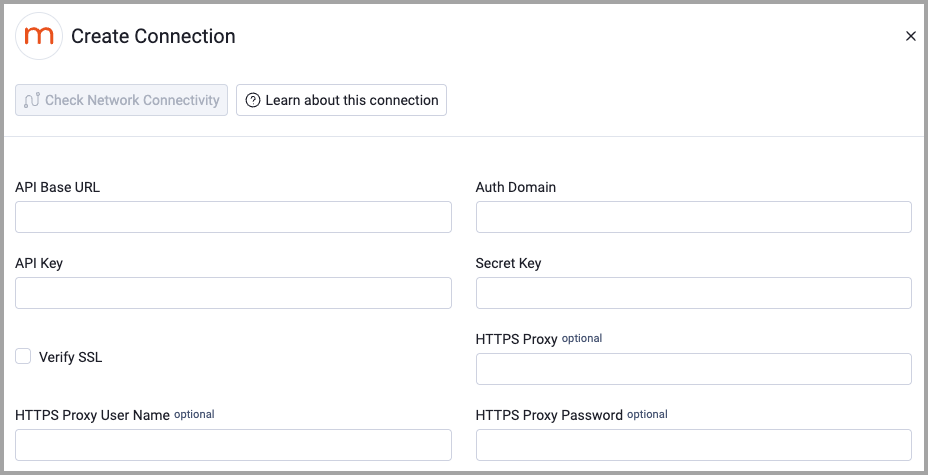
- Provide the following parameters.
Required Parameters
- API Base URL - The base URL for the Mindtickle API. Example:
https://api.mindtickle.com - Auth Domain - Your Mindtickle tenant subdomain used for authentication. Example:
aplace.mindtickle.com - API Key - The API Key obtained from your Mindtickle admin console.
- Secret Key - The Secret Key obtained from your Mindtickle admin console.
Optional Parameters
- Asset Hub API Base URL (API3) - The API3 base URL, required only for fetching Asset Hub application settings. Example:
https://api3.prod.mindtickle.com(Global) orhttps://api3.prod-us.mindtickle.com(US region) - Verify SSL - Select whether to verify the SSL certificate of the server against the CA database inside of Axonius. For more details, see SSL Trust & CA Settings.
- HTTPS Proxy - Connect the adapter to a proxy instead of directly connecting it to the domain.
- HTTPS Proxy User Name - The user name to use when connecting to the value supplied in API Base URL via the value supplied in HTTPS Proxy.
- HTTPS Proxy Password - The password to use when connecting to the server using the HTTPS Proxy.
To learn more about common adapter connection parameters and buttons, see Adding a New Adapter Connection.
Advanced Settings
Note
Advanced settings can either apply for all connections for this adapter, or you can set different advanced settings and/or different scheduling for a specific connection, refer to Advanced Configuration for Adapters.
- Fetch Application Settings (Default: False) - Select this option to fetch application settings from Mindtickle. Requires Asset Hub API Base URL (API3) to be configured for Asset Hub settings to be fetched.
Note
To learn more about Adapter Configuration tab advanced settings, see Adapter Advanced Settings.
Updated 12 days ago