
Lexsynergy
Lexsynergy is a domain management platform that helps organizations manage and protect their domain assets.
Use Cases the Adapter Solves
- Domain Portfolio Visibility: Identify all registered domains managed through Lexsynergy, including status, registration, and expiry details, to maintain a complete and up-to-date inventory of your organization's domain assets.
- Domain Lifecycle Management: Track registration and expiration dates across your domain portfolio to prevent lapses and proactively renew critical domains before they expire.
- DNS Record Auditing: Review DNS record types, content, and TTL values associated with managed domains to detect misconfigurations or unauthorized changes.
Types of Assets Fetched
This adapter fetches the following types of assets:
- Devices
Data Retrieved through the Adapter
Devices - fields such as: Name, Status, Registered At, Expires At, Registrant Email
Before You Begin
Required Ports
- TCP port 443 (HTTPS)
Authentication Methods
Axonius connects to Lexsynergy using an API Key and API Secret. Each request is cryptographically signed using Lexsynergy's HMAC-based request signing mechanism, along with the organization's Realm ID.
APIs
Axonius uses the Lexsynergy API. The following endpoints are called:
POST /{api_version}/domains.json- Retrieve domain count and listPOST /{api_version}/domains/info.json- Retrieve detailed domain informationPOST /{api_version}/dns.json- Retrieve DNS records for each domain
Required Permissions
The values supplied in API Key and API Secret must be associated with credentials that have read access to domain resources in Lexsynergy.
Supported From Version
Supported from Axonius version 6.1.28.0
Connecting the Adapter in Axonius
- Navigate to the Adapter Catalog, search for Lexsynergy, and select the adapter.
- Click Add Connection.
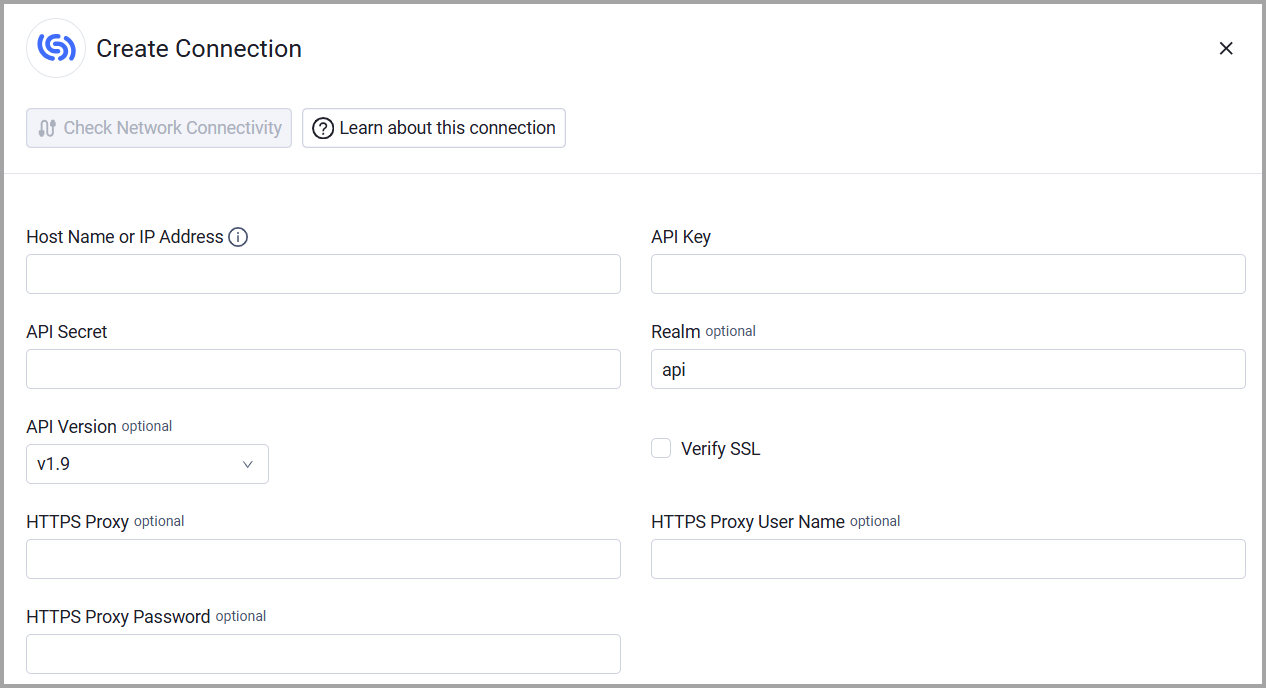
- Provide the following parameters.
Required Parameters
-
Host Name or IP Address- The hostname or IP address of the Lexsynergy server.
-
API Key and API Secret - The credentials for a user account that has permissions to fetch assets.
Optional Parameters
-
Realm (default: api) - Your organization realm ID.
-
API Version (default: v1.9) - Select the Lexsynergy API version to use. Options: v1.9, v1.10.
-
Verify SSL - Select whether to verify the SSL certificate of the server against the CA database inside of Axonius. For more details, see SSL Trust & CA Settings.
-
HTTPS Proxy - Connect the adapter to a proxy instead of directly connecting it to the domain.
-
HTTPS Proxy User Name - The user name to use when connecting to the value supplied in Host Name or IP Address via the value supplied in HTTPS Proxy.
-
HTTPS Proxy Password - The password to use when connecting to the server using the HTTPS Proxy.
To learn more about common adapter connection parameters and buttons, see Adding a New Adapter Connection.
Updated 3 months ago