
LeanIX
LeanIX is a cloud-based software platform that helps companies manage and optimize their IT infrastructure and applications.
Asset Types Fetched
- Devices, Application Services, Business Applications
Before You Begin
APIs
Axonius uses the LeanIX GraphQL API.
Required Permissions
The value supplied for API Key must be associated with credentials that have read fact sheets permissions in order to fetch assets.
Note
Fact sheets are fetched as Business Applications.
Supported From Version
Supported from Axonius version 6.1
Connecting the Adapter in Axonius
Required Parameters
-
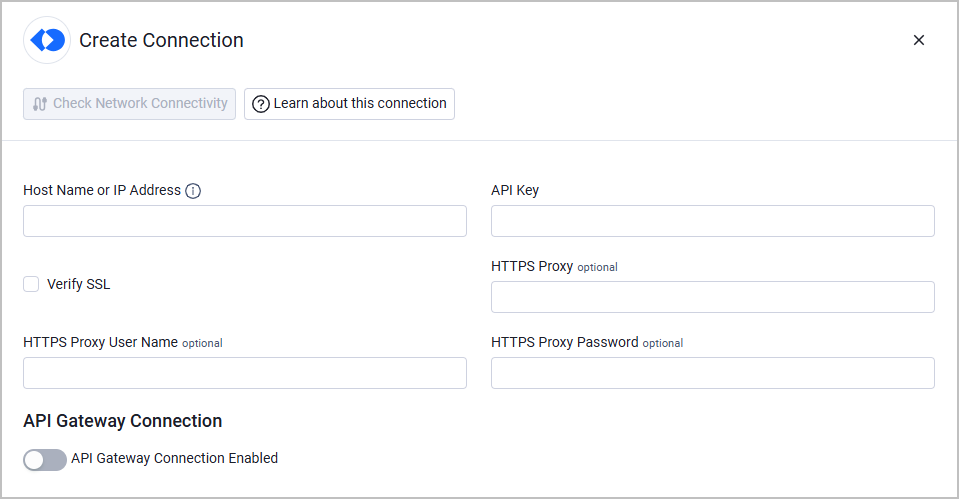
Host Name or IP Address - The hostname or IP address of the LeanIX server.
-
API Key - An API Key associated with a user account that has the Required Permissions to fetch assets. For information on authentication, see Authentication to LeanIX Services.
Optional Parameters
-
Verify SSL - Select whether to verify the SSL certificate of the server against the CA database inside of Axonius. For more details, see SSL Trust & CA Settings.
-
HTTPS Proxy - Connect the adapter to a proxy instead of directly connecting it to the domain.
-
HTTPS Proxy User Name - The user name to use when connecting to the value supplied in Host Name or IP Address via the value supplied in HTTPS Proxy.
-
HTTPS Proxy Password - The password to use when connecting to the server using the HTTPS Proxy.
-
API Gateway Connection - Enable this to use API gateway parameters for authentication. After enabling this option, under API Gateway Type, choose Layer7 and fill in the parameters that are displayed (in addition to Host Name or IP Address). Read about Layer7 API Gateway Parameters.
To learn more about common adapter connection parameters and buttons, see Adding a New Adapter Connection.
Advanced Settings
Note
Advanced settings can either apply for all connections for this adapter, or you can set different advanced settings and/or different scheduling for a specific connection, refer to Advanced Configuration for Adapters.
- Factsheet Types - Select which factsheet types to fetch (default: Application).
- Subscription Factsheet Types - Select which subscription factsheet types to fetch (default: Application).
- Fetch ApplicationServices from Applications - Enable this to fetch Application Services from the Applications endpoint in LeanIX.
Note
To learn more about Adapter Configuration tab advanced settings, see Adapter Advanced Settings.
Related Enforcement Actions
Updated 12 days ago