
HPE GreenLake for Compute Ops Management
HPE GreenLake for Compute Ops Management is a cloud-based management platform for automating and optimizing compute operations.
Use Cases the Adapter Solves
- Compute Server Asset Inventory: Maintain a complete and up-to-date inventory of HPE compute servers managed through HPE GreenLake for Compute Ops Management, enabling teams to track hardware details, OS information, and physical location across the environment.
- Network Device Visibility: Discover and track network devices such as switches and access points managed in HPE GreenLake Device Management, providing a unified view of compute and network infrastructure.
- Hardware Lifecycle Management: Use serial numbers, model, part number, and region data to support hardware refresh cycles, warranty tracking, and maintenance planning.
Asset Types Fetched
- Devices, Software, SaaS Applications
Data Retrieved through the Adapter
Devices - fields such as: Device Name, Serial Number, Model, Manufacturer, Part Number
Before You Begin
Required Ports
- TCP port 443 (HTTPS)
Authentication Methods
OAuth2 Client Credentials
APIs
Axonius uses the following HPE GreenLake APIs:
-
POST https://sso.common.cloud.hpe.com/as/token.oauth2- Obtains an OAuth2 access token using client credentials (grant_type: client_credentials) -
HPE GreenLake for Compute Ops Management API - The following endpoint is called:
GET /compute-ops-mgmt/v1beta2/servers- Retrieves server inventory from the configured Host Name
-
HPE GreenLake for Device Management API - The following endpoint is called:
GET https://global.api.greenlake.hpe.com/devices/v1/devices- Retrieves network device inventory (switches, access points, and other managed devices). This endpoint uses a fixed global URL regardless of the configured Host Name.
Required Permissions
The service account associated with the Client ID and Client Secret must have at minimum read (Observer) access to the following HPE GreenLake services:
- HPE GreenLake for Compute Ops Management
- HPE GreenLake for Device Management
Note:
For information about creating API credentials and assigning roles, see the HPE GreenLake Developer Documentation.
Supported From Version
Supported from Axonius version 6.1
Connecting the Adapter in Axonius
Navigate to the Adapters page, search for HPE GreenLake for Compute Ops Management, and click on the adapter tile.
Click Add Connection.
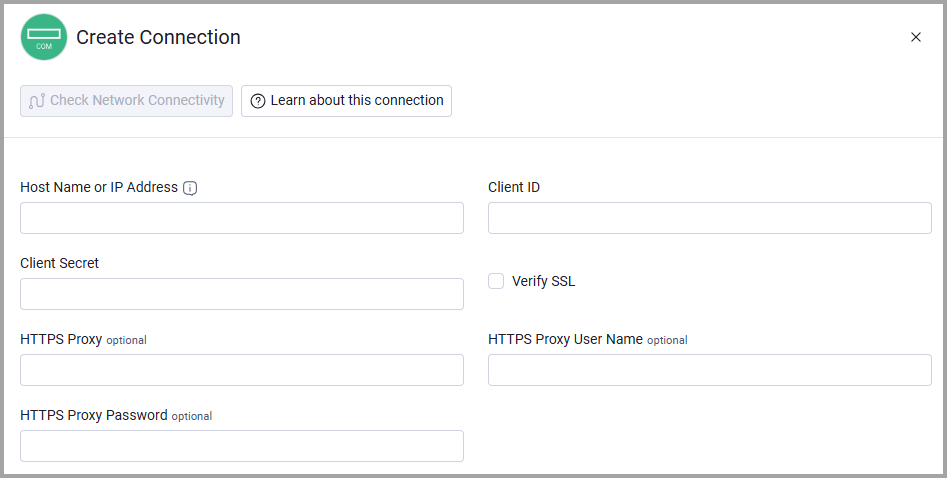
To connect the adapter in Axonius, provide the following parameters:
Required Parameters
- Host Name or IP Address - The hostname or IP address of the HPE GreenLake for Compute Ops Management server.
- Client ID and Client Secret - The credentials for a user account that has permission to fetch assets. For information about how to obtain these credentials, see Generating a token.
- Verify SSL - Select whether to verify the SSL certificate of the server against the CA database inside of Axonius. For more details, see SSL Trust & CA Settings.
Optional Parameters
- HTTPS Proxy - Connect the adapter to a proxy instead of directly connecting it to the domain.
- HTTPS Proxy User Name - The user name to use when connecting to the value supplied in Host Name or IP Address via the value supplied in HTTPS Proxy.
- HTTPS Proxy Password - The password to use when connecting to the server using the HTTPS Proxy.
To learn more about common adapter connection parameters and buttons, see Adding a New Adapter Connection.
Updated 12 days ago