
Remedio (formerly Gytpol)
Remedio (formerly Gytpol) is a security configuration management solution providing both visibility of devices and automation of the hardening process.
Use Cases the Adapter Solves
- Identify Misconfigured Devices: Automatically discover devices with high-severity security misconfigurations across your environment, enabling security teams to prioritize and remediate exposure before it is exploited.
- Enforce Configuration Hardening Policies: Correlate Remedio misconfiguration data with other asset sources in Axonius to validate that hardening standards are consistently applied across managed endpoints.
Asset Types Fetched
- Devices
Data Retrieved through the Adapter
Devices - fields such as: Hostname, IP Address, OS Type, Client Version, Misconfigurations (Severity, Scan Date, Report Date, Remediable)
Before You Begin
Required Ports
- TCP port 443 (HTTPS)
Authentication Methods
- API Token (passed as the
x-api-keyrequest header)
APIs
Axonius uses the Remedio API. The following endpoints are called:
POST /gytpolapi/v1.0/get_misconfigurations_start- Initiates a misconfiguration query and returns a session tokenPOST /gytpolapi/v1.0/get_misconfigurations_next- Fetches paginated misconfiguration results using the session token
Required Permissions
The API Token used must have permissions to query misconfiguration data. Contact your Remedio administrator or Remedio support for instructions on generating an API token with the required permissions.
Supported From Version
Supported from Axonius version 4.8
Connecting the Adapter in Axonius
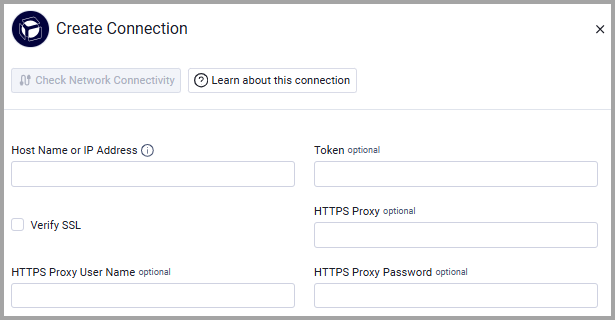
To connect the adapter in Axonius, provide the following parameters:
Required Parameters
-
Host Name or IP Address - The hostname or IP address of the Remedio server. Include the protocol prefix (e.g.,
https://your-remedio-instance.com). Do not add any specific endpoint paths after the domain. -
Token - An API token associated with a user account that has permissions to fetch assets. The token is received from the vendor.
Optional Parameters
-
Verify SSL - Select whether to verify the SSL certificate of the server against the CA database inside of Axonius. For more details, see SSL Trust & CA Settings.
-
HTTPS Proxy (optional) - Connect the adapter to a proxy instead of directly connecting it to the domain.
-
HTTPS Proxy User Name (optional) - The user name to use when connecting to the value supplied in Host Name or IP Address via the value supplied in HTTPS Proxy.
-
HTTPS Proxy Password (optional) - The password to use when connecting to the server using the HTTPS Proxy.
To learn more about common adapter connection parameters and buttons, see Adding a New Adapter Connection.
Updated 3 months ago