
Docker
Docker is a platform designed to help developers build, share, and run container applications.
Types of Assets Fetched
This adapter fetches the following types of assets:
- Devices
- Users
Parameters
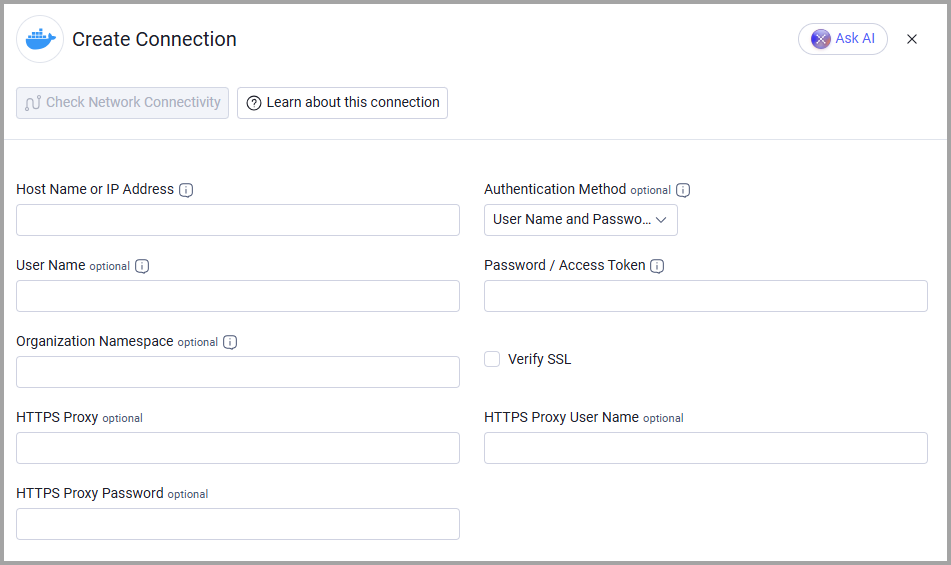
- Host Name or IP Address (required) - The hostname or IP address of the Docker server.
- Authentication Method (default: User Name and Password) - Select how the adapter authenticates, either User Name and Password, Personal Access Token (PAT), or Organization Access Token (OAT). Configure the credentials for your selected method:
- User Name (required) - The user name of an account that has the permissions to fetch assets.
- Password / Access Token (required) - The password of the account.
- Organization Namespace (optional) - The Docker Hub organization name from which to fetch repositories and image tags. When empty, the adapter uses the User Name as the namespace.
Note: Docker Hub does not support User Name and Password authentication for organizations that enforce SSO.
- User Name (required) - The user name of the account that owns the personal access token.
- Password / Access Token (required) - The personal access token.
- Organization Namespace (optional) - The Docker Hub organization name from which to fetch repositories and image tags. When empty, the adapter uses the User Name as the namespace.
- Organization Namespace (required) - The Docker Hub organization name. The adapter fetches repositories and image tags from this namespace.
- Password / Access Token (required) - The organization access token. Leave User Name empty.
Note: The organization access token needs the repository list and read scopes. Without them, Docker Hub returns only public repositories.
- Verify SSL - Select whether to verify the SSL certificate of the server against the CA database inside of Axonius. For more details, see SSL Trust & CA Settings.
- HTTPS Proxy (optional) - Connect the adapter to a proxy instead of directly connecting it to the domain.
- HTTPS Proxy User Name (optional) - The user name to use when connecting to the value supplied in Host Name or IP Address via the value supplied in HTTPS Proxy.
- HTTPS Proxy Password (optional) - The password to use when connecting to the server using the HTTPS Proxy.
To learn more about common adapter connection parameters and buttons, see Adding a New Adapter Connection.
APIs
Axonius uses the Docker API. In particular:Read repository,List users, and personal access tokens.
Axonius calls the following endpoints:
POST /v2/auth/token- Retrieves an access token.GET /v2/namespaces/{namespace}/repositories- Retrieves the repositories of the namespace (Devices).GET /v2/namespaces/{namespace}/repositories/{repository}/tags- Retrieves the tags of each repository (Devices).GET /v2/scim/2.0/Users- Retrieves users (Users).
Supported From Version
Supported from Axonius version 6.0.
Updated about 5 hours ago
Did this page help you?