
DTS Identity
DTS Identity is an identity provider that offers user management, device inventory, multi-factor authentication, and vulnerability tracking for enterprise environments.
Use Cases the Adapter Solves
- Review identity coverage: Compare DTS Identity user records with other asset sources to find accounts that need review.
- Track managed devices: Use device inventory details to identify managed endpoints and their current connection status.
- Assess endpoint software risk: Review installed software and associated CVE information collected for devices.
Asset Types Fetched
- Users, Devices, Aggregated Security Findings, SaaS Applications, Software
Data Retrieved through the Adapter
Users - fields such as: Username, Email, Department, Account Status
Devices - fields such as: Hostname, Device Serial, Operating System, Last Seen
Before You Begin
Required Ports
- TCP port 443 (HTTPS)
Authentication Methods
The adapter uses OAuth 2.0 client credentials.
APIs
Axonius uses the DTS Identity API. The following endpoints are called:
POST /oauth/token- Retrieves an OAuth access token.GET /api/v1/users- Retrieves user records.GET /api/v1/devices- Retrieves device records.
Required Permissions
The OAuth client must support the following scopes:
- users.read - Allows the adapter to retrieve user records.
- devices.read - Allows the adapter to retrieve device records.
Note: Confirm the exact OAuth client permissions and scopes with your DTS Identity administrator, as no public API permission documentation is available.
Supported From Version
Supported from Axonius 9.0.7
Connecting the Adapter in Axonius
- Navigate to the Adapter Catalog, search for DTS Identity, and select the adapter.
- Click Add Connection.
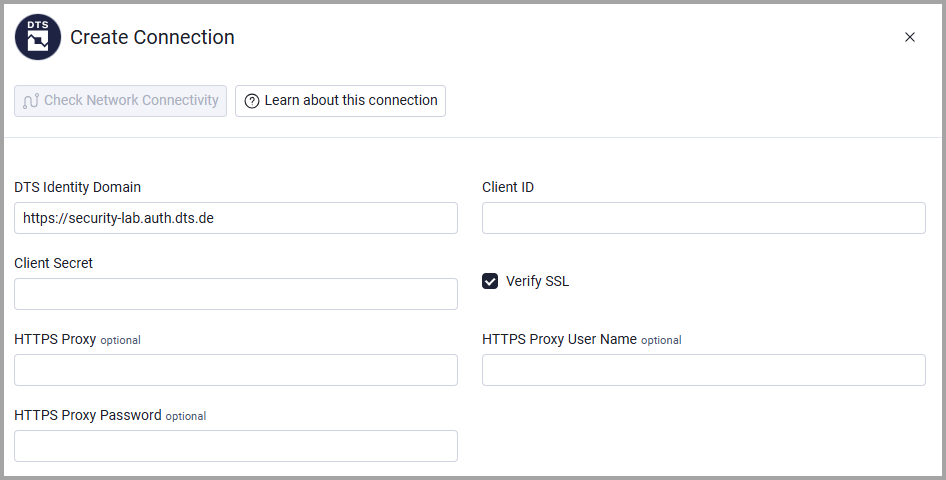
- Provide the following parameters.
Required Parameters
- DTS Identity Domain - The base DTS Identity domain. The default is
https://security-lab.auth.dts.de. - Client ID - The OAuth client ID created for the DTS Identity connection.
- Client Secret - The OAuth client secret for the configured Client ID.
Optional Parameters
- Verify SSL - Select whether to verify the SSL certificate of the server against the CA database inside of Axonius. For more details, see SSL Trust & CA Settings.
- HTTPS Proxy - Connect the adapter to a proxy instead of directly connecting to the DTS Identity Domain.
- HTTPS Proxy User Name - The user name to use when connecting to the DTS Identity Domain via the HTTPS Proxy.
- HTTPS Proxy Password - The password to use when connecting to the DTS Identity Domain using the HTTPS Proxy.
To learn more about common adapter connection parameters and buttons, see Adding a New Adapter Connection.
Updated 22 days ago