
Broadcom Layer7 API Gateway
Broadcom Layer7 API Gateway is an API management platform that provides service routing, policy enforcement, traffic management, and security controls for enterprise APIs.
Use Cases the Adapter Solves
This adapter allows Axonius users to gain comprehensive visibility into their API Gateway infrastructure:
- Service Visibility: Track and monitor all published API services, including their routing patterns, enabled status, and HTTP methods supported
- User Access Management: Identify and audit users with access to the API Gateway, including their roles, account status, and authentication details
- Security and Compliance: Monitor API service configurations, internal vs. external service classifications, and ensure compliance with API security policies
Asset Types Fetched
- Application Resources, Users
Data Retrieved through the Adapter
Application Resources - fields such as Service ID, Name, Version, URL Pattern
Users - fields such as Username, First Name, Last Name, Mail
Before You Begin
Required Ports
- TCP port 443 (HTTPS) or a custom port as configured in your Layer7 Gateway deployment
Authentication Methods
API Key Authentication
The adapter authenticates using HTTP Basic Authentication with a username and password.
APIs
Axonius uses the Layer7 Gateway RESTful Management API v1.0. The following endpoints are called:
GET /restman/1.0/services- Retrieves all published API services with their configurations, mappings, and propertiesGET /restman/1.0/users- Retrieves all user accounts configured in the GatewayGET /apis/discovery.k8s.io/v1/endpointslices- Discovers gateway services across all namespaces (Kubernetes Cluster Discovery only)GET /apis/discovery.k8s.io/v1/namespaces/{namespace}/endpointslices- Discovers gateway services in the specified namespaces (Kubernetes Cluster Discovery only)
Note
The exact API documentation link should be confirmed with your Broadcom administrator or Broadcom support, as the API documentation is not publicly available.
Required Permissions
The following permissions are required:
Administrator or API Management User
The API user must have sufficient privileges to read service and user information via the RESTful Management API. The specific permissions depend on your Layer7 Gateway configuration:
- Service Read Access - Allows reading published API services, service details, mappings, and properties
- User Read Access - Allows reading user account information, including login credentials and user properties
Note
The exact permission names should be confirmed with your Broadcom Layer7 administrator or Broadcom support, as the API documentation is not publicly available.
Kubernetes Service Account (Kubernetes Cluster Discovery only)
The service account whose token you enter in Service Account Token must be authorized to list EndpointSlices (endpointslices) in the discovery.k8s.io API group. Default service accounts do not have this permission, and without it the Kubernetes API returns 403 Forbidden and Axonius cannot discover any gateways.
- If Namespaces is empty, Axonius lists EndpointSlices across the whole cluster, so grant the
listpermission with a ClusterRole and a ClusterRoleBinding. - If Namespaces lists one or more namespaces, grant the
listpermission with a Role and RoleBinding in each of those namespaces.
Supported From Version
Supported from Axonius version 9.0.2
Connecting the Adapter in Axonius
- Navigate to the Adapters page, search for Broadcom Layer7 API Gateway, and click on the adapter tile.
- Click Add Connection.
To connect the adapter in Axonius, provide the following parameters:
Required Parameters
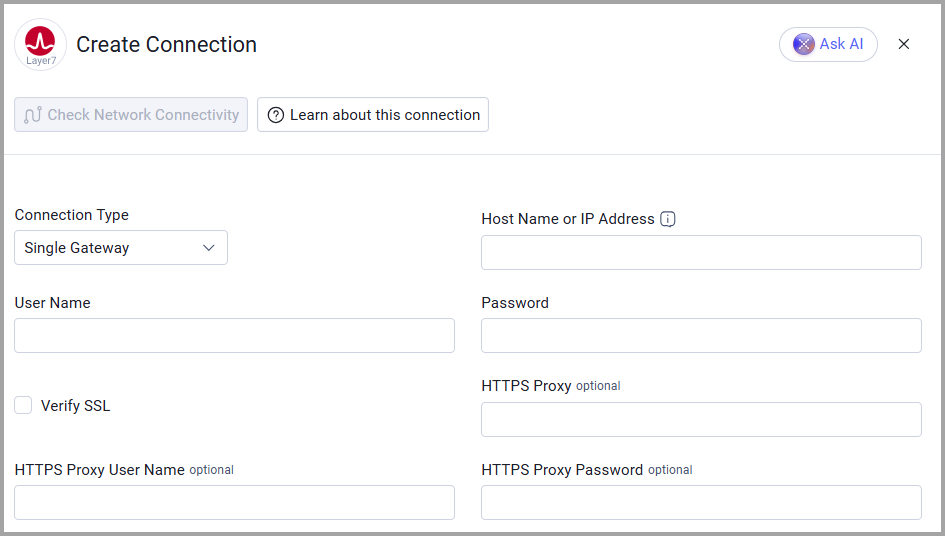
- Connection Type (default: Single Gateway) - Select how Axonius connects to the Layer7 Gateway: Single Gateway or Kubernetes Cluster Discovery.
- Host Name or IP Address - Required for Single Gateway. The full base URL of the Layer7 Gateway, including scheme and port. Do not add any path suffix. Example:
https://gateway.example.com:443
- Kubernetes API Server URL - Required for Kubernetes Cluster Discovery. The full URL of the Kubernetes API server. Example:
https://my-cluster.example.com:443 - Service Account Token - Required for Kubernetes Cluster Discovery. The bearer token of the Kubernetes service account that Axonius uses to access the Kubernetes API server.
- Verify SSL (Kubernetes API) - Select whether to verify the SSL certificate of the Kubernetes API server.
- Gateway Service Name Prefix (default: apigw-) - Required for Kubernetes Cluster Discovery. The prefix of the Kubernetes service names that identify gateways.
- Gateway Service Name Suffix (default: -gateway) - Required for Kubernetes Cluster Discovery. The suffix of the Kubernetes service names that identify gateways.
- Gateway Port (default: 8443) - Required for Kubernetes Cluster Discovery. The management port that the discovered gateways use inside the cluster.
- Namespaces - Optional. One or more namespaces to limit gateway discovery to. Leave this setting empty to discover gateways in all namespaces.
- User Name - The username for API authentication.
- Password - The password for the API user account.
Optional Parameters
- Verify SSL - Select whether to verify the SSL certificate of the server against the CA database inside of Axonius. For more details, see SSL Trust & CA Settings.
- HTTPS Proxy - Connect the adapter to a proxy instead of directly connecting it to the domain.
- HTTPS Proxy User Name - The user name to use when connecting to the value supplied in Host Name or IP Address via the value supplied in HTTPS Proxy.
- HTTPS Proxy Password - The password to use when connecting to the server using the HTTPS Proxy.
To learn more about common adapter connection parameters and buttons, see Adding a New Adapter Connection.
Updated 11 days ago