
Rapid7 Bulk Export
Rapid7 Bulk Export provides visibility and risk prioritization for vulnerabilities found in local, remote, cloud, containerized, and virtual infrastructure.
Asset Types Fetched
 Devices |
  Aggregated Security Findings |
  SaaS Applications
Use Cases the Adapter Solves
Use Rapid7 Bulk Export to export your agent-based policies, vulnerabilities and assets data using a GraphQL API. The data is returned in Parquet format and can be downloaded for use in your business intelligence tools.
Data Retrieved through the Adapter
- Security Findings (vulnerabilities associated with a specific device) - The adapter fetches all fields under Vulnerability Export -> asset.
- Devices - The adapter fetches all fields under Vulnerability Export -> asset_vulnerability.
Before You Begin
APIs
Axonius uses the Rapid7 Bulk Export API to retrieve asset data.
Note
The API exports data in Parquet format and supports region-specific endpoints. Therefore, you need to select the endpoint that corresponds to your deployment region.
Required Permissions
The following permissions are required:
- Platform Administrator permissions, or
- An organization-level API key
Connecting the Adapter in Axonius
Navigate to the Adapters page, search for Rapid7 Bulk Export, and click on the adapter tile.
Click Add Connection.
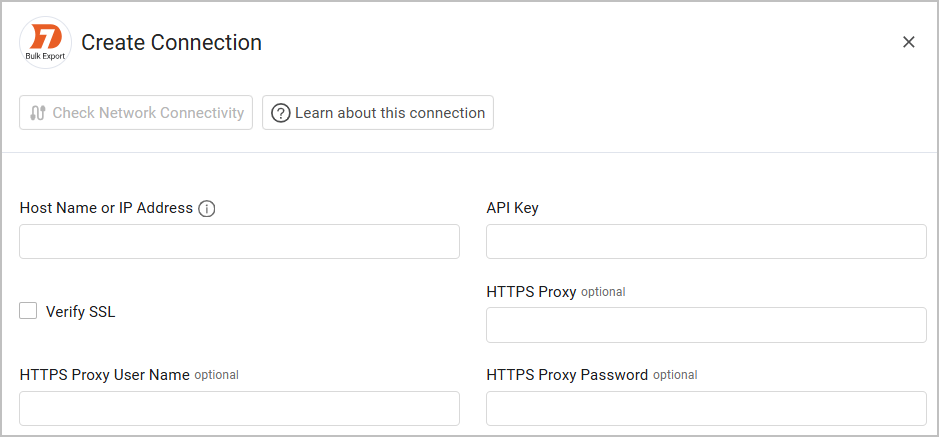
To connect the adapter in Axonius, provide the following parameters:
Required Parameters
- Host Name or IP Address - Enter the hostname or IP address of the Rapid7 Bulk Export server.
- API Key - An Organization API Key that has permissions to fetch all assets. If your company does not allow the use of an organization key, you need to use a user-generated key which can be used with the Rapid7 Nexpose and InsightVM adapter.
Optional Parameters
- Verify SSL - Select whether to verify the SSL certificate of the server against the CA database inside of Axonius. For more details, see SSL Trust & CA Settings.
- HTTPS Proxy - A proxy to use when connecting to the value supplied in Domain.
- HTTPS Proxy User Name - The user name to use when connecting to the value supplied in Domain via the value supplied in HTTPS Proxy.
- HTTPS Proxy Password - The password to use when connecting to the value supplied in Domain via the value supplied in HTTPS Proxy.
To learn more about common adapter connection parameters and buttons, see Adding a New Adapter Connection.
Updated 8 days ago