
OpenAI
OpenAI is a research and deployment AI platform that provides large language and multimodal models such as GPT and Sora for generative and reasoning capabilities.
Asset Types Fetched
- Users, Activities
Before You Begin
Ports
- TCP port 80/443
Authentication Method
- API Key
APIs
Axonius uses the OpenAI API. and the following endpoints
/v1/organization/users (GET)
/v1/organization/usage/completions (GET)
/compliance/workspaces/workspace_id/users (GET)
/compliance/workspaces/workspace_id/logs (GET)
Permissions
The following permissions are required:
The API key must have read permission or higher (All).
Supported From Version
Supported from Axonius version 8.0.1
Connecting the Adapter in Axonius
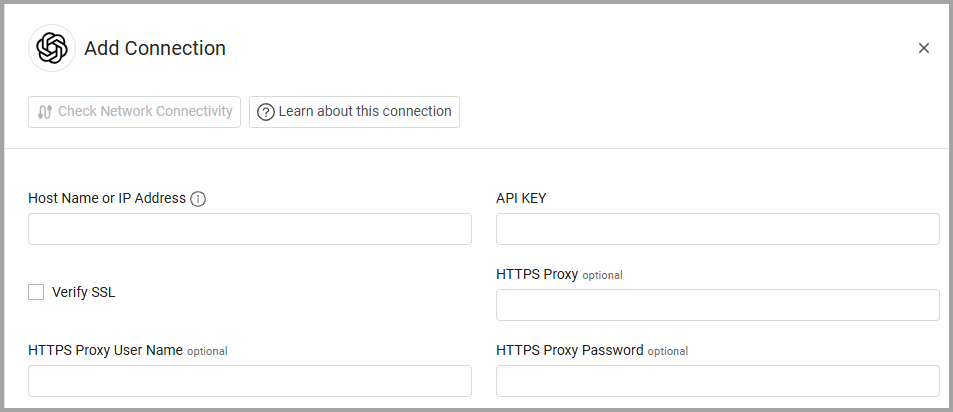
To connect the adapter in Axonius, provide the following parameters:
Required Parameters
-
Host Name or IP Address - The hostname or IP address of the OpenAI server.
-
API Key - An API Key associated with a user account that has the Required Permissions to fetch assets. For more information, see Authentication.
Optional Parameters
-
Compliance API Domain - Enter a base domain for the OpenAI Compliance API (DoD), should contain a prefix of http:// or https://. Do not add any specific endpoints after the domain.
-
Workspace ID - Enter the Workspace ID for accessing compliance endpoints. Only required if enabling the compliance users or logs endpoints.
-
Verify SSL - Select whether to verify the SSL certificate of the server against the CA database inside of Axonius. For more details, see SSL Trust & CA Settings.
-
HTTPS Proxy - Connect the adapter to a proxy instead of directly connecting it to the domain.
-
HTTPS Proxy User Name - The user name to use when connecting to the value supplied in Host Name or IP Address via the value supplied in HTTPS Proxy.
-
HTTPS Proxy Password - The password to use when connecting to the server using the HTTPS Proxy.
To learn more about common adapter connection parameters and buttons, see Adding a New Adapter Connection.
Advanced Settings
Note
- Advanced settings can apply to either all connections of this adapter, or to a specific connection. For more detailed information, see Advanced Configuration for Adapters.
- For more general information about advanced settings, see Adapter Advanced Settings.
Fetch Users of sub type compliance_user from Compliance Users - Enable this option to fetch user data from the OpenAI Compliance API.
Fetch AuditActivities from Compliance Logs - Enable this option to fetch audit and activity logs from the OpenAI Compliance API.
Lookback Period (Hours) (default 24) - Set the number of hours to look back for compliance logs on first request. Subsequent pages use last_end_time from previous response.
Event Type Filter - Select one or more event types to filter logs by event type .
Updated 6 days ago