
ImmuniWeb
ImmuniWeb develops machine learning and AI technologies providing continuous monitoring for web applications and APIs.
Types of Assets Fetched
This adapter fetches the following types of assets:
- Devices, Domains & URLs, Alerts/Incidents
Parameters
-
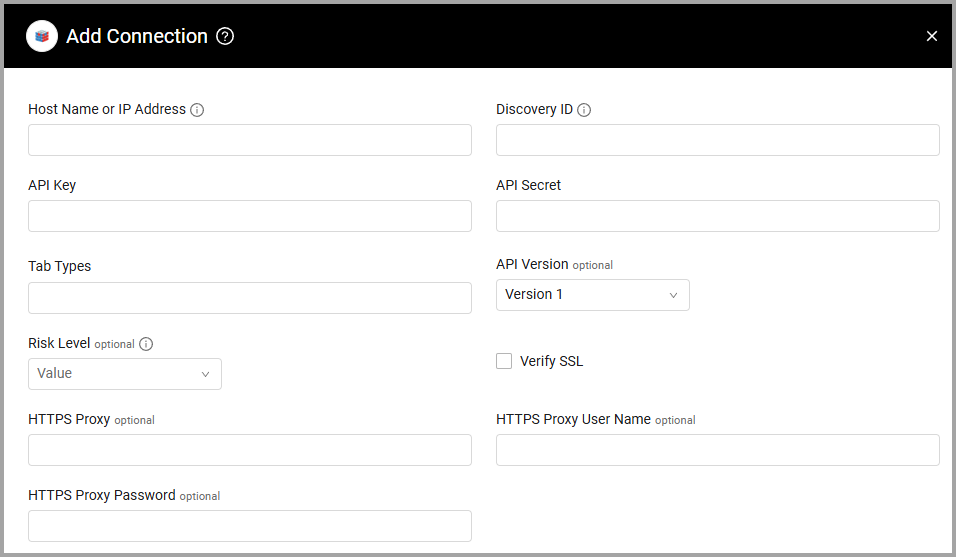
Host Name or IP Address (required) - The hostname or IP address of the ImmuniWeb server.
-
Discovery ID (required) - The unique ID that can be found on the project itself and can be found on the “Discovery Projects” tab after you click on the "create API keys" button.
-
API Key and API Secret (required) - Refer to your ImmuniWeb API documentation for information on how to generate the API Key and the API Secret.
-
API Version (optional, default: Version 1) - Select the version of the ImmuniWeb API.
-
Risk Level (optional, only used for API Version 2) - From the dropdown, select the risk level. If selected, only assets with the specified risk level are retrieved.
-
Verify SSL - Select whether to verify the SSL certificate of the server against the CA database inside of Axonius. For more details, see SSL Trust & CA Settings.
-
HTTPS Proxy (optional) - Connect the adapter to a proxy instead of directly connecting it to the domain.
-
HTTPS Proxy User Name (optional) - The user name to use when connecting to the value supplied in Host Name or IP Address via the value supplied in HTTPS Proxy.
-
HTTPS Proxy Password (optional) - The password to use when connecting to the server using the HTTPS Proxy.
To learn more about common adapter connection parameters and buttons, see Adding a New Adapter Connection.
Advanced Settings
Note
Advanced settings can either apply to all connections for this adapter, or to a specific connection. Refer to Advanced Configuration for Adapters.
- Endpoints Config - Click on
>to open the following settings for configurable endpoints. The fetch settings are enabled by default:- Fetch Cloud - Select this option to retrieve Cloud tab data.
- Fetch Domains - Select this option to retrieve Domains tab data. When enabled, the following settings can be configured:
- Parse Domains Tab As Url - Select this option to force parse the domains tab as Domains and URLs and as devices.
- Parse Domain Without Ip As Only Url - Select this option to parse the domains tab as a Domains and URLs entity only.
- Fetch Network - Select this option to retrieve Network tab data.
- Fetch Repositories - Select this option to retrieve Repositories tab data.
- Fetch Webapps - Select this option to retrieve Webapps tab data.
- Fetch Incidents - Select this option to retrieve Incidents tab data.
Note:
The adapter no longer retrieves applications from the mobileapps tab.
Note
To learn more about Adapter Configuration tab advanced settings, see Adapter Advanced Settings.
APIs
Axonius uses the ImmuniWeb API.
Supported From Version
Supported from Axonius version 6.0
Updated 21 days ago