
Greenhouse
Greenhouse is a talent acquisition software company that offers its suite of tools and services to help businesses with the hiring process.
Use Cases the Adapter Solves
- Talent Acquisition Visibility: Discover and track Greenhouse users, roles, and permissions to ensure proper access controls and identify potential security gaps in your hiring platform.
- User Access Governance: Correlate Greenhouse user accounts with corporate identity sources to detect orphaned accounts, verify least-privilege access, and maintain compliance across HR technology systems.
Types of Assets Fetched
This adapter fetches the following types of assets:
- Users
- SaaS data
Before You Begin
Required Ports
- TCP port 443 (HTTPS)
Authentication Methods
The Greenhouse adapter supports two authentication methods:
Important
OAuth 2.0 (Recommended): As of Axonius version 8.0.25, the Greenhouse adapter supports OAuth 2.0 authentication with the Harvest API v3.
API Key (Deprecated): The API Key authentication method (used with Harvest API v1/v2) is deprecated and will be discontinued by Greenhouse on August 31, 2026.
OAuth 2.0 Client Credentials flow
This method uses OAuth 2.0 Client Credentials (Client ID and Client Secret) to authenticate with the Greenhouse Harvest API v3.
API Key Authentication (Basic Auth)
This method uses a Greenhouse API Key with Basic Authentication to access the Harvest API v1/v2.
APIs
Axonius uses the Greenhouse Harvest API. The endpoints called depend on the authentication method used.
OAuth token endpoint:
-
POST https://auth.greenhouse.io/tokenData endpoints:
-
GET /v3/users -
GET /v3/user_job_permissions -
GET /v3/user_roles
-
The following endpoints are called:
GET /v1/users- Retrieve user informationGET /v1/users/{id}/permissions/jobs- Retrieve user job permissionsGET /v1/user_roles- Retrieve user roles
Required Permissions
The credentials supplied to the adapter must be associated with a user account that has permissions to access the following data in Greenhouse:
- Read access to users
- Read access to user roles
- Read access to user permissions
Supported From Version
Supported from Axonius version 5.0
Connecting the Adapter in Axonius
Navigate to the Adapters page, search for Greenhouse, and click on the adapter tile.
Click Add Connection.
To connect the adapter in Axonius, provide the following parameters based on your chosen authentication method:
Required Parameters
-
Host Name or IP Address (required, default:
https://harvest.greenhouse.io) - The hostname or IP address of the Greenhouse server. Example:https://harvest.greenhouse.io -
API Version - Select the API Version (authentication method):
- Client ID (required) - Enter your OAuth 2.0 Client ID from Greenhouse.
- Client Secret (required) - Enter your OAuth 2.0 Client Secret from Greenhouse.
- API Key (required) - Your Harvest API key for API v1 authentication.
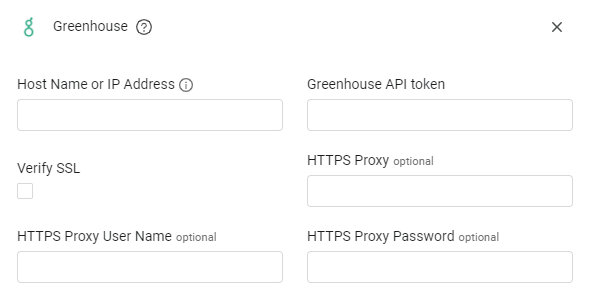
Optional Parameters
- Verify SSL - Select whether to verify the SSL certificate of the server against the CA database inside of Axonius. For more details, see SSL Trust & CA Settings.
- HTTPS Proxy (optional) - Connect the adapter to a proxy instead of directly connecting it to the domain.
- HTTPS Proxy User Name (optional) - The user name to use when connecting to the value supplied in Host Name or IP Address via the value supplied in HTTPS Proxy.
- HTTPS Proxy Password (optional) - The password to use when connecting to the server using the HTTPS Proxy.
To learn more about common adapter connection parameters and buttons, see Adding a New Adapter Connection.
Updated 5 months ago