
Elastic Fleet
Elastic Fleet is a management component that offers centralized control over Elastic Agents, policies, and integrations for data collection and protection.
Asset Types Fetched
- Devices
Before You Begin
Ports
- TCP port 80/443
Authentication Method
- API Key
APIs
Axonius uses the Kibana Serverless API.
Permissions
Fleet-Specific Privileges:
fleet-agents-read: Required for GET/api/fleet/agentsendpointfleet-agent-policies-read: For accessing agent policy informationfleet-enrollment-api-keys-read: For retrieving enrollment tokens
Supported From Version
Supported from Axonius version 7.0.10
Connecting the Adapter in Axonius
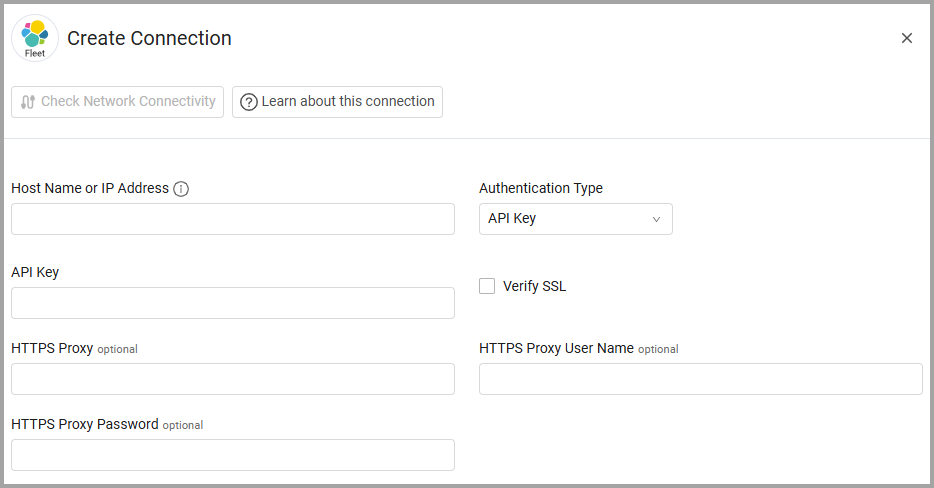
To connect the adapter in Axonius, provide the following parameters:
Required Parameters
- Host Name or IP Address - The hostname or IP address of the Elastic Fleet server.
- Authentication Type - Select the Authentication Type, either API Key or Basic.
API Key - An API Key associated with a user account that has the Required Permissions to fetch assets.
User Name and Password - The credentials for a user account that has the Required Permissions to fetch assets.
Optional Parameters
-
Verify SSL - Select whether to verify the SSL certificate of the server against the CA database inside of Axonius. For more details, see SSL Trust & CA Settings.
-
HTTPS Proxy - Connect the adapter to a proxy instead of directly connecting it to the domain.
-
HTTPS Proxy User Name - The user name to use when connecting to the value supplied in Host Name or IP Address via the value supplied in HTTPS Proxy.
-
HTTPS Proxy Password - The password to use when connecting to the server using the HTTPS Proxy.
To learn more about common adapter connection parameters and buttons, see Adding a New Adapter Connection.
Advanced Settings
Note
- Advanced settings can apply to either all connections of this adapter, or to a specific connection. For more detailed information, see Advanced Configuration for Adapters.
- For more general information about advanced settings, see Adapter Advanced Settings.
- Global Endpoints Config
- Fetch Inactive Agents - Select this option to fetch agents that have not checked in recently (inactive agents). By default, only active agents are fetched.
- Endpoints Config
-
Fetch Devices of sub type Fleet Agent from Fleet Agents - Select this option to retrieve Fleet Agent devices as a subtype of endpoint devices.
-
Spaces - applies context on the following endpoints: Fleet Agents (by Space ID) Spaces optional - Select spaces to filter Fleet Agent discovery by Elastic Spaces, allowing you to scope data collection to specific organizational contexts. Leave empty to fetch Fleet Agents from all Spaces (default behavior).
Related Enforcement Actions
Updated 5 days ago