
Bently Nevada
Bently Nevada is a condition monitoring system that provides asset protection and predictive maintenance solutions.
This adapter uploads XML and TXT files.
Asset Types Fetched
- Devices
Connecting the Adapter in Axonius
The adapter parameters are the same as the CSV adapter parameters, except for the following parameters:
-
File contains users information, File contains installed software information, and File contains database information - These fields are not part of the adapter configuration, as the adapter provides devices data only, without any information on the installed software.
-
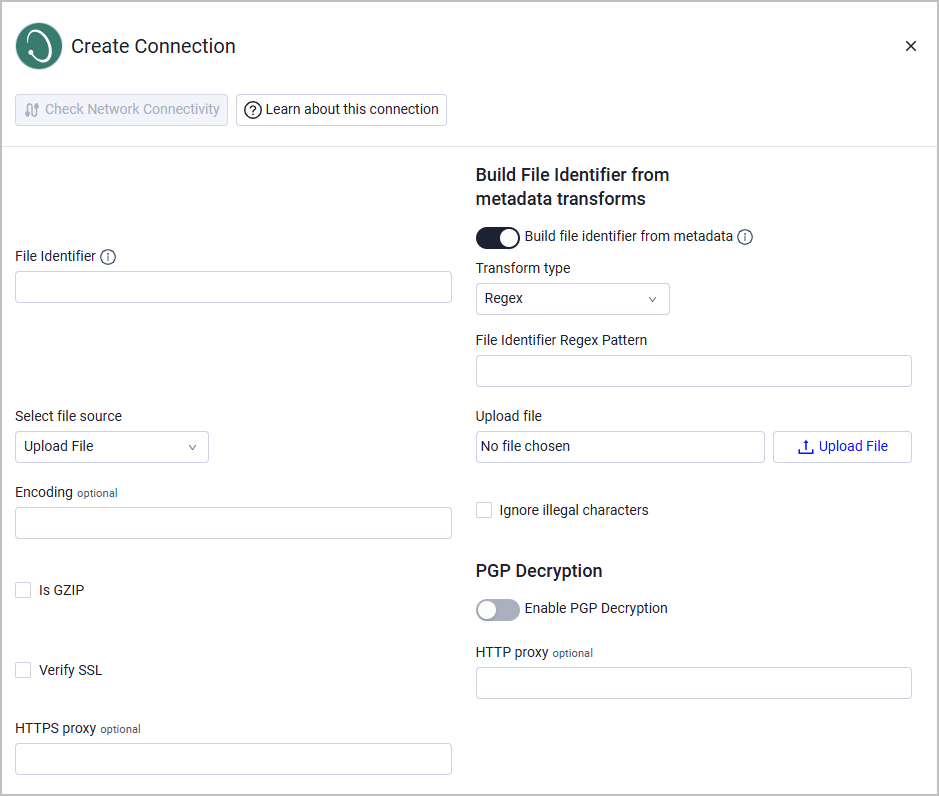
Build file identifier from metadata - Enable this to derive the file identifier is from source metadata (path, file name, blob key, etc.) rather than the static File Identifier field.
Note
This setting is relevant only when the File Source is SMB Share.
When this is enable, the following parameters are required:
- Transform type - Regex is the only option.
- File Identifier Regex Pattern - Enter a regular expression to apply to the resolved file identifier, for example,
(.+)\.txt.- If the pattern contains a capture group
(), the first capture group is used as the file identifier. - If no capture group exists, the full match is used.
- Invalid patterns or no-match scenarios are silently ignored.
- If the pattern contains a capture group
Attention
The Build file identifier from metadata setting should only be enabled in rare, special cases when the file identifier needs to be derived from source metadata rather than the static File Identifier field. For most use cases, the standard File Identifier field is the recommended approach.
Here are some examples for special use cases when this setting is recommended:
- File identifiers are embedded in file paths or file names from the source system
- Multiple files share the same logical identifier but have different metadata
- The source system does not provide a static identifier that works for your use case
Example Configuration - Extract a device name from the following file path:
/data/devices/device123.txt- Enable Build file identifier from metadata:.
- Set
Regexas the Transform type (default). - For File Identifier Regex Pattern, enter
([^/]+)\.txt$. - Result: The file identifier would be
device123instead of the static File Identifier field value.
Supported From Version
Supported from Axonius version 6.1.65
Advanced Settings
Note
Advanced settings can either apply to all connections for this adapter, or to a specific connection. Refer to Advanced Configuration for Adapters.
- Fetch Devices of sub type xml_device from Devices from XML - Select this option to fetch devices of the subtype 'xml_device' from the Devices endpoint from XML.
- Fetch Devices of sub type txt_device from Devices from TXT - Select this option to fetch devices of the subtype 'txt_device' from the Devices endpoint from TXT.
Note
To learn more about Adapter Configuration tab advanced settings, see Adapter Advanced Settings.
Updated about 2 months ago