
Forward Networks
Forward Networks delivers a digital twin of the network, enabling operators to ensure the network is secure, reliable, and agile. The platform supports devices from all major networking vendors and cloud providers.
Asset Types Fetched
- Devices, Aggregated Security Findings, SaaS Applications
Before You Begin
Ports
- TCP port 80/443
Authentication Method
- User Name/Password
APIs
Axonius uses the Forward API. Contact your admistrator for further information about connecting.
Permissions
The value supplied in User Name must have Read permissions to fetch assets.
Supported From Version
Supported from Axonius version 4.5
Connecting the Adapter in Axonius
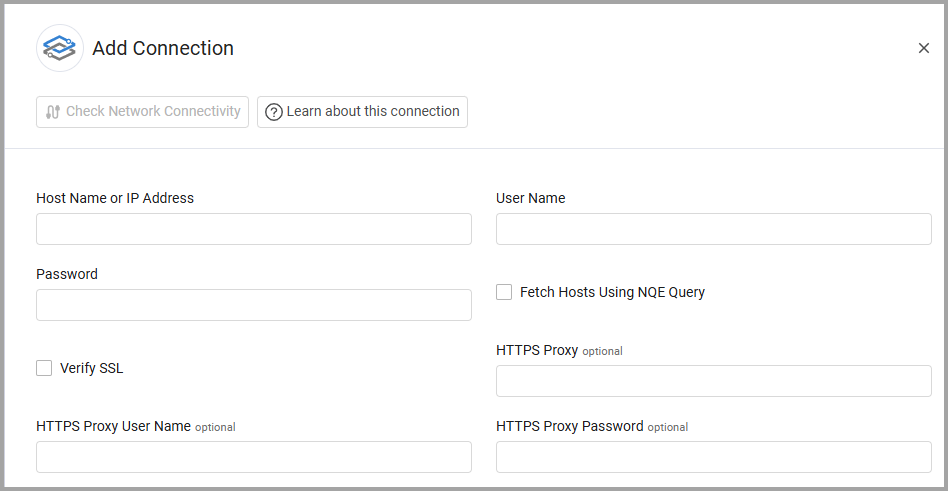
To connect the adapter in Axonius, provide the following parameters:
Required Parameters
- Host Name or IP Address - The hostname or IP address of the Forward Networks server.
- User Name and Password - The credentials for a user account that has the permissions to fetch assets. The API access key can be used as a user and the API Secret Key can be used as the password. For more information, see APIs.
Optional Parameters
-
Fetch Hosts Using NQE Query - Select to use the Network Query Engine endpoint to fetch additional devices.
-
Verify SSL - Select to verify the SSL certificate of the server against the CA database inside of Axonius. For more details, see SSL Trust & CA Settings.
-
HTTPS Proxy - Connect the adapter to a proxy instead of directly connecting it to the domain.
-
HTTPS Proxy User Name - The user name to use when connecting to the value supplied in Host Name or IP Address via the value supplied in HTTPS Proxy.
-
HTTPS Proxy Password - The password to use when connecting to the server using the HTTPS Proxy.
To learn more about common adapter connection parameters and buttons, see Adding a New Adapter Connection.
Advanced Settings
Note
Advanced settings can either apply to all connections for this adapter, or to a specific connection. Refer to Advanced Configuration for Adapters.
- Do not display Asset name for devices - Select to not display the asset name for devices.
- Network Name Include list - Enter a list of comma-separated network names to include in the fetch. If left empty, all network names are included in the fetch.
- Use Networks API to fetch devices - Select this option to use the networks API to fetch devices.
- Fetch Vulnerabilities - Select this option to fetch vulnerabilities.
- Fetch STIG Compliance Checks - Enable to fetch STIG compliance check data for all devices in the network. This includes check status, severity, finding details, and remediation guidance. When enabled, the following setting becomes available:
- STIG compliance NQE query - Specify the NQE query used to retrieve STIG compliance checks. Use the default query or provide a custom query (when your query returns field names that are excluded by the adapter.). Note that changing the field names returned by this query might interfere with Forward Networks STIG data ingestion.
- Devices custom NQE query - Enter a custom NQE query for devices.
Field Parsing for NQE Device Query
When you define a custom NQE query for devices, the fields parsed from the NQE path (nqe_query=True) yields Host assets via NQE_DEVICES_QUERY. The parsing logic is as follows.
If you make any changes to the raw key, or define keys that are not listed here, the parsing will fail.
Host
Identity
| Field | Raw Key | Notes |
|---|---|---|
| ID | macAddress + hostname + network_object.id | Format: {MAC}_{hostname}_{network_id} or {MAC}_{network_id} if no hostname |
| Name | name or hostname | Skipped if do_not_display_asset_name is enabled |
| Host Machine Name | name | Always set |
Core Fields
| Field | Raw Key |
|---|---|
| Hostname | hostname |
| Physical Location | location |
| Last Seen | network_object.latest_snapshot.latestCollectionMillis |
IP / NIC Fields
One Network Interface per host built from:
MAC Address
Checked in priority order (first non-null wins):
| Priority | Raw Key |
|---|---|
| 1 | macAddress |
| 2 | macAddresses |
If the value is a list, all entries are joined with _ into a single string - still one NIC.
["aa:bb:cc:dd:ee:ff", "11:22:33:44:55:66"] → mac: "aa:bb:cc:dd:ee:ff_11:22:33:44:55:66"Addresses
Source field: addresses (list of strings)
All entries are processed together and passed to a single add_nic() call - one NIC with multiple IPs, not one NIC per IP.
Each entry is split on /:
- With
/→ base IP goes toips, full CIDR goes tosubnets - Without
/→ IP goes toipsonly
"addresses": ["10.1.1.2/24", "fe80::1"]
→ one NIC with ips: ["10.1.1.2", "fe80::1"], subnets: ["10.1.1.2/24"]
Interface Name and VLANs
| Network Interface Field | Raw Key |
|---|---|
| Name | interface |
| VLANs | vlans (list of strings, each becomes a DeviceAdapterVlan) |
Shared Fields
Device-Specific Fields
| Field | Raw Key |
|---|---|
| Host Type | hostType |
| SNMP Device | SNMP |
Network Data (from network_object)
network_object)| Field | Raw Key |
|---|---|
| Network ID | id |
| Parent ID | parentId |
| Name | name |
| Org ID | orgId |
| Creator ID | creatorId |
| Note | note |
| Created Date | createdAt |
Snapshot (from network_object.latest_snapshot)
network_object.latest_snapshot)| Field | Raw Key |
|---|---|
| Snapshot ID | id |
| Note | note |
| Parent Snapshot ID | parentSnapshotId |
| Processing Trigger | processingTrigger |
| State | state |
| Is Draft | isDraft |
| Creation Date | creationDateMillis |
| Processed Date | processedAtMillis |
-
Location custom NQE query - Enter a custom NQE query for location.
-
Limit adapter fetch to NQE queries only - Select to skip the regular device API fetch and fetch data only from custom NQE queries.
For this setting to work:
- You must have custom NQE queries configured
- The Fetch Hosts Using NQE Query optional parameter must be selected
Note
To learn more about Adapter Configuration tab advanced settings, see Adapter Advanced Settings.
Version Matrix
This adapter was only tested with the versions marked as supported, but may work with other versions. Contact Axonius Support if you have a version that is not listed and is not functioning as expected.
| Version | Supported | Notes |
|---|---|---|
| Forward Networks 21.9.3 | Yes |
Updated 19 days ago