
Saviynt Security Manager
Saviynt Enterprise Identity Cloud is a cloud identity and access governance platform.
Asset Types Fetched
- Users, Groups, Roles, Accounts/Tenants
Before You Begin
APIs
Axonius uses the Saviynt Security Manager API and the following endpoints:
- Get User List -
POST {api_version}/getUser- Fetches users with optional pagination - Get User Groups -
POST {api_version}/fetchUserGroup- Fetches groups and group members - Get User Roles -
POST {api_version}/getRoles- Fetches roles assigned to users - Get Accounts -
POST {api_version}/getAccounts- Fetches Saviynt accounts - Get Entitlement Details -
POST {api_version}/getEntDetailsforUsers- Fetches entitlement details for each user
Supported From Version
Supported from Axonius version 4.5
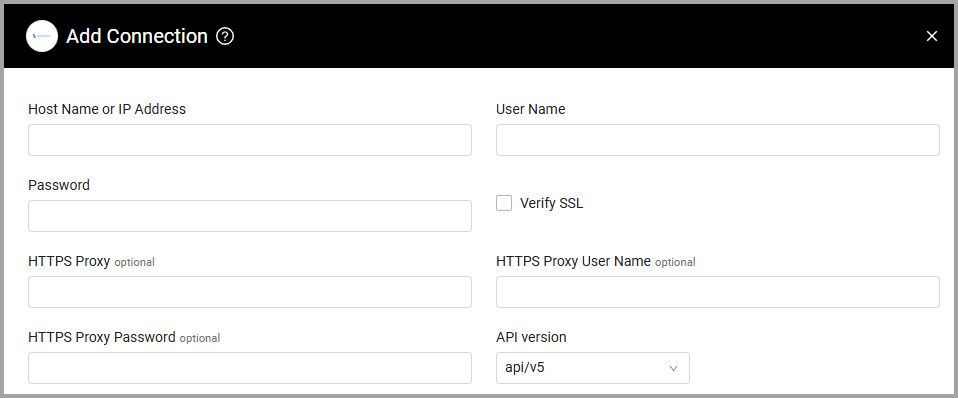
Parameters
-
Host Name or IP Address (required) - The hostname or IP address of the Saviynt Security Manager server.
-
User Name and Password (required) - The credentials for a user account that has the permissions to fetch assets.
-
Verify SSL - Select whether to verify the SSL certificate of the server against the CA database inside of Axonius. For more details, see SSL Trust & CA Settings.
-
HTTPS Proxy (optional) - Connect the adapter to a proxy instead of directly connecting it to the domain.
-
HTTPS Proxy User Name (optional) - The user name to use when connecting to the value supplied in Host Name or IP Address via the value supplied in HTTPS Proxy.
-
HTTPS Proxy Password (optional) - The password to use when connecting to the server using the HTTPS Proxy.
-
API version (required, default: api/v5)
- Select api/v5 for SSM 5.2 or newer versions.
- Select api for older versions of SSM.
To learn more about common adapter connection parameters and buttons, see Adding a New Adapter Connection.
Advanced Settings
NoteAdvanced settings can either apply to all connections for this adapter, or to a specific connection. Refer to Advanced Configuration for Adapters.
- Fields to skip - From the dropdown, select fields to ignore for user data.
- Fetch attestations and entitlements - Select this option to fetch attestation and entitlement data. Note: This adds at least 2 requests per user and makes the fetch 3 times slower.
- Fetch access details entitlements - Select this option to fetch access details entitlements.
- Fetch groups - Select this option to fetch Groups as Identity assets. Groups are used to populate the Associated Groups field on users.
- Fetch roles - Select this option to fetch Roles as Identity assets. Roles are used to populate the Assigned Roles field for users.
- Fetch accounts - Enable this option to fetch Saviynt accounts. When enabled, you can select whether to Fetch only active accounts.
- Get Entitlement Details For Users - Select this option to fetch entitlement details for each user. Note that this option adds at least one request per user and therefore can increase fetch time.
- Page size (Default: 100) - Number of records fetched per page from each Saviynt endpoint.
- Enrichment batch size (Default: 20) - Number of users enriched concurrently per batch (async requests fired at a time).
- Enable Custom Parsing - Enable this option to define how to parse specific fields from the raw data fetched. You can choose to parse the data into an already existing field, or create a new one. See Adapter Custom Parsing for more information.
NoteTo learn more about Adapter Configuration tab advanced settings, see Adapter Advanced Settings.
Updated 12 days ago