
Proofpoint Security Awareness Training
Proofpoint Security Awareness Training provides interactive and customizable security awareness training.
Use Cases the Adapter Solves
- Track Security Awareness Training Completion: Monitor which employees have completed required security awareness training to identify gaps and ensure compliance with organizational training mandates.
- Analyze Phishing Simulation Results: Review phishing campaign results across the workforce to measure susceptibility, track improvement over time, and target follow-up training for at-risk users.
Asset Types Fetched
- Users
Data Retrieved through the Adapter
Users - Fields such as Email Address, First Name, Last Name, User Locale
Before You Begin
Required Ports
- TCP port 443 (HTTPS)
Authentication Methods
API Key
APIs
Axonius uses the Proofpoint Security Awareness Training Results API. The following endpoints are called:
GET /api/reporting/v0.3.0/users— Retrieves user recordsGET /api/reporting/v0.3.0/cyberstrength— Retrieves knowledge assessment data (enabled by default)GET /api/reporting/v0.3.0/phishalarm— Retrieves phishing alarm data (enabled by default)GET /api/reporting/v0.3.0/phishing— Retrieves phishing simulation data (enabled by default)GET /api/reporting/v0.3.0/phishing_extended— Retrieves extended phishing click event data (disabled by default; enable via the Enrich Users with Phishings Extended advanced setting)GET /api/reporting/v0.3.0/training— Retrieves training assignment data (enabled by default)
Required Permissions
The API key must be associated with a user account that has permissions to access the Proofpoint Security Awareness Training Reporting API.
Supported From Version
Supported from Axonius version 4.8
Connecting the Adapter in Axonius
Navigate to the Adapters page, search for Proofpoint Security Awareness Training, and click on the adapter tile.
Click Add Connection.
To connect the adapter in Axonius, provide the following parameters:
Required Parameters
-
Host Name or IP Address (required) - The hostname or IP address of the Proofpoint Security Awareness Training server. When using cloud hosted Proofpoint Security Awareness Training you will need to enter one of the following hostnames, depending on your region. Refer to Proofpoint Security Awareness Training API
- US: results.us.securityeducation.com
- EU: results.eu.securityeducation.com
- AP: results.ap.securityeducation.com
-
API Key (required) - An API Key associated with a user account that has permissions to fetch assets.
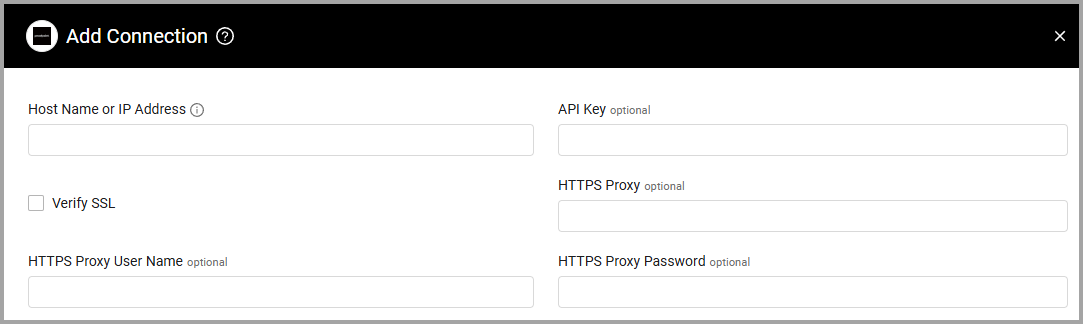
Optional Parameters
- Verify SSL - Select whether to verify the SSL certificate of the server against the CA database inside of Axonius. For more details, see SSL Trust & CA Settings.
- HTTPS Proxy (optional) - Connect the adapter to a proxy instead of directly connecting it to the domain.
- HTTPS Proxy User Name (optional) - The user name to use when connecting to the value supplied in Host Name or IP Address via the value supplied in HTTPS Proxy.
- HTTPS Proxy Password (optional) - The password to use when connecting to the server using the HTTPS Proxy.
To learn more about common adapter connection parameters and buttons, see Adding a New Adapter Connection.
Advanced Settings
Note
Advanced settings can either apply for all connections for this adapter, or you can set different advanced settings and/or different scheduling for a specific connection, refer to Advanced Configuration for Adapters.
- Endpoints Config - By default the adapter enriches users via various endpoints. Click on
>to open the following settings for configurable endpoints:- Fetch User Tags - Select this option to fetch user tags.
- Enrich Users with Knowledge Assessments - Toggle off to not enrich with knowledge assessments.
- Enrich Users with Phishing Alarms - Toggle off to not enrich users with phishing alarms.
- Enrich Users with Phishings - Toggle off to not enrich users with phishings.
- Enrich Users with Phishings Extended (optional, default: Disabled) - Enable this option to enrich users with event-level phishing click data from the
/api/reporting/v0.3.0/phishing_extendedendpoint. Returns extended event data including IP address, event type, browser, user agent, and geographic and ISP attribution (city, state, country, continent, ISP, organization). - Enrich Users with Trainings - Toggle off to not enrich users with trainings.
Note
To learn more about Adapter Configuration tab advanced settings, see Adapter Advanced Settings.
Updated 12 days ago