
Moody's CreditLens
Moody's CreditLens is a commercial lending and credit risk platform that helps financial institutions manage the full credit lifecycle. This adapter fetches user account data from the platform.
Use Cases the Adapter Solves
- Review user access: Identify user accounts, roles, and portfolio assignments for access reviews.
- Monitor account status: Find inactive or locked accounts and review recent login activity.
Asset Types Fetched
- Users, Application Settings
Data Retrieved through the Adapter
Users - fields such as: User ID, Email, Last Login, Role
Application Settings - fields such as: Password Account Locked, Has Password, Is System User
Before You Begin
Required Ports
- TCP port 443 (HTTPS)
Authentication Methods
The adapter supports these authentication methods:
- Basic Authentication
- JWT-Based Authentication
APIs
Axonius uses the Moody's CreditLens API. The following endpoints are called:
POST /api/security/authenticate- Authenticates users of the Basic Authentication method and retrieves a token.POST /api/reports/downloadReports- Downloads the User Audit Report and User Access Report in CSV format.POST /api/search/UserSearch- Retrieves Application Settings data
Required Permissions
Moody's CreditLens API documentation is not publicly available - verify exact permission names in the official Moody's CreditLens documentation.
API User Requirements
The Axonius connection requires a dedicated, non-interactive CreditLens user account. This account:
- Must be a pre-created CreditLens user ID that is not used for interactive (human) login.
- Must have IAM privileges granting read access to Users, Roles, and security/configuration settings so the report endpoints return data.
- Must not be the default
adminaccount.
Recommended Role: Security Administrator
Based on the CreditLens Administration Guide, the Security Administrator role is the most appropriate for the API user, as it provides:
- Access to create and manage users and IAM policies.
- Read access to user data, roles, and organizational settings required for the User Audit Report and User Access Report endpoints.
Note: CreditLens uses an attribute-based access control (ABAC) model. Permissions are not controlled by role alone — they are determined by administrator-defined attributes assigned to the user. A Security Administrator in your environment must confirm that the API user's attributes grant read access to the following:
| Required Access | Purpose |
|---|---|
| Users | Required to retrieve user identity data (User ID, Name, Email, Active status, Lock status) |
| Roles | Required to retrieve user role assignments per portfolio |
| Security/Configuration Settings | Required to authenticate and run the /api/reports/downloadReports endpoint |
IP Allowlisting
The CreditLens server may require the Axonius IP address to be allowlisted. A 403 response from the API indicates that the source IP is not allowlisted. Contact your CreditLens administrator to add the Axonius IP to the allowed sources.
Verify with Your Administrator
Because CreditLens API documentation requires customer login, verify the exact attribute assignments and IAM policy configuration with your CreditLens Security Administrator before connecting.
Supported From Version
Supported from Axonius version 9.0.7
Connecting the Adapter in Axonius
- Navigate to the Adapter Catalog, search for Moody's CreditLens, and select the adapter.
- Click Add Connection.
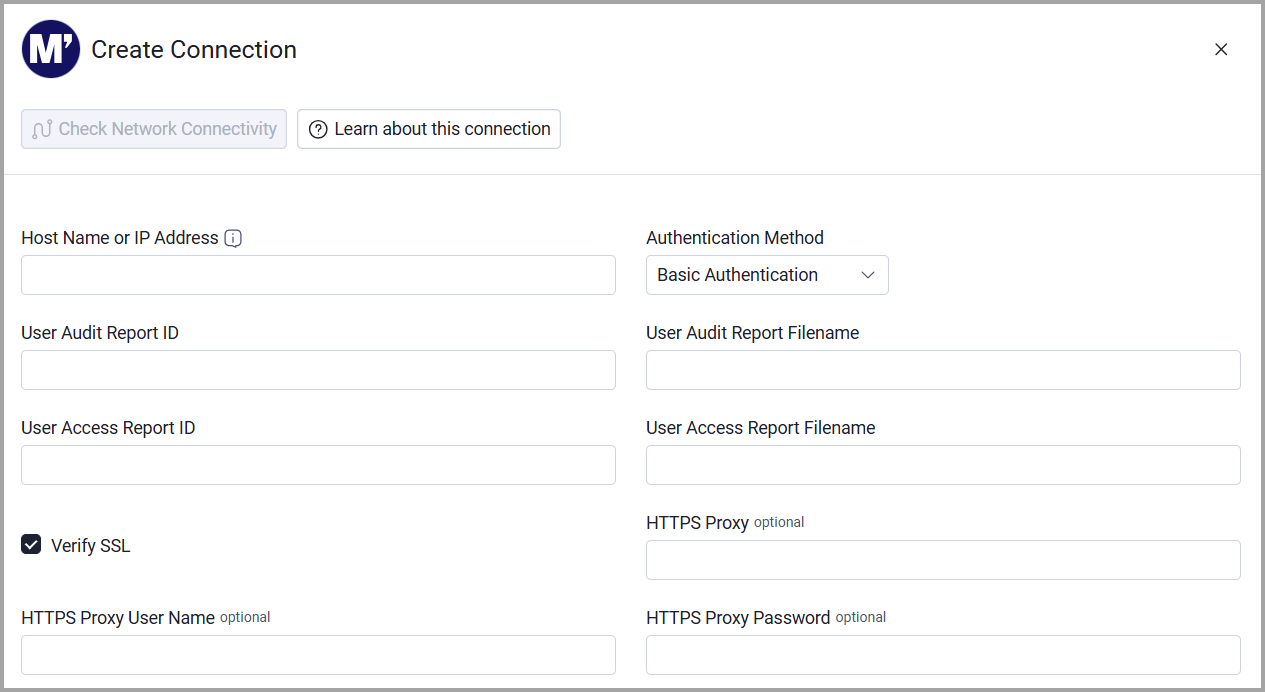
- Provide the following parameters.
Required Parameters
- Host Name or IP Address - Enter the base domain for the API, including the http:// or https:// prefix and without a specific API endpoint. Example: https://creditlens.example.com
- Authentication Method - Select Basic Authentication or JWT-Based Authentication.
- User Audit Report ID - Enter the report ID for the User Audit Info report.
- User Audit Report Filename - Enter the fileNameInStorage value sent with the User Audit Info report request.
- User Access Report ID - Enter the report ID for the User Access report.
- User Access Report Filename - Enter the fileNameInStorage value sent with the User Access report request.
- User Name and Password - If you select Basic Authentication, enter the credentials used to retrieve a token.
- JWT Token - If you select JWT-Based Authentication, enter the JWT token linked to a CreditLens user ID.
Optional Parameters
- Verify SSL - Select whether to verify the SSL certificate of the server against the CA database inside of Axonius. For more details, see SSL Trust & CA Settings (/docs/certificate-settings#ssl-trust-ca-settings).
- HTTPS Proxy - Connect the adapter to a proxy instead of directly connecting it to the domain.
- HTTPS Proxy User Name - The user name to use when connecting to the value supplied in Host Name or IP Address via the value supplied in HTTPS Proxy.
- HTTPS Proxy Password - The password to use when connecting to the server using the HTTPS Proxy.
To learn more about common adapter connection parameters and buttons, see Adding a New Adapter Connection.
Advanced Settings
Note
- Advanced settings can apply to either all connections of this adapter, or to a specific connection. For more detailed information, see Advanced Configuration for Adapters.
- For more general information about advanced settings, see Adapter Advanced Settings.
- Fetch Application Settings (Default: Disabled) - Select this option to fetch Application Settings for CreditLens users.
Updated 14 days ago