
Lenel OnGuard
Lenel OnGuard is an integrated access control and alarm monitoring system.
Use Cases the Adapter Solves
- Physical Access Visibility: Bring Lenel OnGuard cardholder records into Axonius to correlate physical access identities with your broader user inventory and identify accounts that exist in OnGuard but are missing from other identity systems.
- Access Reader Device Inventory: Discover and track all access control reader devices managed by Lenel OnGuard alongside the rest of your network device inventory in Axonius.
Asset Types Fetched
- Devices, Users
Data Retrieved through the Adapter
Devices - Fields such as Name, Description, Reader Key
Users - Fields such as Person ID, First Name, Last Name, Username
Before You Begin
Required Ports
- TCP port 443 (HTTPS)
Authentication Methods
Username and Password
APIs
Axonius uses the Lenel OnGuard NBAPI (Network Box API).
POST {host}/goforms/nbapiwithLogincommand — authenticate and retrieve a session IDPOST {host}/goforms/nbapiwithSearchPersonDatacommand — fetch cardholder (user) recordsPOST {host}/goforms/nbapiwithGetReaderscommand — fetch access control reader devices (optional, controlled by Advanced Settings)
Required Permissions
The user account supplied in User Name and Password must have read access to the Lenel OnGuard NBAPI service.
Supported From Version
Supported from Axonius version 6.0
Setting Up Lenel OnGuard to Work with Axonius
Consult your Lenel OnGuard administrator for instructions on creating a service account with NBAPI read access, and for confirming that the NBAPI endpoint (/goforms/nbapi) is reachable from the Axonius host.
Connecting the Adapter in Axonius
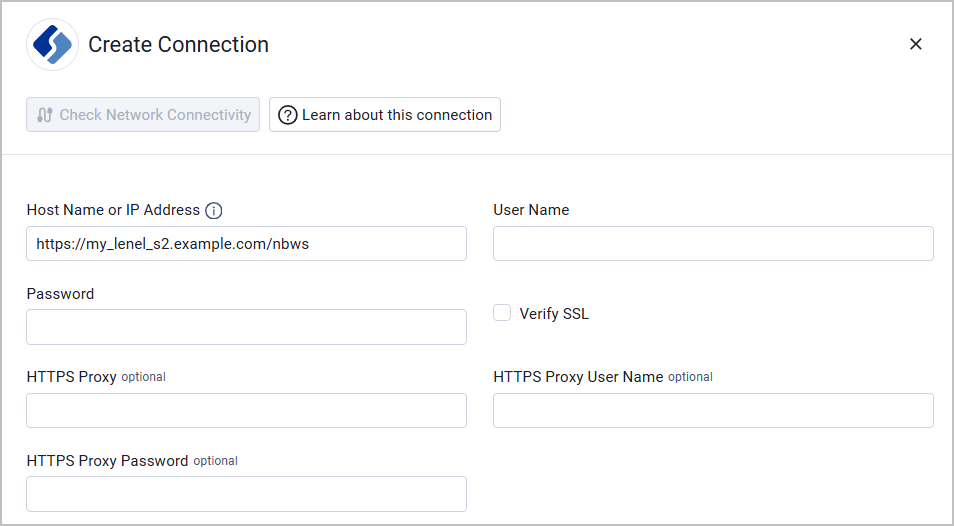
To connect the adapter in Axonius, provide the following parameters:
Required Parameters
- Host Name or IP Address - The hostname or IP address of the Lenel OnGuard server.
- Example of a valid domain for non-global host (this is the default value):
https://my_lenel_s2.example.com/nbws - Example of a valid domain for global host:
https://my_lenel_s2.example.com/global/nbws
- Example of a valid domain for non-global host (this is the default value):
- User Name and Password - The credentials for a user account that has permission to fetch assets.
- Verify SSL - Select whether to verify the SSL certificate of the server against the CA database inside of Axonius. For more details, see SSL Trust & CA Settings.
Optional Parameters
- HTTPS Proxy - Connect the adapter to a proxy instead of directly connecting it to the domain.
- HTTPS Proxy User Name - The user name to use when connecting to the value supplied in Host Name or IP Address via the value supplied in HTTPS Proxy.
- HTTPS Proxy Password - The password to use when connecting to the server using the HTTPS Proxy.
To learn more about common adapter connection parameters and buttons, see Adding a New Adapter Connection.
Advanced Settings
Note
Advanced settings can either apply to all connections for this adapter, or to a specific connection. Refer to Advanced Configuration for Adapters.
To learn more about Adapter Configuration tab advanced settings, see Adapter Advanced Settings.
- Fetch Devices from Readers - Select this option to fetch access control reader devices from Lenel OnGuard.
Updated 6 days ago