
Figma
Figma is a design platform that provides collaborative interface design, prototyping, design system management, and developer handoff capabilities for product teams.
Use Cases the Adapter Solves
- Identify unauthorized users and access: Detect users who have access to Figma design files and projects, ensuring only authorized personnel have access to sensitive design assets.
- Monitor design team activity: Track user activity through audit logs to identify suspicious behavior, unauthorized file access, or policy violations within your design organization.
Asset Types Fetched
- Users
- Groups
- Audit Activities
Data Retrieved through the Adapter
Users - fields such as Email Address, Display Name, User Remote ID
Groups - fields such as Display Name, External ID, Members
Audit Activities - fields such as Action Name, Action Timestamp, Actor Email, Affected User Email
Before You Begin
Required Ports
- TCP port 443 (HTTPS)
Authentication Methods
The Figma adapter uses two authentication methods:
-
SCIM API Token Authentication: Used for fetching Users and Groups data via the SCIM v2 API. The adapter authenticates using a Bearer token generated by an enterprise admin in the Figma admin console.
-
OAuth 2.0 Client Credentials: Used for fetching Activity Logs. The adapter obtains an OAuth 2.0 access token using the client credentials grant type (client ID and client secret) to authenticate requests to the Activity Logs API.
APIs
Axonius uses the Figma SCIM API and Figma Activity Logs API. The following endpoints are called:
POST /v1/oauth/token- Obtains OAuth 2.0 access token for Activity Logs API authenticationGET /scim/v2/{tenant_id}/Users- Retrieves user accounts from the SCIM provisioning systemGET /scim/v2/{tenant_id}/Groups- Retrieves group memberships from the SCIM provisioning systemGET /v1/activity_logs- Retrieves activity log events for security monitoring and audit purposes
Required Permissions
The following permissions and requirements apply:
SCIM API Access
- Enterprise Plan: Required for SCIM API access
- SCIM Enabled: SCIM must be enabled in the Figma admin console
- SCIM API Token: A Bearer token generated by an enterprise admin with permissions to read Users and Groups
Activity Logs API Access (Optional)
- Enterprise Plan: Required for Activity Logs API access
- Organization Admin: The OAuth application must be authorized by a Figma organization admin
- OAuth Scope:
org:activity_log_read- Read organization activity logs
Note: Activity Logs data collection is optional. If you do not provide the Client ID and Client Secret parameters, the adapter will only fetch Users and Groups data via the SCIM API.
Supported From Version
Supported from Axonius version 9.0.2
Setting Up Figma to Work with Axonius
Step 1: Enable SCIM in Figma
- Log in to your Figma organization as an enterprise admin.
- Navigate to Settings → SCIM.
- Click Enable SCIM to activate SCIM provisioning.
- Copy the Tenant ID displayed on the SCIM settings page.
- Generate a new SCIM API Token and copy it for use in Axonius.
Step 2: Create OAuth Application for Activity Logs (Optional)
If you want to collect Activity Logs data:
- Navigate to the Figma Developer Console.
- Click Create new app to register a new OAuth application.
- Configure the OAuth application settings:
- App Name: Axonius Asset Management
- Redirect URI: (not required for client credentials flow)
- Scopes: Select
org:activity_log_read
- After creating the app, copy the Client ID and Client Secret for use in Axonius.
Connecting the Adapter in Axonius
Navigate to the Adapters page, search for Figma, and click on the adapter tile.
Click Add Connection.
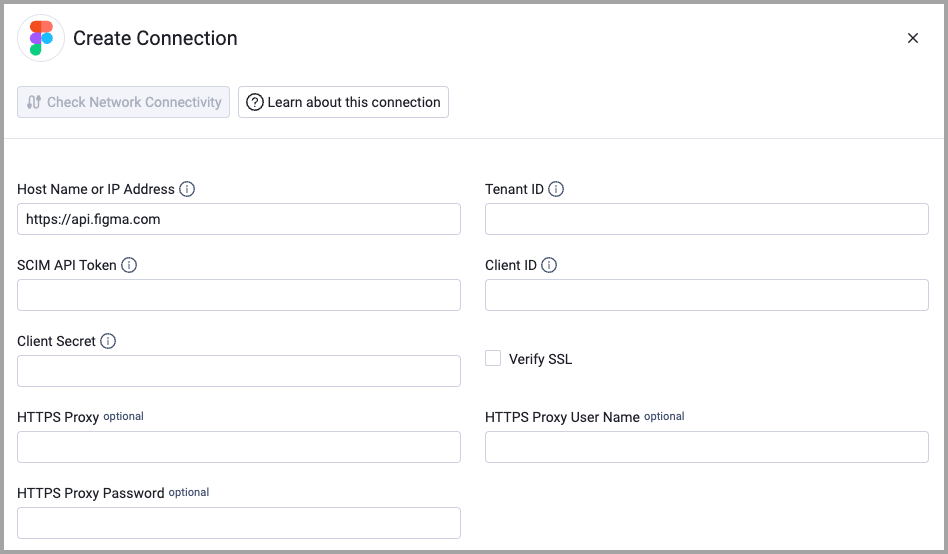
To connect the adapter in Axonius, provide the following parameters:
Required Parameters
- Host Name or IP Address - Base domain for the Figma SCIM API. Should include the http:// or https:// prefix. Do not add any specific endpoints after the domain. Example:
https://api.figma.com - Tenant ID - The Figma SCIM tenant ID provided to the admin when SCIM is enabled in the Figma admin console. Example:
abc123def-4567-8901-2345-6789abcdef01 - SCIM API Token - Bearer token generated by an enterprise admin in Figma (Admin → SCIM). Used to authenticate requests to the SCIM Users and Groups endpoints.
- Client ID - OAuth 2.0 client ID. Required only for fetching Activity Logs (Enterprise plan, org:activity_log_read scope). Leave blank if you do not want to collect Activity Logs.
- Client Secret - OAuth 2.0 client secret. Required only for fetching Activity Logs. Leave blank if you do not want to collect Activity Logs.
Optional Parameters
- Verify SSL - Select whether to verify the SSL certificate of the server against the CA database inside of Axonius. For more details, see SSL Trust & CA Settings.
- HTTPS Proxy - Connect the adapter to a proxy instead of directly connecting it to the domain.
- HTTPS Proxy User Name - The user name to use when connecting to the value supplied in Host Name or IP Address via the value supplied in HTTPS Proxy.
- HTTPS Proxy Password - The password to use when connecting to the server using the HTTPS Proxy.
Related Enforcement Actions
To learn more about common adapter connection parameters and buttons, see Adding a New Adapter Connection.
Updated about 2 months ago