
Cisco IoT Control Center (IoTCC)
Cisco IoT Control Center is a connectivity management platform that offers device activation, usage monitoring, rate plan administration, and security controls for cellular IoT deployments.
Use Cases the Adapter Solves
- Track IoT Device Inventory: Monitor and manage cellular IoT devices across your deployment, including SIM status, rate plans, and activation states.
- Optimize Connectivity Costs: Identify devices with excessive data, SMS, or voice usage to optimize rate plans and prevent overage charges.
Asset Types Fetched
- Devices
Data Retrieved through the Adapter
Devices - fields such as: ICCID, IMSI, Status, Rate Plan, Communication Plan, CTD Data Usage, Account ID, Modem ID
Before You Begin
Required Ports
- TCP port 443 (HTTPS)
Authentication Methods
HTTP Basic Authentication
The adapter authenticates using HTTP Basic Authentication with a Control Center user name and API key. The credentials are encoded and sent in the Authorization header for all API requests.
APIs
Axonius uses the Cisco IoT Control Center REST API v1. The following endpoints are called:
GET /rws/api/v1/devices- Retrieves a list of devices with pagination supportGET /rws/api/v1/devices/{iccid}- Retrieves detailed information for a specific deviceGET /rws/api/v1/devices/{iccid}/ctdUsages- Retrieves current cycle-to-date usage data for a device
Required Permissions
The API user must have an Account Admin role in Cisco IoT Control Center. This role provides the following permissions:
- View and edit device information - Access to SIM state, rate plan, communication plan, and device configuration
- View rate plan usage - Access to data, SMS, and voice usage information
- Manage customers - View and manage customer accounts
Note: The exact permission names should be confirmed with your Cisco IoT Control Center administrator or Cisco support, as the API documentation is not publicly available.
Supported From Version
Supported from Axonius version 9.0.5
Connecting the Adapter in Axonius
- Navigate to the Adapter Catalog, search for Cisco IoT Control Center (IoTCC), and select the adapter.
- Click Add Connection.
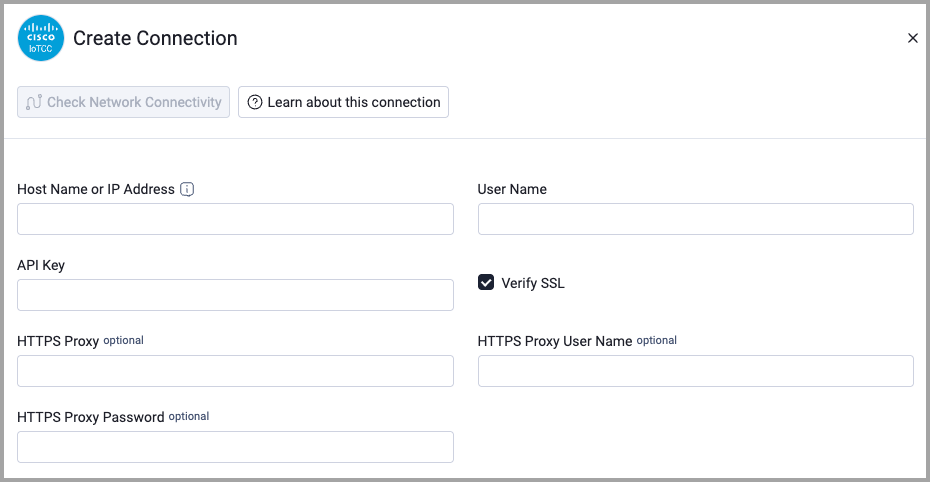
- Provide the following parameters.
Required Parameters
- Host Name or IP Address - Base domain for the API, should contain a prefix of http:// or https://. Do not add any specific endpoints after the domain. Example:
https://your-instance.jasper.com - User Name - Your Control Center user name. Example:
admin_user - API Key - The API key associated with your Control Center user account. Example:
d703f52b-1200-4318-ae0d-0f6092b2e6ab
Optional Parameters
- Verify SSL - Select whether to verify the SSL certificate of the server against the CA database inside of Axonius. For more details, see SSL Trust & CA Settings.
- HTTPS Proxy - Connect the adapter to a proxy instead of directly connecting it to the domain.
- HTTPS Proxy User Name - The user name to use when connecting to the value supplied in Host Name or IP Address via the value supplied in HTTPS Proxy.
- HTTPS Proxy Password - The password to use when connecting to the server using the HTTPS Proxy.
To learn more about common adapter connection parameters and buttons, see Adding a New Adapter Connection.
Advanced Settings
Note:
Advanced settings can either apply to all connections for this adapter, or to a specific connection. Refer to Advanced Configuration for Adapters.
To learn more about Adapter Configuration tab advanced settings, see Adapter Advanced Settings.
Endpoint Configuration
The Cisco IoT Control Center adapter supports the following advanced endpoint configurations:
- Modified Since (days ago) - Specifies how many days in the past to fetch device modification data. Devices modified since this time period will be retrieved. Default: 7 days.
- Get Device Details - Enrichment endpoint that retrieves detailed device information including IMSI, MSISDN, IMEI, rate plan, communication plan, and account details. Default: Disabled.
- Get Device CTD Usage - Enrichment endpoint that retrieves current cycle-to-date usage data, including data usage, SMS usage, voice usage, and overage information. Default: Disabled.
Updated 2 days ago