
Verification Gates
Verification Gates are logical, multi-layered filters that are part of the Verification Engine. Those filters refine your device inventory: only devices that meet all the requirements defined by the gates are marked as Verified, ensuring your inventory reflects only reliable, active, and identified assets.
The Verification Engine runs against the All Devices list in your environment. It evaluates each device sequentially using AND and AND NOT logic. To be marked as verified (Axonius Verified = Yes), a device must pass through all active gates.
You have the option to disable or enable any gate, as well as all gates. If all gates are disabled, all devices in the system are marked as Verified.
Notes
- The Hygiene Engine re-categorizes all devices during the Post-Correlation stage of the Discovery Cycle. That means that any fix you apply to unverified devices in the source system (e.g., adding a missing hostname) is not reflected in Axonius until the next Fetch + Correlate cycle is complete.
- The engine checks all gates even when a failure occurs before the last gate, so it can provide the full Verification Reasons in the Devices table.
Asset-Including Gates (AND)
Recency Gate
This gate ensures that only devices with recent network activity, defined by a set number of days, are included in the Devices view. The default is to include devices seen within the last 30 days, but you can set any other number.
You have the option to bypass this gate for devices without a "Last Seen" date. However, enabling this might increase the chances for false positive - for example, a device that was last seen 100 days ago, but since it doesn't have a "Last Seen" date, it automatically passes the gate even though it doesn't meet the criteria of "seen within the last 30 days".
Note
Don't use the bypass option unless you have confirmed that a specific source in your environment indeed reports active devices without a Last Seen value. When bypass is enabled, devices pass the gate based on the absence of evidence - rather than on an actual evidence that they are current. In most environments, the best fix is to correct the source so that it provides a Last Seen value.
Identity Gate
This gate ensures that only devices with at least one of the following key data points are included in the Devices view:
- IP Address
- MAC Address
- Serial Number
- Cloud ID
This gate excludes newly discovered devices (devices that were first seen in the last 2 days) unless they belong to 'hot' subnets (e.g., production) or cloud environments.
- Bypass gate for assets reported from these adapters - An optional setting. Use this to bypass this gate for assets reported by adapters that typically don't record any of the abovementioned fields (such as MAC Address) to avoid false positives.
- If Microsoft Active Directory (AD) or Microsoft Entra ID (Azure AD) and Microsoft Intune are configured in your environment - they will appear on this list by default. This is because these adapters don't typically provide network identifiers, but they are still considered reliable sources for device data. If neither of these adapters are configured, the list will be empty.
- You can add or remove any other adapter(s) configured in your environment.
Asset-Excluding Gates (AND NOT)
Instability Gate
This gate filters out short-lived, "ghost" records that lack cross-adapter correlation. This logic removes devices seen only briefly within a narrow window, thus preventing temporary or transient data from cluttering your inventory.
The default is to exclude devices seen only once within the last 2 days, but you can set any other option.
Low Confidence Source Exclusion Gate (Integrity & Reliance)
This gate filters out records that lack cross-adapter correlation (single-sourced adapters). Such devices must have at least one system-flagged normalization reason (e.g., "Bad Hostname By Serial") - Select the relevant normalization reason(s) from the dropdown.
Verification Logic
The verification logic of each verification gate is transparent to you and can be found in the Queries Page. Filter queries by ax-data-hygiene to inspect them:
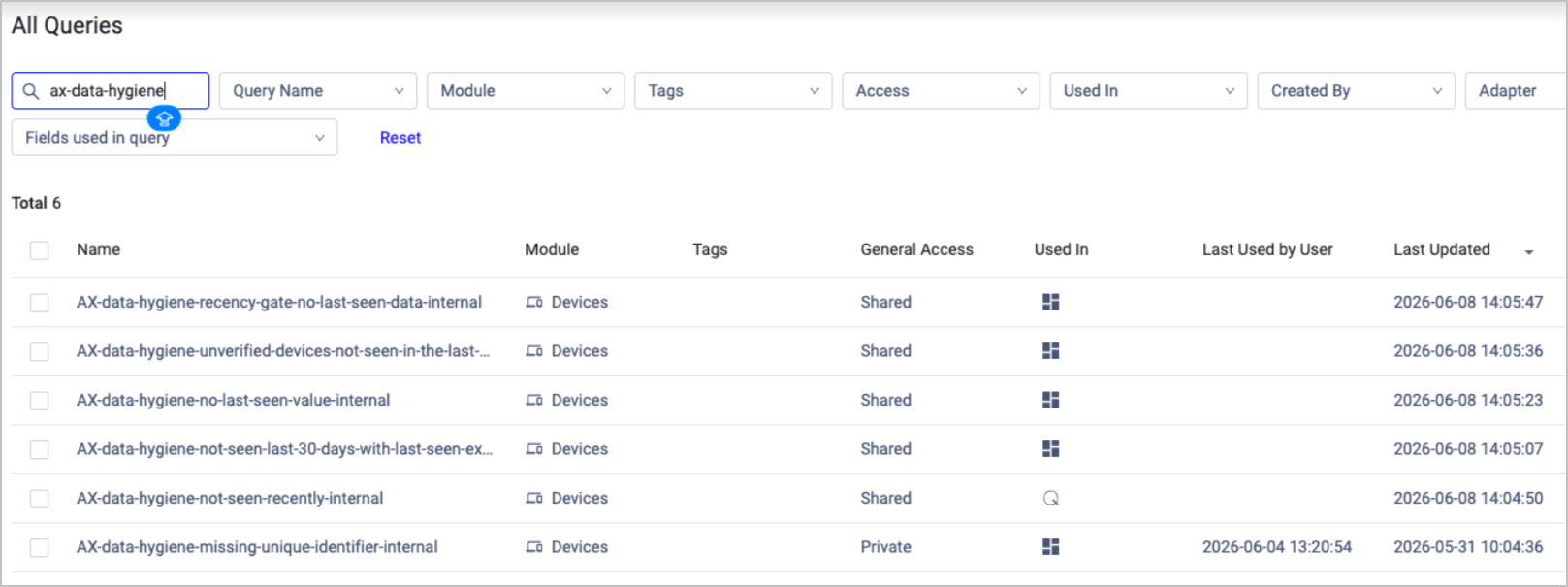
Click on a query to open its Saved Query drawer and view its details.
This is, for example, the default logic of the Identity Gate query: it includes only devices that have at least one of the following key data point - IP Address, MAC Address, Serial Number, or Cloud ID. This eliminates 'anonymous' or partial records.
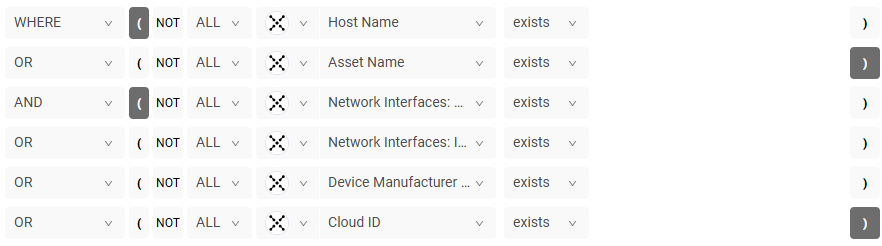
You cannot edit these queries - they update automatically according to settings changes you perform on the verification gates.
Example Use Cases
Example 1 - Pass Scenario
In this scenario, a standard corporate laptop is evaluated by the engine and successfully marked as verified.
- Device Profile: A corporate laptop last seen yesterday. It has a recorded MAC address and serial number. It has been active for 6 months and its data is correlated across both an EDR tool and an MDM solution.
Evaluation Steps:
- Recency Gate (AND): The laptop was seen 1 day ago, which falls well within the required 30-day window → PASSED.
- Identity Gate (AND): The laptop has a valid MAC address and serial number, fulfilling the requirement for at least one key identifier → PASSED.
- Instability Gate (AND NOT): The laptop has been seen consistently over the last 6 months, so it does not match the exclusion criteria of being seen "only once within the last 2 days" → PASSED.
- Low Confidence Source Exclusion Gate (AND NOT): The laptop does not have any system-flagged normalization reasons, and its data comes from reliable sources → PASSED.
Final Result: The device meets all verification criteria. The Axonius Verified field is set to Yes.
Example 2 - Fail Scenario
In this scenario, a transient network artifact is evaluated by the engine and fails to be verified.
- Device Profile: A rogue IP address or "ghost" record picked up briefly by a network scanner 24 hours ago. It has an IP address but lacks a MAC address, serial number, or cloud ID. It has only been detected once, and its only data source is an uncorrelated IPAM adapter.
Evaluation Steps:
- Recency Gate (AND): The record was seen yesterday, which is within the 30-day window → PASSED.
- Identity Gate (AND): While the device has an IP address, it is a newly discovered record that does not belong to a designated 'hot' subnet or cloud environment, and it lacks the other required identifiers → FAILED.
- Instability Gate (AND NOT): The record matches the exclusion criteria because it was seen only once within the last 2 days. The engine drops it here as a "ghost" record → FAILED.
- Low Confidence Source Exclusion Gate (AND NOT): The data originated solely from an IPAM adapter, which is one of the checked categories selected for exclusion → FAILED.
Final Result: The device failed to meet the verification criteria. The Axonius Verified field is set to No.
Updated 2 months ago