
ThreatLocker
ThreatLocker is a zero-trust platform.
Use Cases the Adapter Solves
- Zero-Trust Endpoint Security: Discover and monitor all endpoints protected by ThreatLocker's zero-trust security controls to ensure comprehensive visibility into your endpoint protection posture.
- Agent Version Compliance: Track ThreatLocker agent versions and deployment status across all devices to identify outdated or missing security agents that may leave endpoints vulnerable.
This adapter fetches the All Computers report.
Asset Types Fetched
- Devices
Data Retrieved through the Adapter
Devices - Fields such as Hostname, Operating System, Last Seen, ThreatLocker Agent Version.
Before You Begin
Required Ports
- TCP port 443 (HTTPS)
Authentication Methods
API Key Authentication
ThreatLocker uses an API key (Auth Key) for authentication. The adapter supports two API versions:
- Old (Deprecated): Legacy API using only the Auth Key
- New: Current API requiring both Auth Key and Managed Organization ID
APIs
Axonius uses the ThreatLocker API. The following endpoints are called:
Old API Version (Deprecated):
GET /api/Reports?list- Get list of available reportsGET /api/Reports- Fetch report data (All Computers report)
New API Version:
POST /portalapi/Computer/ComputerGetByAllParameters- Fetch all computersGET /portalapi/Report/ReportGetByOrganizationId- Get list of reports for organizationPOST /portalapi/Report/ReportGetDynamicData- Fetch dynamic report dataGET /portalapi/Computer/ComputerNetworkGetByComputerId- Fetch all IP addresses for each computerGET /portalapi/Computer/ComputerGetIPAddressById- Fetch local IP addresses per computer (optional, used when the Enrich All Computers with Computer IP Addresses advanced setting is enabled)
Required Permissions
The API key must have the following permissions:
- Report permission - Required to access and retrieve report data
Contact ThreatLocker support to obtain the API key with the necessary Report permissions.
Supported From Version
Supported from Axonius version 6.0
Connecting the Adapter in Axonius
Navigate to the Adapters page, search for ThreatLocker, and click on the adapter tile.
Click Add Connection.
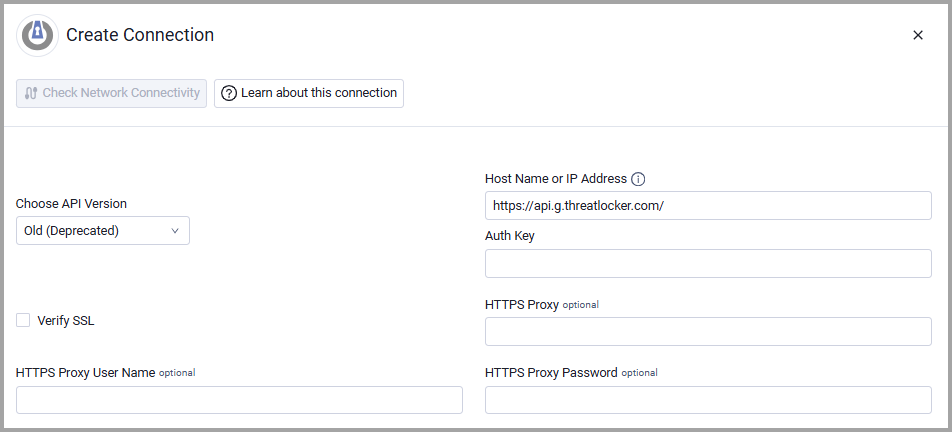
To connect the adapter in Axonius, provide the following parameters:
Required Parameters
- Choose API Version (default: Old (Deprecated)) - Select the API Version you want to use to connect, either Old (Deprecated) or New.
Note
When New API Version is selected, Managed Org ID is required.
- Host Name or IP Address (required, default:
https://api.g.threatlocker.com/) - The hostname or IP address of the ThreatLocker server.
Note:ThreatLocker has different API URLs depending on your region. Your specific regional API URL should be provided when you receive your API keys from ThreatLocker.
-
Auth Key (required) - Specify the user authentication key associated with a user account that has permissions to fetch assets. Contact ThreatLocker to obtain the API key. Axonius needs the "Report" API key for this parameter.
-
Managed Org ID (only required for New API Version) - The managed organization ID provided by ThreatLocker support.
Optional Parameters
-
Verify SSL - Select whether to verify the SSL certificate of the server against the CA database inside of Axonius. For more details, see SSL Trust & CA Settings.
-
HTTPS Proxy - Connect the adapter to a proxy instead of directly connecting it to the domain.
-
HTTPS Proxy User Name - The user name to use when connecting to the value supplied in Host Name or IP Address via the value supplied in HTTPS Proxy.
-
HTTPS Proxy Password - The password to use when connecting to the server using the HTTPS Proxy.
To learn more about common adapter connection parameters and buttons, see Adding a New Adapter Connection.
Advanced Settings
Note:
- Advanced settings can apply to either all connections of this adapter, or to a specific connection. For more detailed information, see Advanced Configuration for Adapters.
- For more general information about advanced settings, see Adapter Advanced Settings.
Enrich All Computers with Reports Data - Select this option to enable enrichment from the ThreatLocker "All Computers" report to retrieve additional device security information.
Enrich All Computers with Approval Requests Data - Select this option to enable enrichment from the ThreatLocker "Approval Requests Actioned in the Last 7 Days" report to track approval request metrics and SLA.
Enrich All Computers with Computer IP Addresses - Select this option to enable enrichment of each device with local IP addresses retrieved from the ComputerGetIPAddressById endpoint (New API version only). This setting is disabled by default and runs independently of the Enrich All Computers with Reports Data setting.
Updated 5 days ago