
Socket
Socket is a developer-first platform that provides real-time monitoring and static analysis to prevent supply chain attacks in open source dependencies.
Asset Types Fetched
- Application Resources
Before You Begin
Ports
- TCP port 80/443
Authentication Method
- API Key
APIs
Axonius uses the Socket API.
Permissions
Access to specific endpoints depends on token scopes:
full-scans:listis required for full-scan endpoints.repo:listis required for repository-related endpoints.alerts:listis required for the alerts enrichment.
Supported From Version
Supported from Axonius version 7.0.9
Connecting the Adapter in Axonius
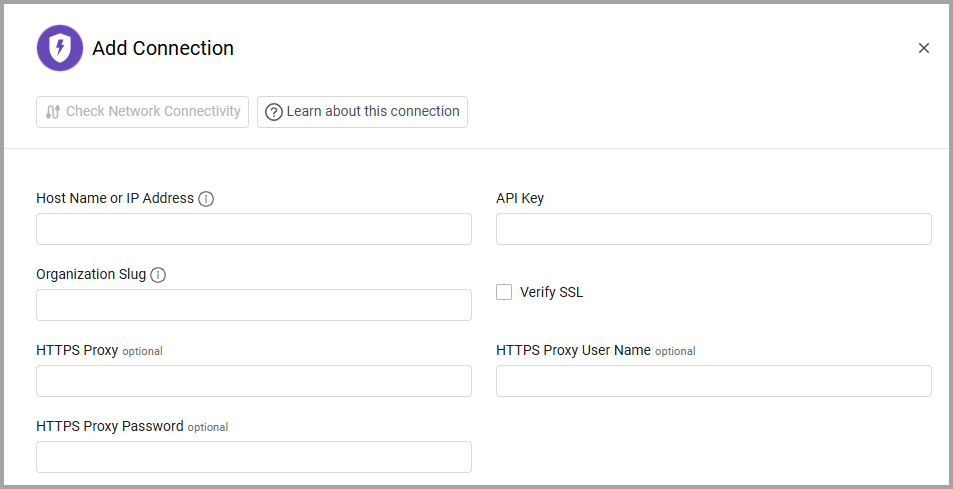
To connect the adapter in Axonius, provide the following parameters:
Required Parameters
- Host Name or IP Address - The hostname or IP address of the Socket server.
- API Key - An API Key associated with a user account that has the Required Permissions to fetch assets.
- Organization Slug - The slug of the organization.
Optional Parameters
-
Verify SSL - Select whether to verify the SSL certificate of the server against the CA database inside of Axonius. For more details, see SSL Trust & CA Settings.
-
HTTPS Proxy - Connect the adapter to a proxy instead of directly connecting it to the domain.
-
HTTPS Proxy User Name - The user name to use when connecting to the value supplied in Host Name or IP Address via the value supplied in HTTPS Proxy.
-
HTTPS Proxy Password - The password to use when connecting to the server using the HTTPS Proxy.
To learn more about common adapter connection parameters and buttons, see Adding a New Adapter Connection.
Advanced Settings
Note
- Advanced settings can apply to either all connections of this adapter, or to a specific connection. For more detailed information, see Advanced Configuration for Adapters.
- For more general information about advanced settings, see Adapter Advanced Settings.
- Fetch Scans from X Days ago (default 5) - Only fetch scans that started after this date. This setting filters scan data to retrieve only scans created within the specified number of days. The date calculation starts at midnight UTC.
- Enrich Repositories with Full Scans - Select this option to fetch repository scan information.
- Enrich Repositories with Alerts - Select this option to fetch vulnerability alerts for repositories.
Updated 5 months ago