
eMASS
eMASS is a federal system designed to help maintain information assurance situational awareness, manage risk, and comply with federal regulations.
Use Cases the Adapter Solves
- Federal Compliance Management: Track and manage compliance status of federal systems with authorization workflows and control implementation status
- Security Authorization Monitoring: Monitor system authorization packages, workflow stages, and approval status across the enterprise to identify bottlenecks
- Risk and Vulnerability Tracking: Aggregate POAM (Plan of Action and Milestones) data and security findings across federal systems for centralized visibility
Asset Types Fetched
This adapter fetches the following types of assets:
- Devices, Users, Compute Services
Data Retrieved through the Adapter
Devices - Fields such as System ID, Asset Name, Serial Number,Hardware details and sensor information
Users - Fields such as Email, Last Name, User Roles, System role assignments
Compute Services - Fields such as System information, POAM summaries and details, Control compliance status, security control details
Before You Begin
Required Ports
Axonius must be able to communicate with the value supplied in Host Name or IP Address via the following port:
- TCP port 80/443 (HTTPS)
Authentication Methods
Certificate-Based Authentication
The eMASS adapter uses mutual TLS (mTLS) authentication with client certificates issued by eMASS. You must provide:
- An eMASS-issued certificate file (.CRT)
- The corresponding private key file (.KEY) created during the Certificate Signing Request (CSR) process
- An API Key (optional - can be auto-generated)
- Your Organization ID provided by eMASS Support
APIs
Axonius uses the eMASS REST API (v3.3). The following endpoints are called:
POST /api/api-key- Generate API key for authenticationGET /api/systems- Fetch system informationGET /api/system-roles- Fetch system rolesGET /api/system-roles/{role_category}- Fetch users by roleGET /api/dashboards/system-hardware-details- Fetch device hardware detailsGET /api/dashboards/system-sensor-hardware-details- Fetch sensor hardware informationGET /api/dashboards/system-poam-summary- Fetch POAM summary dataGET /api/dashboards/system-poam-details- Fetch detailed POAM informationGET /api/dashboards/system-control-compliance-summary- Fetch control compliance summaryGET /api/dashboards/system-security-controls-details- Fetch security control detailsGET /api/dashboards/system-assessment-procedures-details- Fetch assessment procedure detailsGET /api/dashboards/system-workflows-history-summary- Fetch workflow history summary (organization, system details, workflow metrics)GET /api/dashboards/system-workflows-history-details- Fetch workflow history details (workflow types, packages, decisions, stages)GET /api/dashboards/system-workflows-history-stage-details- Fetch workflow stage-level details (stage actions, users, comments, duration)
Required Permissions
The eMASS user account and certificate must have the following permissions:
Data Access Requirements
- Read access to system hardware and sensor data
- Read access to POAM (Plan of Action and Milestones) data
- Read access to security controls and compliance data
- Read access to system roles and user assignments
- Read access to workflow history data (summary, details, and stage-level information)
Supported From Version
Supported from Axonius version 4.8
Connecting the Adapter in Axonius
Navigate to the Adapters page, search for eMASS, and click on the adapter tile.
Click Add Connection.
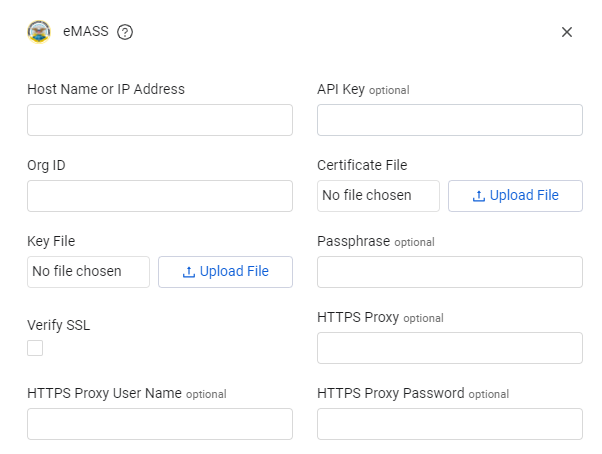
To connect the adapter in Axonius, provide the following parameters:
Required Parameters
- Host Name or IP Address - The hostname or IP address of the eMASS server that Axonius can communicate with via HTTPS. Example:
emass.example.mil - Org ID - Organization ID provided by eMASS Support. This identifies your organization within the eMASS system. Example:
12345 - Certificate File - Choose and upload (click Upload File) the eMASS-issued certificate file (.CRT) received from eMASS Support
- Key File - Choose and upload (click Upload File) the private key file (.KEY) created as part of the Certificate Signing Request (CSR) process for authentication.
Optional Parameters
- Verify SSL - Select whether to verify the SSL certificate of the server against the CA database inside of Axonius. For more details, see SSL Trust & CA Settings.
- API Key - An API Key associated with a user account that has permissions to fetch assets. If not provided, Axonius will automatically generate one using the eMASS
/api/api-keyendpoint - Passphrase - A passphrase for the private key file, if the key is encrypted
- HTTPS Proxy - Connect the adapter to a proxy instead of directly connecting it to the domain
- HTTPS Proxy User Name - The user name to use when connecting to the value supplied in Host Name or IP Address via the value supplied in HTTPS Proxy
- HTTPS Proxy Password - The password to use when connecting to the server using the HTTPS Proxy
To learn more about common adapter connection parameters and buttons, see Adding a New Adapter Connection.
Advanced Settings
Note: Advanced settings can either apply to all connections for this adapter, or to a specific connection. Refer to Advanced Configuration for Adapters. To learn more about Adapter Configuration tab advanced settings, see Adapter Advanced Settings.
The eMASS adapter includes several advanced configuration options to customize data collection:
Configurable Endpoints
The following endpoints can be enabled or disabled based on your data collection requirements:
Enabled by Default:
- Devices Endpoint (
system-hardware-details) - System Poam Summary Endpoint
- System Poam Details Endpoint
- System Control Compliance Summary Endpoint
- Systems Endpoint
- Roles Endpoint
- Users Endpoint
Disabled by Default (Compute Services Enrichment): - enrich compute services with information from the following endpoints (enable the endpoints that interest you)
- Sensor Hardware Summary Endpoint
- System Security Controls Details Endpoint
- System Ports Protocols Summary Endpoint
- System Ports Protocols Details Endpoint
- System Device Findings Summary Endpoint
- System Device Findings Details Endpoint
- System Terms Conditions Summary Endpoint
- System Terms Conditions Details Endpoint
- System ATC IATC Details Endpoint
- System Artifacts Summary Endpoint
- System Artifacts Details Endpoint
- System Workflows History Summary Endpoint
- System Workflows History Details Endpoint
- System Workflows History Stage Details Endpoint
These configurable endpoints allow you to optimize fetch performance by only collecting the data you need. To enable additional endpoints, contact Axonius Support or your Axonius administrator.
Updated 5 days ago