
CipherTrust Manager
Thales CipherTrust Manager is a key management solution for the CipherTrust Data Security Platform.
Types of Assets Fetched
This adapter fetches the following types of assets:
- Devices, Licenses, SaaS Applications, Compute Services, Secrets
Parameters
-
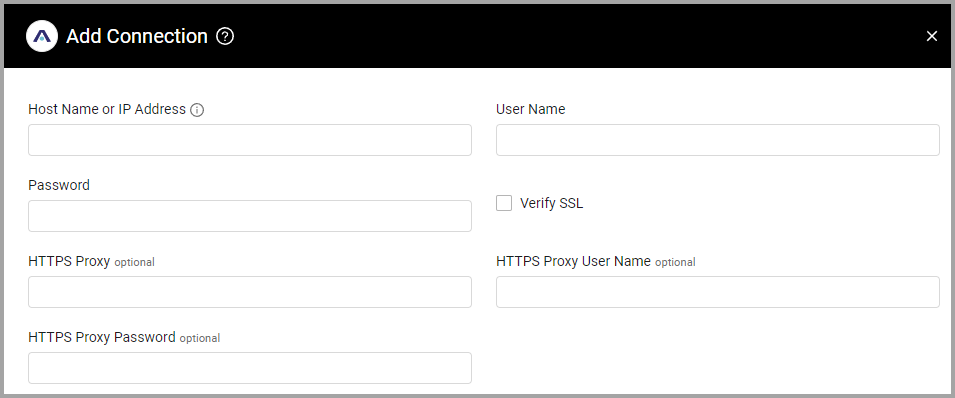
Host Name or IP Address (required) - The hostname or IP address of the CipherTrust Manager server.
-
User Name and Password (required) - The credentials for a user account that has the Required Permissions to fetch assets.
-
Verify SSL - Select whether to verify the SSL certificate of the server against the CA database inside of Axonius. For more details, see SSL Trust & CA Settings.
-
HTTPS Proxy (optional) - Connect the adapter to a proxy instead of directly connecting it to the domain.
-
HTTPS Proxy User Name (optional) - The user name to use when connecting to the value supplied in Host Name or IP Address via the value supplied in HTTPS Proxy.
-
HTTPS Proxy Password (optional) - The password to use when connecting to the server using the HTTPS Proxy.
To learn more about common adapter connection parameters and buttons, see Adding a New Adapter Connection.
Advanced Settings
Note
Advanced settings can either apply for all connections for this adapter, or you can set different advanced settings and/or different scheduling for a specific connection, refer to Advanced Configuration for Adapters.
- Endpoints Config - By default the adapter enriches users via various endpoints. Click on
>to open the following settings for configurable endpoints:- Fetch Devices of sub type device2 from Clients Endpoint - Toggle on to fetch devices of the subtype device2 from the Clients endpoint. When enabled, the following setting can be configured:
- Enrich Clients Endpoint with Client Guard Status - Toggle on to enrich the clients endpoint with client guard status.
- Fetch ComputeServices from Clusters Summary Endpoint - Toggle on to fetch compute services from the Cluster Summary endpoint.
- Fetch Licenses from Licensing Features Endpoint - Toggle on to fetch licenses from the Licensing Features endpoint.
- Fetch Devices of sub type device2 from Clients Endpoint - Toggle on to fetch devices of the subtype device2 from the Clients endpoint. When enabled, the following setting can be configured:
Note
To learn more about Adapter Configuration tab advanced settings, see Adapter Advanced Settings.
APIs
Axonius uses the CipherTrust Manager Administration REST API.
Axonius fetches data from the following endpoints:
POST /api/v1/auth/tokens/ - Token authentication endpoint (uses username and password)
Primary Device Endpoints (Reports-based - enabled by default)
- GET
/api/v1/transparent-encryption/reports/clients- Fetches client information - GET
/api/v1/transparent-encryption/reports/clients-guard-status/- Fetches client guard status (filtered by domain_name and client_name) - GET
/api/v1/transparent-encryption/policies/{policy_id}/keyrules- Fetches key rules for specific policies
Alternative Device Endpoints (disabled by default)
- GET
/api/v1/transparent-encryption/clients- Alternative clients endpoint - GET
/api/v1/transparent-encryption/clients/{clientid}/guardpoints- Alternative guardpoints endpoint
KMIP Clients (enabled by default)
- GET
/api/v1/kmip/kmip-clients- Fetches KMIP (Key Management Interoperability Protocol) client information
Compute Services Endpoints (disabled by default)
- GET
/api/v1/cluster/summary- Fetches cluster summary information
Licensing Endpoints (disabled by default)
- GET
/api/v1/licensing/features- Fetches licensing features information
Secrets Endpoints (enabled by default)
- GET
/api/v1/vault/keys2/- Fetches secrets/keys from the vault
Required Permissions
The value supplied in User Name must have read permissions in order to fetch assets.
Supported From Version
Supported from Axonius version 6.0
Updated 4 months ago