
Akamai API Security
Akamai API Security is an API security platform that provides API discovery, posture management, runtime threat detection, and compliance monitoring across enterprise API environments.
Use Cases the Adapter Solves
- Discover Shadow APIs: Identify all API endpoints across your enterprise environment, including undocumented or forgotten APIs that may pose security risks.
- Monitor API Security Posture: Track security findings, vulnerabilities, and compliance issues across your API landscape to ensure APIs meet organizational security standards.
Asset Types Fetched
- Aggregated Security Findings, SaaS Applications, Domains & URLs, Application Settings, Users
Data Retrieved through the Adapter
URLs - Fields such as Domain, Path, Method, API Type,
Before You Begin
Required Ports
- TCP port 443 (HTTPS)
Authentication Methods
The Akamai API Security adapter supports two authentication methods:
- Service Account (Client Credentials) - The adapter authenticates using a service account with Client ID and Client Secret. T
- User Credentials (Email + Password) - The adapter authenticates using user credentials (email and password).
APIs
Axonius uses the Akamai API Security REST API (v3 and v4). The following endpoints are called:
Authentication
POST /auth/token— Obtain a bearer token using Service Account credentials (Client ID and Client Secret)POST /api/v3/users/generate-api-token— Obtain a bearer token using User Credentials (email and password)
Data
GET /api/v3/apis— Fetch API assetsGET /api/v4/findings— Fetch security findings (used to enrich API asset records)GET /api/v3/users— Fetch usersGET /api/v3/users— Fetch application settings, including user lock and registration status (optional; only called when the Fetch Application Settings advanced setting is enabled)
Required Permissions
The account used for the adapter must have permissions to access the API endpoints for reading API information and security findings. Note: The exact permission names should be confirmed with your Akamai API Security administrator or Akamai support, as the API documentation is not publicly available.
Supported From Version
Supported from Axonius version 8.0.24
Connecting the Adapter in Axonius
Navigate to the Adapters page, search for Akamai API Security, and click on the adapter tile.
Click Add Connection.
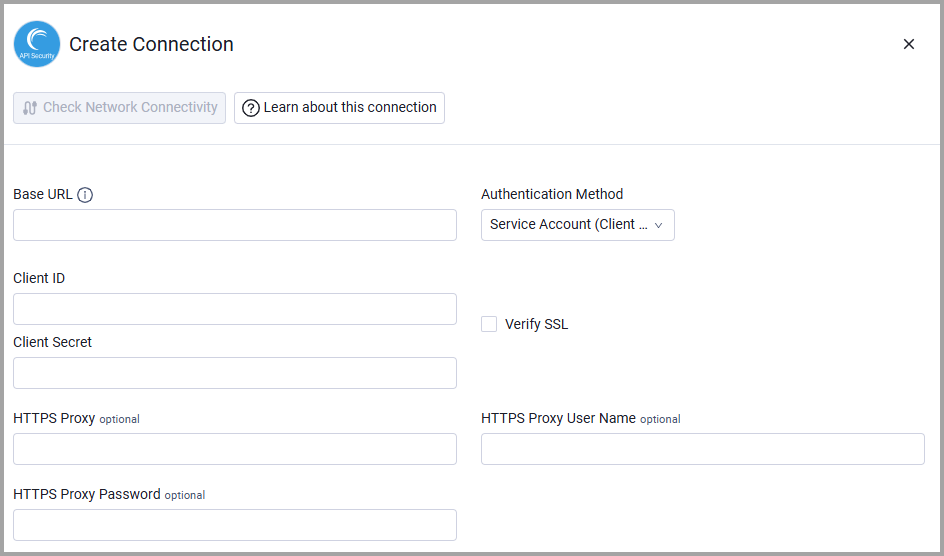
To connect the adapter in Axonius, provide the following parameters:
Required Parameters
- Base URL - The tenant-specific API base URL for your Akamai API Security instance. Example:
https://tenant.akamai-api-security.com - Authentication Method - Select the authentication method to use:
- Client ID - The Client ID generated from the Akamai API Security console.
- Client Secret- The Client Secret generated from the Akamai API Security console.
- Email - The email address of the user account.
- Password - The password for the user account.
Optional Parameters
- Verify SSL - Select whether to verify the SSL certificate of the server against the CA database inside of Axonius. For more details, see SSL Trust & CA Settings.
- HTTPS Proxy - Connect the adapter to a proxy instead of directly connecting it to the domain.
- HTTPS Proxy User Name - The user name to use when connecting to the value supplied in Base URL via the value supplied in HTTPS Proxy.
- HTTPS Proxy Password - The password to use when connecting to the server using the HTTPS Proxy.
To learn more about common adapter connection parameters and buttons, see Adding a New Adapter Connection.
Advanced Settings
Note:
- Advanced settings can apply to either all connections of this adapter, or to a specific connection. For more detailed information, see Advanced Configuration for Adapters.
- For more general information about advanced settings, see Adapter Advanced Settings.
- Fetch Application Settings - Select whether to fetch application settings, including user lock and registration status. Disabled by default.
Updated 11 days ago