
Splunk - Create and Update Assets
Splunk - Create and Update Assets creates and/or updates assets in Splunk for:
- Assets returned by the selected query or assets selected on the relevant asset page.
Depending on the action selected, assets not in Splunk are created and existing Splunk assets are updated.
See Creating Enforcement Sets to learn more about adding Enforcement Actions to Enforcement Sets.
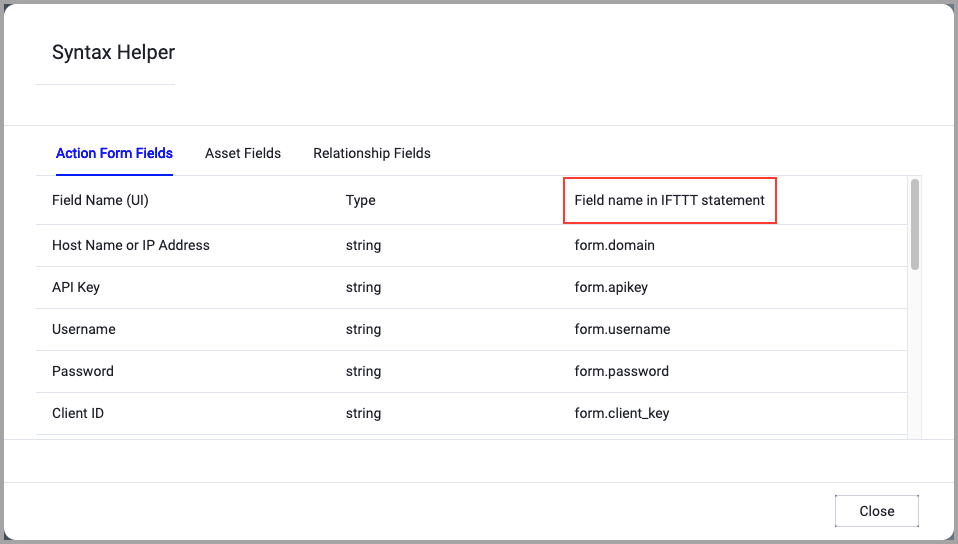
When accessing an enforcement action using the API, you must use the backend form of field names.
Use the Syntax Helper to find the correct name. In the enforcement action, enable Configure Dynamic Values and select Syntax Helper.
Note
- Not all asset types are supported for all Enforcement Actions.
- See Actions supported for Activity Logs, Adapters Fetch History, and Asset Investigation modules.
- See Actions supported for Aggregated Security Findings.
- See Actions supported for Software.
Required Fields
-
Compute Node - The Axonius node to use when connecting to the specified host. For more details, see Working with Axonius Compute Nodes.
- Action name - The name of this Enforcement Action. The system sets a default name. You can change the name.
- Configure Dynamic Values (optional) - Toggle on to enter a Dynamic Value statement. See Creating Enforcement Action Dynamic Value Statements to learn more about Dynamic Value statement syntax.
-
Use stored credentials from Splunk adapter - Select this option to choose which Splunk connected adapter credentials to use.
-
When you select this option, the Select Adapter Connection drop-down becomes available. Select the adapter connection to use for this Enforcement Action.
NoteTo use this option, you must successfully configure a Splunk adapter connection.
-
Additional Fields
These fields are optional.
Connection and CredentialsWhen Use stored credentials from the adapter is toggled off, some of the connection fields below are required to create the connection, while other fields are optional.
Host Name - The hostname of the Splunk search head.
Port - Specify the port of the Splunk system. It is recommended to use TCP port 8089. For more details, see Splunk Docs - Securing Splunk Enterprise.
Protocol (rdefault: HTTPS) - Select between HTTP and HTTPS protocols when using that specific adapter connection.
User Name and Password - The user name and password for an account that has read access to the API.
API Token - API token can be used instead of user name and password.
SplunkLib Version - Select the version of the Splunk library to use.
Certificate file (optional) - Upload a client certificate file in
.pemformat. Required when the Splunk server enforces mutual TLS (mTLS) authentication (requireClientCert = true).Private key file (optional) - Upload the corresponding private key file in
.pemformat for the client certificate. Required together with the Certificate file when mTLS is enforced.Verify SSL (Optional) (default: enabled) - Selects whether to verify the SSL certificate of the server against the CA database inside of Axonius. For more details, see SSL Trust & CA Settings. This setting is enabled by default on all new adapter settings. If you need to disable SSL verification, make sure you disable this setting.)
- Action Choice - Select one of the following:
- Create - Create Splunk assets for the assets returned by the query.
- Update - Update existing Splunk assets returned by the query.
- Create and Update - Create and update Splunk assets for the assets returned by the query. Existing Splunk assets will be updated. Assets not already in Splunk will be created.
-
Exclude connections - Assets from the selected connections will not be included in the query results. You can select more than one.
-
Map Axonius fields to adapter fields - Use the Field Mapping Wizard to map Axonius fields to fields in external systems. In this way, you can transfer data found in Axonius into the external system as part of the configuration of relevant enforcement actions. The wizard shows you which fields exist on the Axonius system, allowing you to map them easily.
NoteFor details, see Axonius to External Field Mapping.
About Vendor FieldsIf the Vendor field (table column) does not currently exist within the collection, Axonius adds the field value(s) specified as a new column(s) in the KV Store Collection. If the field already exists, Axonius updates or adds the mapped value.
-
KV Store Collection Name - The name of the KV store collection in which to create and update the assets.
Notes- If a KV Store Collection name is not provided, the default name will be listed as “axonius”.
- The KV Store stores your data as key-value pairs in collections. Collections are the containers for your data, similar to a database table. Collections exist within the context of a given app.
- Fields correspond to key names, similar to the columns in a database table. Fields contain the values of your data in JSON format.
-
Mapped Axonius field to Splunk ID (Required field for Update Assets) - Select fields fetched from the Splunk adapter to map their values to Splunk IDs. Note that when you select Update for Action Choice, this field is mandatory.
-
KVStore App Namespace - Splunk app namespace under which the KV store collection is created (e.g., "search", "system"). Defaults to "system" if not specified.
-
Input Lookup Name - InputLookup name to register in Splunk (used to query the collection). Leaving this field empty will not register a lookup definition. When provided, the action automatically creates or updates a lookup definition in Splunk with the appropriate field mappings, allowing the KV store collection to be queried using SPL's
inputlookupcommand.
APIs
Axonius uses the Splunk API.
Required Permissions
The stored credentials, or those provided in Connection and Credentials, must have the following permission(s) to perform this Enforcement Action:
- Permission to create and update assets.
For more details about other enforcement actions available, see Action Library.
Updated 26 days ago