
Black Duck Continuous Dynamic (formerly NTT Application Security)
Black Duck Continuous Dynamic (formerly NTT Application Security/WhiteHat Security) is a Dynamic Application Security Testing (DAST) tool that provides automated dynamic analysis to identify runtime vulnerabilities during application testing and development workflows.
Asset Types Fetched

Devices |

Aggregated Security Findings |

Users |

Software |

Roles |

Groups |

SaaS Applications |

Alerts/Incidents
Before You Begin
APIs
Axonius uses the API Assets API v2.0 - Retrieve API Asset Information.
Required Ports
- TCP port 80, 443
Required Permissions
- ReadOnly
Supported From Version
Supported from Axonius version 4.7
Connecting the Adapter in Axonius
Required Parameters
-
Host Name or IP Address - The hostname or IP address of the NTT Application Security server.
-
API Key - An API Key associated with a user account that has permissions to fetch assets. To obtain an API key generate it through the application's console. See Authentication.
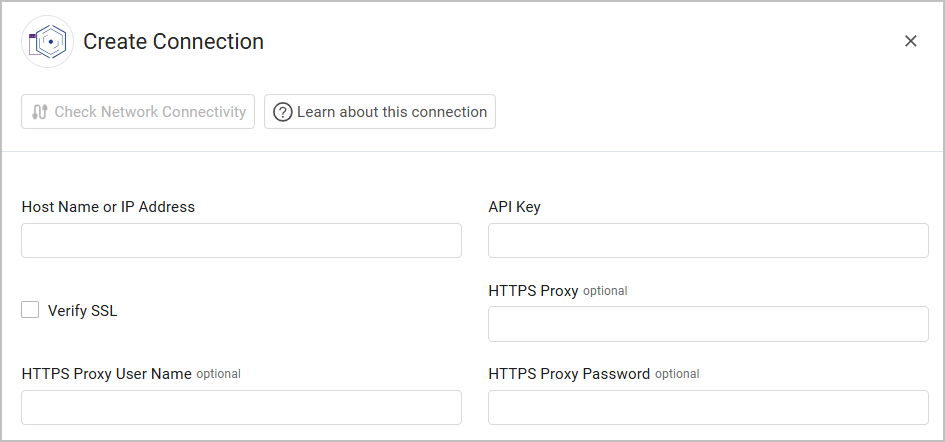
Optional Parameters
-
Verify SSL - Select whether to verify the SSL certificate of the server against the CA database inside of Axonius. For more details, see SSL Trust & CA Settings.
-
HTTPS Proxy (optional) - Connect the adapter to a proxy instead of directly connecting it to the domain.
-
HTTPS Proxy User Name (optional) - The user name to use when connecting to the value supplied in Host Name or IP Address via the value supplied in HTTPS Proxy.
-
HTTPS Proxy Password (optional) - The password to use when connecting to the server using the HTTPS Proxy.
To learn more about common adapter connection parameters and buttons, see Adding a New Adapter Connection.
Advanced Settings
Note
Advanced settings can either apply to all connections for this adapter, or to a specific connection. Refer to Advanced Configuration for Adapters.
- Fetch asset findings - Select to fetch findings for each asset.
- Fetch site credentials - Select this option to fetch site credentials.
- Fetch found links from the recent scan - Select this option to fetch links found from the most recent scan.
- Fetch asset BLA information - Select asset BLA information to fetch from the list, ('Details', 'Statistics', 'History', 'Capacity', 'Information')
- Number of assets per request (optional, default: 50) - Set the number of assets to fetch in the API response from the WhiteHat API. This configuration is recommended in order to reduce the adapter memory usage when it is too high. The minimum value is 1; the maximum value is 200.
- Fetch vulnerabilities from source - Select this option to fetch vulnerabilities. They will be parsed as Application Development Exposures asset.
Note
To learn more about Adapter Configuration tab advanced settings, see Adapter Advanced Settings.
Version Matrix
This adapter was only tested with the versions marked as supported, but may work with other versions. Contact Axonius Support if you have a version that is not listed, which is not functioning as expected.
| Version | Supported | Notes |
|---|---|---|
| WhiteHat version 1.0.0 | Yes |
Updated 27 days ago