
i-doit
i-doit is a platform that offers integrated IT documentation and a configuration management database (CMDB) that enables tracking of IT assets, licenses, contracts, mappings, and change processes.
Asset Types Fetched
- Devices, Users
Before You Begin
Ports
- TCP port 80/443
Authentication Method
- User Name/Password
- API Key
APIs
Axonius uses the i-doit API (JSON-RPC).
Permissions
Consult with your vendor for the exact permissions to fetch the objects.
Supported From Version
Supported from Axonius version 8.0.2
Connecting the Adapter in Axonius
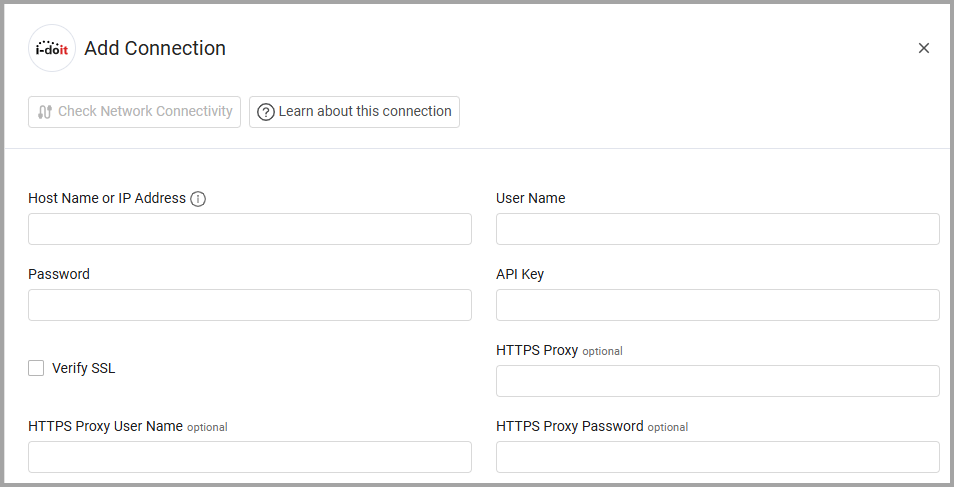
To connect the adapter in Axonius, provide the following parameters:
Required Parameters
-
Host Name or IP Address - The hostname or IP address of the i-doit server.
-
User Name and Password - The credentials for a user account that has permissions to fetch assets.
-
API Key - An API Key associated with a user account that has permissions to fetch assets.
Optional Parameters
-
Verify SSL - Select whether to verify the SSL certificate of the server against the CA database inside of Axonius. For more details, see SSL Trust & CA Settings.
-
HTTPS Proxy - Connect the adapter to a proxy instead of directly connecting it to the domain.
-
HTTPS Proxy User Name - The user name to use when connecting to the value supplied in Host Name or IP Address via the value supplied in HTTPS Proxy.
-
HTTPS Proxy Password - The password to use when connecting to the server using the HTTPS Proxy.
To learn more about common adapter connection parameters and buttons, see Adding a New Adapter Connection.
Advanced Settings
Note
Advanced settings can either apply to all connections for this adapter, or to a specific connection. Refer to Advanced Configuration for Adapters.
Endpoints Config
This section contains device and user object type lists and category lists related to specified endpoints. For each setting, add or remove object type IDs or category IDs.
Object types and categories are identified by their numeric IDs in i-doit. To find the ID for an object type or category, refer to your i-doit instance or the i-doit API documentation.
Device
-
Device Object Type List — Applies context to the following endpoints: Device Search. Enter a list of i-doit object type IDs to include when searching for devices.
-
Device Details — Toggle on to retrieve additional category data per device. If this setting is enabled, the setting below may be configured.
- Device Category List — Applies context to the following endpoints: Device Details. Enter a list of i-doit category IDs to retrieve for each device.
Users
-
User Search — Toggle on to fetch users from i-doit. If this setting is enabled, the settings below may be configured.
-
User Object Type List — Applies context to the following endpoints: User Search. Enter a list of i-doit object type IDs to include when searching for users. Default value:
C__OBJTYPE__PERSON. -
User Details — Toggle on to retrieve additional category data per user. If this setting is enabled, the setting below may be configured.
- User Category List — Applies context to the following endpoints: User Details. Enter a list of i-doit category IDs to retrieve for each user. Default value:
C__CATS__PERSON.
- User Category List — Applies context to the following endpoints: User Details. Enter a list of i-doit category IDs to retrieve for each user. Default value:
-
Note
To learn more about Adapter Configuration tab advanced settings, see Adapter Advanced Settings.
Updated 7 months ago