
HAProxy
HAProxy is free and open source software that provides a high availability load balancer and reverse proxy for TCP and HTTP-based applications.
Asset Types Fetched
- Devices, Users
Before You Begin
Ports
- TCP port 80/443
Authentication Method
- User Name/Password
APIs
Axonius uses the HAProxy Enterprise Data Plane API, and the following endpoints.
Base URL Pattern: https://{domain}/{api_version}/services/haproxy/configuration
- API v2:
{domain}/v2/services/haproxy/configuration - API v3:
{domain}/v3/services/haproxy/configuration
API v2 Endpoints (Default)
Devices
Servers:
GET /v2/services/haproxy/configuration/servers
Frontends:
GET /v2/services/haproxy/configuration/frontends
Frontend Enrichment (per frontend):
GET /v2/services/haproxy/configuration/acls?parent_type=frontend&parent_name={frontend_name}GET /v2/services/haproxy/configuration/binds?frontend={frontend_name}
SSL Certificates:
-
GET /v2/services/haproxy/storage/ssl_certificates- Note: Uses different base path (
/v2/services/haproxy/storageinstead of/configuration)
Users
- Note: Uses different base path (
User Lists:
GET /v2/services/haproxy/configuration/userlists
Users (per userlist):
GET /v2/services/haproxy/configuration/users?userlist=USERLIST_NAME
API v3 Endpoints
Devices
Backends:
GET /v3/services/haproxy/configuration/backends
Backend Servers (per backend):
GET /v3/services/haproxy/configuration/backends/{backend_name}/servers
Rings:
GET /v3/services/haproxy/configuration/rings
Ring Servers (per ring):
GET /v3/services/haproxy/configuration/rings/{ring_name}/servers
Peer Sections:
GET /v3/services/haproxy/configuration/peer_section
Peer Servers (per peer section):
GET /v3/services/haproxy/configuration/peers/{peer_name}/servers
Users
User Lists and Users:
- Same endpoints as API v2 (userlists and users endpoints are identical across versions)
Permissions
The value supplied in User Name must have read-only permissions in order to fetch assets.
Supported From Version
Supported from Axonius version 4.8
Connecting the Adapter in Axonius
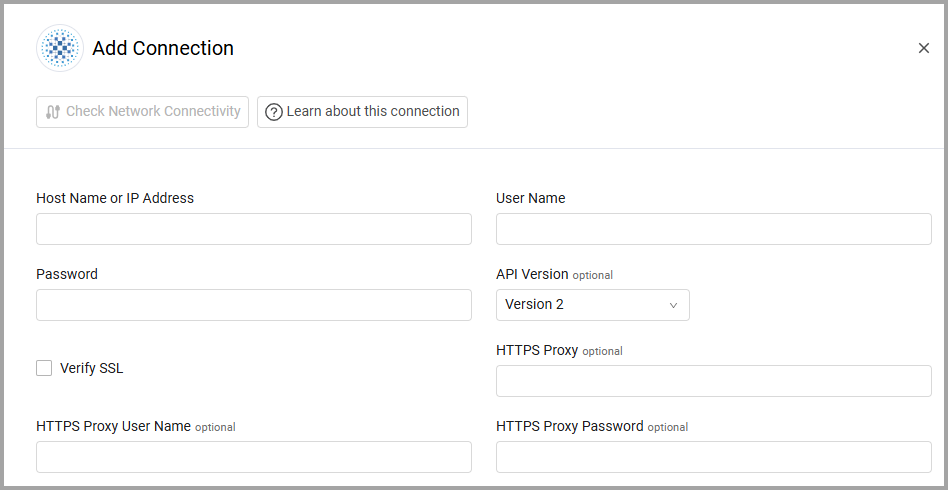
To connect the adapter in Axonius, provide the following parameters:
Required Parameters
-
Host Name or IP Address - The hostname or IP address of the HAProxy server.
-
User Name and Password - The credentials for a user account that has the permissions to fetch assets.
-
API Version (default: Version 2) - Select the API Version, either Version 2 or Version 3.
Optional Parameters
-
Verify SSL - Select whether to verify the SSL certificate of the server against the CA database inside of Axonius. For more details, see SSL Trust & CA Settings.
-
HTTPS Proxy - Connect the adapter to a proxy instead of directly connecting it to the domain.
-
HTTPS Proxy User Name - The user name to use when connecting to the value supplied in Host Name or IP Address via the value supplied in HTTPS Proxy.
-
HTTPS Proxy Password - The password to use when connecting to the server using the HTTPS Proxy.
To learn more about common adapter connection parameters and buttons, see Adding a New Adapter Connection.
Updated 3 months ago