
Certero
Certero is an IT hardware, software, SaaS, and cloud asset management solution.
Types of Assets Fetched
This adapter fetches the following types of assets:
- Devices
- Certificates
Parameters
-
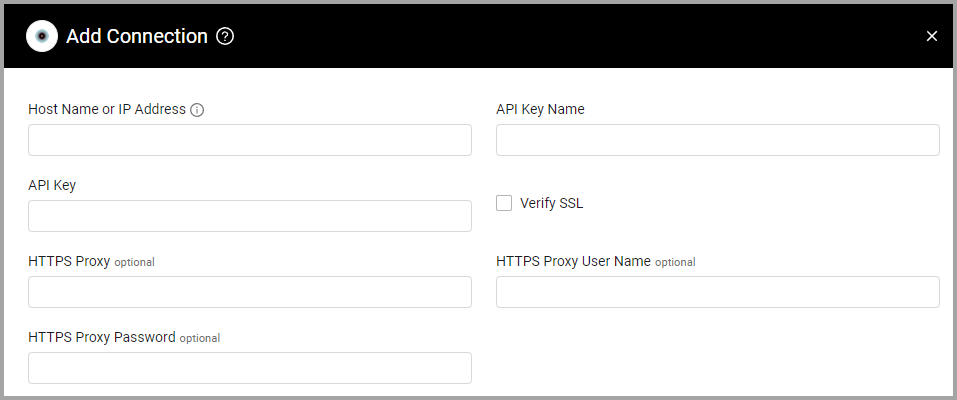
Host Name or IP Address (required) - The hostname or IP address of the Certero server.
-
API Key Name (required) - The username for the API Key associated with a user account that has permissions to fetch assets.
-
API Key (required) - An API Key associated with a user account that has permissions to fetch assets.
-
Verify SSL - Select whether to verify the SSL certificate of the server against the CA database inside of Axonius. For more details, see SSL Trust & CA Settings.
-
HTTPS Proxy (optional) - Connect the adapter to a proxy instead of directly connecting it to the domain.
-
HTTPS Proxy User Name (optional) - The user name to use when connecting to the value supplied in Host Name or IP Address via the value supplied in HTTPS Proxy.
-
HTTPS Proxy Password (optional) - The password to use when connecting to the server using the HTTPS Proxy.
To learn more about common adapter connection parameters and buttons, see Adding a New Adapter Connection.
Advanced Settings
Note:
- Advanced settings can apply to either all connections of this adapter, or to a specific connection. For more detailed information, see Advanced Configuration for Adapters.
- For more general information about advanced settings, see Adapter Advanced Settings.
Fetch Certificate from Certificate (default: enabled) - Clear this option to not fetch Certificate assets from Certero.
APIs
Axonius uses the Certero Unified Platform API Version 3.
Supported From Version
Supported from Axonius version 4.8
Updated 11 days ago