
Serval
Serval is an identity and access management platform that provides user lifecycle management and access control capabilities.
Use Cases the Adapter Solves
- User Access Visibility: Gain visibility into user accounts, authentication methods, and administrative permissions across your Serval platform to ensure proper access controls are in place.
- Identity Lifecycle Management: Track user creation, deactivation status, and authentication methods to support onboarding and offboarding processes.
Asset Types Fetched
- Users
Before You Begin
Required Ports
- TCP port 443 (HTTPS)
Authentication Methods
OAuth 2.0 Client Credentials Authentication
The adapter uses OAuth 2.0 Client Credentials grant flow. Authentication is performed via HTTP Basic Authentication where the Client ID serves as the username and the Client Secret serves as the password. The adapter retrieves a Bearer token from the /v2/auth/token endpoint and uses it for subsequent API calls.
APIs
Axonius uses the Serval API v2. The following endpoints are called:
POST /v2/auth/token- Authenticate and retrieve access token using OAuth 2.0 Client Credentials.GET /v2/users- List all users, including deactivated users.
Required Permissions
To use this adapter, you need to create API credentials in your Serval account.
Note: The exact permission names should be confirmed with your Serval administrator or Serval support, as the API documentation is not publicly available.
Supported From Version
Supported from Axonius version 8.0.
Connecting the Adapter in Axonius
Navigate to the Adapters page, search for Serval, and click on the adapter tile.
Click Add Connection.
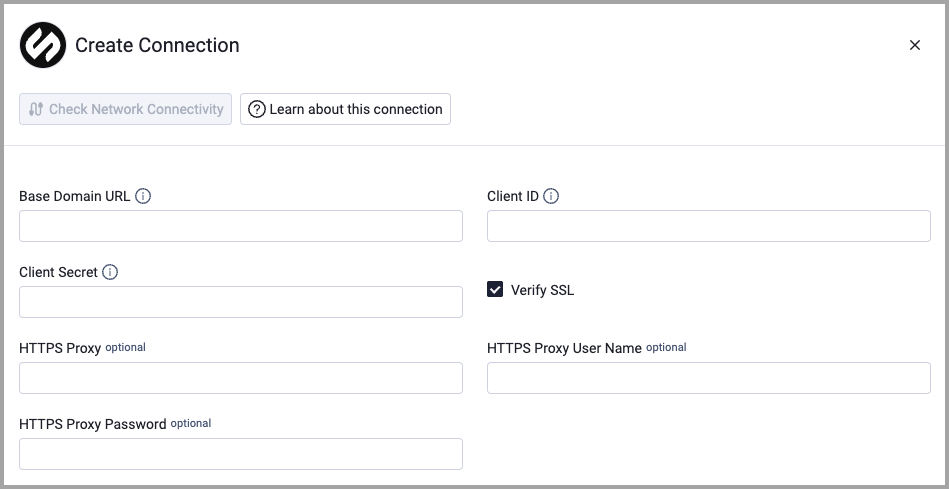
To connect the adapter in Axonius, provide the following parameters:
Required Parameters
- Base Domain URL - Base domain for the Serval API. Example:
https://public.api.serval.com. - Client ID - Serval API Client ID from API Settings.
- Client Secret - Serval API Client Secret from API Settings.
Optional Parameters
- Verify SSL - Select whether to verify the SSL certificate of the server against the CA database inside of Axonius. For more details, see SSL Trust & CA Settings.
- HTTPS Proxy - Connect the adapter to a proxy instead of directly connecting it to the domain.
- HTTPS Proxy User Name - The user name to use when connecting to the value supplied in Base Domain URL via the value supplied in HTTPS Proxy.
- HTTPS Proxy Password - The password to use when connecting to the server using the HTTPS Proxy.
To learn more about common adapter connection parameters and buttons, see Adding a New Adapter Connection.
Updated 3 months ago