
HPE OneView
HPE OneView is an integrated IT management solution that transforms compute, storage, and networking into software-defined infrastructure for task automation.
Use Cases the Adapter Solves
- Server Hardware Inventory: Maintain a complete, up-to-date inventory of all HPE ProLiant servers managed by HPE OneView, including model, serial number, firmware versions, and slot information.
- Manufacturer and Processor Visibility: Surface device manufacturer and processor type data alongside server hardware records to support procurement, lifecycle, and compliance workflows.
- Infrastructure State Monitoring: Track power state, maintenance state, and hardware status for HPE servers to support operational monitoring and incident response.
Types of Assets Fetched
This adapter fetches the following types of assets:
- Devices
Data Retrieved through the Adapter
Devices - fields such as: Hostname, IP Addresses, MAC Addresses, Serial Number, Model
Before You Begin
Required Ports
- TCP port 443 (HTTPS)
Authentication Methods
HPE OneView uses session-based authentication.
An optional Authentication Login Domain can be specified when the user account belongs to an Active Directory or LDAP directory.
APIs
Axonius uses the HPE OneView API. The following endpoints are called:
GET rest/version- Detect the supported API version range from the serverPOST rest/login-sessions- Authenticate and obtain a session tokenGET rest/server-hardware- Fetch server hardware inventory (paginated, with full sub-resource expansion)
Required Permissions
The user account supplied in User Name must have read access to Server Hardware resources in HPE OneView.
Axonius only performs read operations via the HPE OneView REST API. A read-only role with access to the following resource category is sufficient:
- Server Hardware — required to fetch device inventory
Consult your HPE OneView administrator to confirm the minimum built-in role that grants read access to Server Hardware in your environment.
Connecting the Adapter in Axonius
Navigate to the Adapters page, search for HPE OneView, and click on the adapter tile.
Click Add Connection.
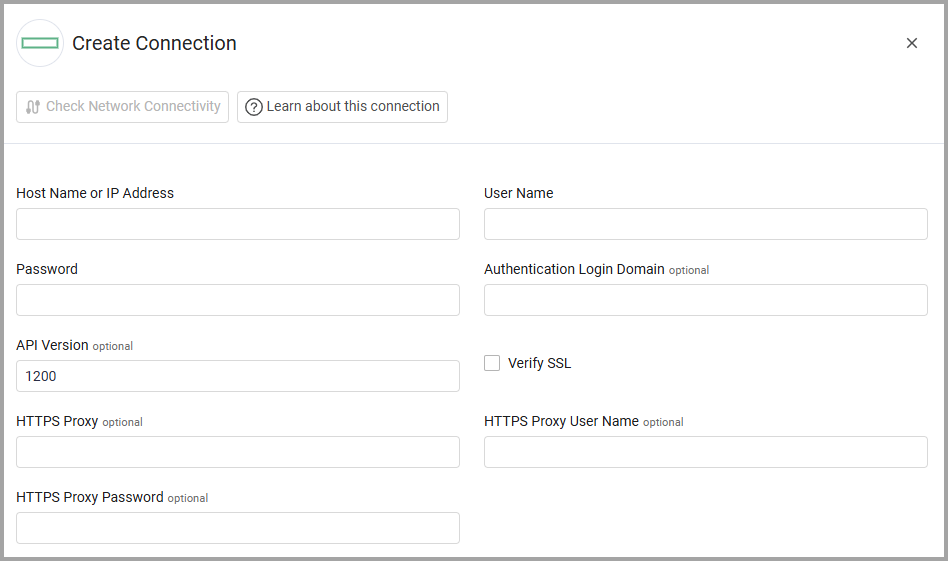
To connect the adapter in Axonius, provide the following parameters:
Required Parameters
- Host Name or IP Address - The hostname or IP address of the HPE OneView server.
- User Name and Password - The credentials for a user account that has the permissions to fetch assets.
Optional Parameters
- Authentication Login Domain - Specify an optional directory used for authentication.
- API Version (default 1200) - Enter an API Version.
- Verify SSL - Select whether to verify the SSL certificate of the server against the CA database inside of Axonius. For more details, see SSL Trust & CA Settings.
- HTTPS Proxy - Enter an HTTPS proxy address to connect the adapter to a proxy instead of directly connecting it to the domain.
- HTTPS Proxy User Name - Enter the user name to use when connecting to the value supplied in Host Name or IP Address via the value supplied in HTTPS Proxy.
- HTTPS Proxy Password - Enter the password to use when connecting to the server using the HTTPS Proxy.
To learn about additional optional/common adapter connection parameters, see Adding a New Adapter Connection.
Advanced Settings
Note
Advanced settings can either apply for all connections for this adapter, or you can set different advanced settings and/or different scheduling for a specific connection, refer to Advanced Configuration for Adapters.
- Set device manufacturer to HPE when not reported by the chassis - Select this option to set the device manufacturer to HPE for devices where the chassis does not report a manufacturer.
Note
To learn more about Adapter Configuration tab advanced settings, see Adapter Advanced Settings.
Updated 23 days ago