
Red Hat IDM
Red Hat Identity Management (IdM) provides a centralized and unified way to manage identity stores, authentication, policies, and authorization policies in a Linux-based domain.
Asset Types Fetched
- Devices, Users
Before You Begin
APIs
Axonius uses the Identity Management API.
Supported From Version
Supported from Axonius version 4.5
Connecting the Adapter in Axonius
Required Parameters
-
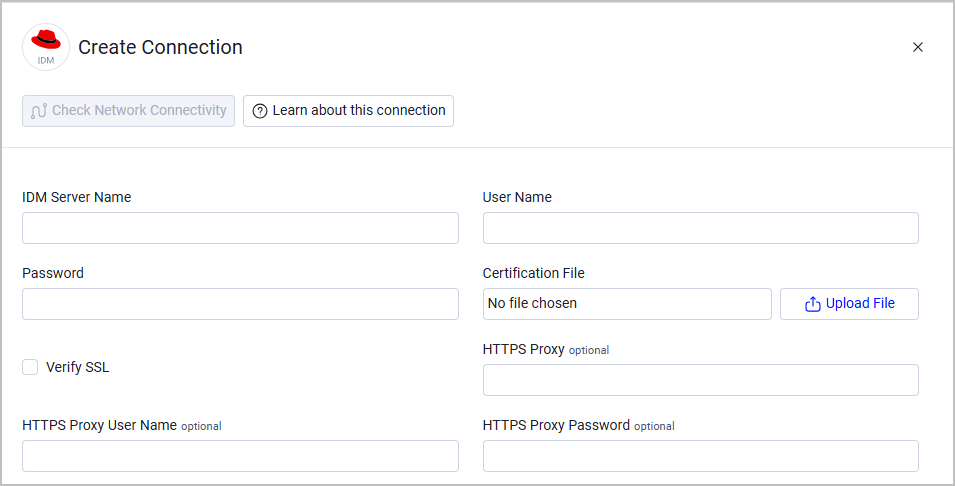
IDM Server Name - Specify the domain name of the Identity Management server.
-
User Name and Password - The credentials for a user account that has the permissions to fetch assets.
-
Certification File - Click Upload File to upload an IdM Server certificate file.
Optional Parameters
-
Verify SSL - Select whether to verify the SSL certificate of the server against the CA database inside of Axonius. For more details, see SSL Trust & CA Settings.
-
HTTPS Proxy - Connect the adapter to a proxy instead of directly connecting it to the domain.
-
HTTPS Proxy User Name - The user name to use when connecting to the value supplied in Host Name or IP Address via the value supplied in HTTPS Proxy.
-
HTTPS Proxy Password - The password to use when connecting to the server using the HTTPS Proxy.
To learn more about common adapter connection parameters and buttons, see Adding a New Adapter Connection.
Advanced Settings
Note
Advanced settings can either apply to all connections for this adapter, or to a specific connection. Refer to Advanced Configuration for Adapters.
To learn more about Adapter Configuration tab advanced settings, see Adapter Advanced Settings.
- LDAP Search size limit (sizelimit or olcSizeLimit) - Enter the maximum number of results your Red Hat IDM server should return in a single LDAP search query (the server's configured sizelimit or olcSizeLimit value). When the adapter detects that a query returned exactly this many results, it automatically re-queries using alphabetic prefix filters to fetch all remaining devices and users. Leave this field empty if your server's default limit (100) is sufficient or if you're uncertain about the configured value.
- To find your server's LDAP sizelimit, check your Red Hat IDM server configuration for the sizelimit (FreeIPA) or olcSizeLimit (LDAP) value. This is typically configured in the LDAP server settings. If you're unsure, consult your Red Hat IDM administrator.
- How this works:
- The adapter queries the Red Hat IDM server for devices or users.
- If the response returns exactly the configured sizelimit number of results, the adapter assumes more data exists beyond the limit.
- The adapter automatically re-queries using alphabetic prefix filters (a, e, j, x, z) to fetch the remaining assets.
- All results are combined and deduplicated to ensure complete asset coverage.
Updated about 1 month ago