
Lakeside SysTrack
Lakeside SysTrack is a digital experience monitoring solution used for workplace analytics, IT asset optimization, and end-user experience.
Types of Assets Fetched
This adapter fetches the following types of assets:
- Devices
Before You Begin
Required Ports
- TCP port 443 (HTTPS)
Authentication Methods
The Lakeside SysTrack adapter supports two authentication methods:
API Key Authentication - Uses a SysTrack API key for authentication. This is the recommended method for new integrations.
To generate an API key:
- Log in to your SysTrack portal
- Navigate to Settings > Manage API Keys
- Create a new API key with one of the following types:
- SysTrack Read-Only (recommended for Axonius)
- SysTrack Read/Write
Note: API keys expire after up to 180 days. You will need to regenerate and update the key in Axonius before expiration.
OAuth2 (Username/Password) Authentication - Uses Azure AD B2C OAuth2 authentication with username and password. This is the legacy authentication method.
This method requires:
- Azure AD B2C domain for token requests
- SysTrack Client ID
- Service account username and password
APIs
Axonius uses the SysTrack API. The following endpoints are called:
GET /api/systems- Fetch device informationGET /api/systems/{system_id}?$expand=invn.localmembers- Fetch system local members (optional)
Supported From Version
Supported from Axonius version 4.5
Connecting the Adapter in Axonius
Navigate to the Adapters page, search for Lakeside SysTrack, and click on the adapter tile.
Click Add Connection.
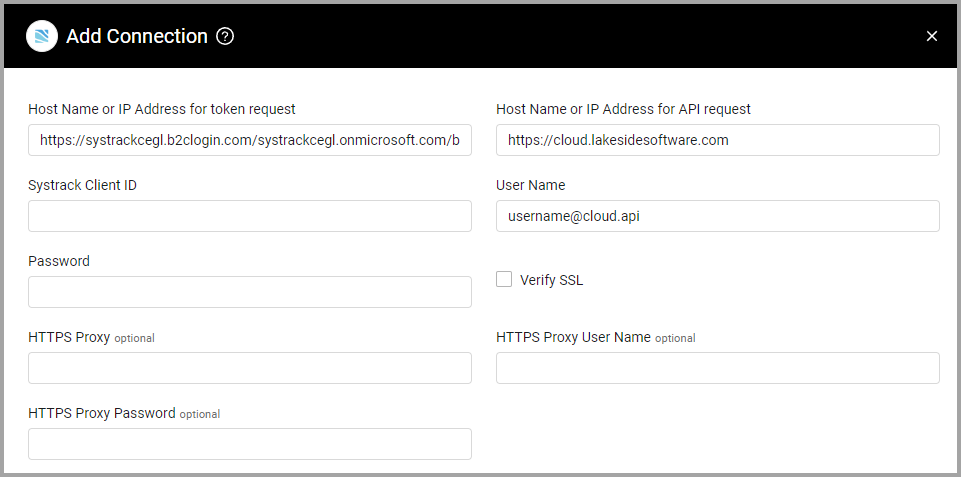
To connect the adapter in Axonius, provide the following parameters:
Required Parameters
-
Host Name or IP Address for API request (default:
https://cloud.lakesidesoftware.com) - The hostname or IP address of the Lakeside SysTrack server. -
Authentication Method - Select API Key from the dropdown.
-
API Key (required) - The SysTrack API key generated from Settings > Manage API Keys in SysTrack. Use a "SysTrack Read-Only" or "SysTrack Read/Write" key type. API keys expire after up to 180 days.
-
Host Name or IP Address for API request (default:
https://cloud.lakesidesoftware.com) - The hostname or IP address of the Lakeside SysTrack server. -
Authentication Method - Select OAuth2 (Username/Password) from the dropdown.
-
Host Name or IP Address for token request (
lakaborgsystrack.b2clogin.com) - The Azure AD B2C domain for OAuth2 token requests. -
Systrack Client ID (required) - The Client ID for your SysTrack tenant. Can be found on the Tenant Information page in SysTrack.
-
User Name and Password (required) - The service account username for API access and the service account password.
Optional Parameters
-
Verify SSL - Select whether to verify the SSL certificate of the server against the CA database inside of Axonius. For more details, see SSL Trust & CA Settings.
-
HTTPS Proxy (optional) - Connect the adapter to a proxy instead of directly connecting it to the domain.
-
HTTPS Proxy User Name (optional) - The user name to use when connecting to the value supplied in Host Name or IP Address via the value supplied in HTTPS Proxy.
-
HTTPS Proxy Password (optional) - The password to use when connecting to the server using the HTTPS Proxy.
To learn more about common adapter connection parameters and buttons, see Adding a New Adapter Connection.
Advanced Settings
Note:
Advanced settings can either apply to all connections for this adapter, or to a specific connection. Refer to Advanced Configuration for Adapters.
To learn more about Adapter Configuration tab advanced settings, see Adapter Advanced Settings.
- Fetch system's local members - Select this option to fetch the local member inventory for each system.
Updated 7 months ago