
Databricks
Databricks combines data warehouses & data lakes into a lakehouse architecture that handles data, analytics, and AI use cases.
Use Cases the Adapter Solves
- Cloud Data Platform Asset Visibility: Discover and inventory Databricks compute clusters across workspaces and cloud providers (AWS, Azure, GCP), giving security and IT teams a unified view of data lakehouse infrastructure alongside the rest of their asset estate.
- Identity and Access Governance for Data Platforms: Correlate Databricks workspace and account-level users and groups with corporate identity sources to detect unmanaged accounts, orphaned identities, and group membership drift across the data platform.
Asset Types Fetched
- Devices, Users, Groups, Application Settings, SaaS Applications
Before You Begin
Required Ports
- TCP port 443 (HTTPS)
Authentication Methods
The Databricks adapter supports the following authentication methods.
Bearer token authentication using a Databricks Personal Access Token (PAT).
OAuth 2.0 Client Credentials grant (Machine-to-Machine) using a Databricks service principal. Tokens are automatically refreshed before expiration.
The token endpoint depends on the configured Databricks Level:
- Workspace / SQL level:
POST /oidc/v1/token - Account level:
POST /oidc/accounts/{account_id}/v1/token
APIs
Axonius uses the Databricks REST API 2.0. The endpoints called depend on the configured Databricks Level.
OAuth M2M token endpoints (when using OAuth authentication):
POST /oidc/v1/token- Obtains an OAuth access token for workspace-level connections using theclient_credentialsgrant.POST /oidc/accounts/{account_id}/v1/token- Obtains an OAuth access token for account-level connections using theclient_credentialsgrant.
Workspace level:
GET /api/2.0/clusters/listGET /api/2.0/preview/scim/v2/Users
Account level:
GET /api/2.0/accounts/{account_id}/workspacesGET /api/2.0/accounts/{account_id}/scim/v2/UsersGET /api/2.0/accounts/{account_id}/scim/v2/GroupsGET /api/2.0/accounts/{account_id}/scim/v2/Groups/{group_id}
SQL level:
POST /api/2.0/sql/statementsGET /api/2.0/sql/statements/{statement_id}
Application Settings
GET /api/2.0/accounts/{account_id}/oauth2/published-app-integrations- Fetches OAuth app integrationsGET /api/2.0/accounts/{account_id}/oauth2/published-apps- Fetches OAuth app metadata for enrichment
Required Permissions
The credentials supplied to the adapter (Personal Access Token or OAuth service principal) must be associated with an identity that has read permission on the resources being fetched. The exact permissions required depend on the configured Databricks Level:
Workspace Level
- Workspace access (member of the workspace).
- Permission to call the Clusters API (
clusters/list) - typically granted to any workspace user; cluster visibility is governed by cluster ACLs. - Workspace admin role to read the SCIM Users API (
preview/scim/v2/Users).
Account Level
- Databricks Account Admin role on the target account, which is required to:
- List workspaces under the account (
accounts/{account_id}/workspaces). - Read account-level users and groups via the Account SCIM API (
accounts/{account_id}/scim/v2/Users,accounts/{account_id}/scim/v2/Groups). - When fetching Application Settings:
- Read published OAuth app integrations
(GET /api/2.0/accounts/{account_id}/oauth2/published-app-integrations) - Read published OAuth apps
(GET /api/2.0/accounts/{account_id}/oauth2/published-apps)
- Read published OAuth app integrations
- List workspaces under the account (
- For per-workspace cluster and user fetches performed in account mode, the same workspace-level permissions listed above apply (workspace admin recommended).
SQL Level
- CAN USE permission on the configured SQL Warehouse.
- USE CATALOG on the target catalog and USE SCHEMA on the target schema.
- SELECT privilege on the table, view, or objects referenced by the configured Table/View Name or Custom SQL Statement.
Note
When using OAuth M2M authentication, the service principal must be assigned to the workspace and/or account with the same role and entitlement requirements listed above.
Supported From Version
Supported from Axonius version 4.7
Connecting the Adapter in Axonius
- Navigate to the Adapters page, search for Databricks, and click on the adapter tile.
- Click Add Connection.
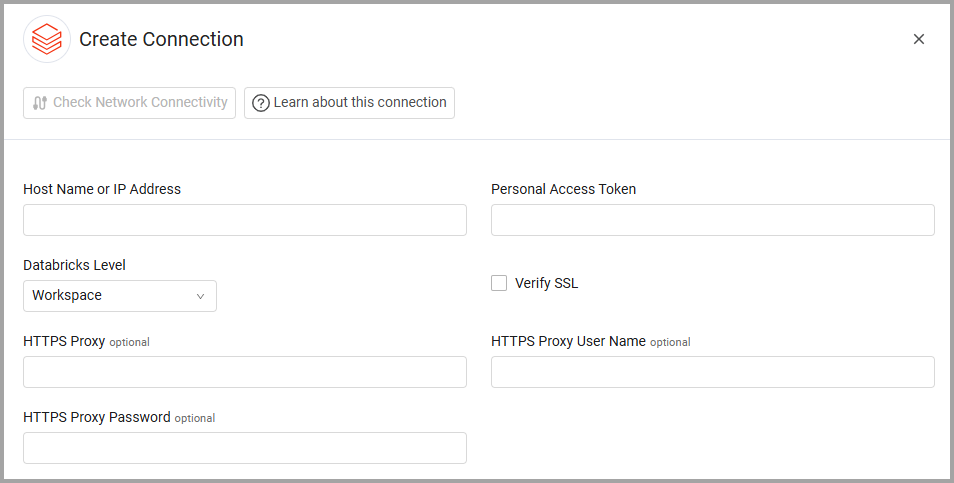
- To connect the adapter in Axonius, provide the following parameters:
Required Parameters
-
Host Name or IP Address - The hostname or IP address of the Databricks server. Example:
mycompany.cloud.databricks.comoraccounts.cloud.databricks.comfor account-level. -
Authentication Type - Select the authentication method:
Personal Access Token - Enter your Databricks personal access token.
- Client ID - Enter your OAuth service principal client ID.
- Client Secret - Enter your OAuth service principal client secret
-
Databricks Level - Select Account, Workspace or SQL.
When you select Account the system scans all workspaces to retrieve devices and users while also fetching account-level users and groups.
Enter the Databricks Account IDUse SQL to fetch devices or users using custom SQL queries.
- Asset Type (required) - Select the asset type associated with the SQL Server table. Axonius will consider the data fetched from the specified table as the data of the selected asset type.
- SQL Warehouse ID (required) - The Databricks SQL Warehouse to run queries against.
- Table or View Name (required) - The table or view to query. The adapter will run
SELECT *against this table/view. - Catalog (optional) - The Unity Catalog name.
- Schema (optional) - The schema/database name within the catalog.
- Custom SQL Statement (optional) - A custom SQL query that overrides the Table or View Name. If provided, this query will be executed as-is.
Important: The table, view, or custom query result must include an
idcolumn (called "id") to uniquely identify each asset. Without it, the asset is skipped.
Optional Parameters
- Verify SSL - Select whether to verify the SSL certificate of the server against the CA database inside of Axonius. For more details, see SSL Trust & CA Settings.
- HTTPS Proxy - Connect the adapter to a proxy instead of directly connecting it to the domain.
- HTTPS Proxy User Name - The user name to use when connecting to the value supplied in Host Name or IP Address via the value supplied in HTTPS Proxy.
- HTTPS Proxy Password - The password to use when connecting to the server using the HTTPS Proxy.
To learn more about common adapter connection parameters and buttons, see Adding a New Adapter Connection.
Advanced Settings
Note
- Advanced settings can apply to either all connections of this adapter, or to a specific connection. For more detailed information, see Advanced Configuration for Adapters.
- For more general information about advanced settings, see Adapter Advanced Settings.
- Fetch SaaS applications (Account Level Only) - Fetch published OAuth app integrations as SaaS Applications. The adapter must be configured to use Account-level authentication to use this setting and you must provide a valid Databricks Account ID in the connection settings.
- Fetch Application Settings - Select this option to fetch detailed information about each OAuth application integration.
- Enable Custom Parsing - Enable this option to define how to parse specific fields from the raw data fetched. You can choose to parse the data into an already existing field, or create a new one. See Adapter Custom Parsing for more information.
Version Matrix
This adapter was only tested with the versions marked as supported, but may work with other versions. Contact Axonius Support if you have a version that is not listed, which is not functioning as expected.
| Version | Supported | Notes |
|---|---|---|
| Clusters API 2.0 | Yes |
Updated 14 days ago