
Confluent
Confluent is a data streaming platform that enables you to easily access, store, and manage data as continuous, real-time streams.
Use Cases the Adapter Solves
- Kafka Cluster Inventory: Automatically discover and inventory all Confluent Kafka clusters, their broker configurations, and topic metadata, giving security teams a complete view of streaming infrastructure.
- ACL and Access Control Auditing: Fetch Kafka ACL permissions across all clusters to identify overly permissive access rules and verify alignment with the principle of least privilege per NIST-800-53.
- Settings Compliance Evaluation: Monitor Confluent ACL settings—permission type, operation scope, and pattern type—against security benchmarks such as CIS for SaaS v1, NIST CSF 2.0, and internal cybersecurity policies.
Types of Assets Fetched
This adapter fetches the following types of assets:
- Devices
- Users
- Application Settings
Data Retrieved through the Adapter
Devices (Clusters) – cluster ID, ACL permissions, broker configurations, topic names
Users – full name, email, created date, resource name
Application Settings – ACL permission (ALLOW/DENY), operation (READ, WRITE, etc.), pattern type (LITERAL/PREFIXED)
Authentication Methods
The adapter authenticates using HTTP Basic Authentication. The API Key ID is used as the username and the API Secret Key is used as the password. Credentials are base64-encoded and sent as an Authorization: Basic {token} header with each request.
APIs
Axonius uses the Confluent REST Proxy API. The following endpoints are called:
Devices (Clusters)
GET iam/v2/api-keys- Fetch API keys to identify cluster accessGET org/v2/environments- Fetch environmentsGET kafka/v3/clusters/{cluster_id}- Fetch cluster detailsPOST iam/v2/api-keys- Create temporary API key for cluster accessGET {cluster_url}/broker-configs- Fetch broker configurationsGET {cluster_url}/acls- Fetch ACLsGET {cluster_url}/topics- Fetch topicsDELETE iam/v2/api-keys/{key_id}- Delete temporary API key after fetch
Users
GET iam/v2/users- Fetch users
Application Settings (SSPM)
GET clusters- Fetch clusters (dependency endpoint)GET clusters/{cluster_id}/acls- Fetch ACL permission, operation, and pattern type settings
Required Ports
Axonius must be able to communicate with the value supplied in Host Name or IP Address via the following ports:
- TCP port 80/443
Required Permissions
The value supplied in API Key ID and API Secret Key must be associated with a user account that has the OrganizationAdmin role.
This role is required because the adapter performs the following operations during each fetch cycle:
- Lists all API keys and environments across the organization
- Creates a temporary cluster-scoped API key per Kafka cluster to access V3 endpoints
- Fetches broker configurations, ACLs, and topics using the temporary key
- Deletes the temporary API key after each cluster fetch
A role with narrower permissions (such as a cluster-level key) cannot list organization-wide resources or create and delete API keys, so OrganizationAdmin is the minimum required role.
Connecting the Adapter in Axonius
- Navigate to the Adapter Catalog, search for Confluent, and select the adapter.
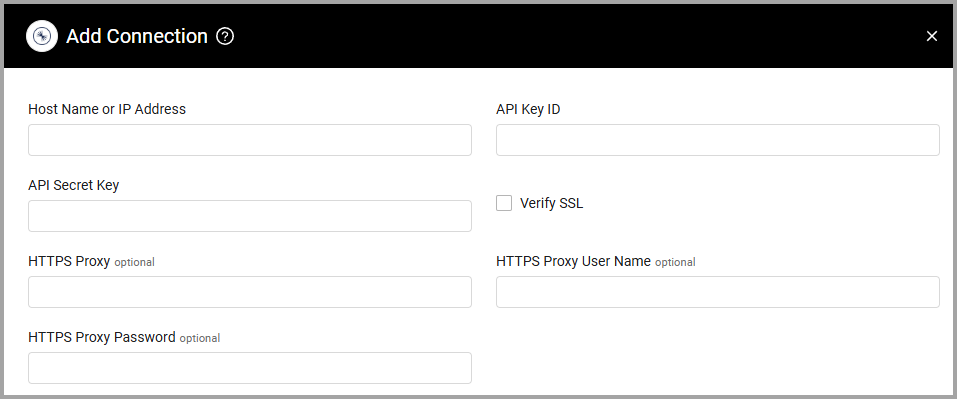
- Click Add Connection.
- Provide the following parameters.
Required Parameters
-
Host Name or IP Address (required, default: https://api.confluent.cloud/) - The hostname or IP address of the Confluent server that Axonius can communicate with.
-
API Key ID (required) - An API Key associated with a user account that has the OrganizationAdmin role to fetch assets.
-
API Secret Key (required) - An API Secret associated with a user account that has permissions to fetch assets.
Note
The API Secret Key is only exposed momentarily in the Create API key dialog. Make sure to store the secret and its corresponding key in a secure location.
For more details about obtaining an API Key and API Secret Key, see Create a Cloud API Key.
- Verify SSL - Select whether to verify the SSL certificate of the server against the CA database inside of Axonius. For more details, see SSL Trust & CA Settings.
Optional Parameters
-
HTTPS Proxy (optional) - Connect the adapter to a proxy instead of directly connecting it to the domain.
-
HTTPS Proxy User Name (optional) - The user name to use when connecting to the value supplied in Host Name or IP Address via the value supplied in HTTPS Proxy.
-
HTTPS Proxy Password (optional) - The password to use when connecting to the server using the HTTPS Proxy.
To learn more about common adapter connection parameters and buttons, see Adding a New Adapter Connection.
Advanced Settings
Note
Advanced settings can either apply for all connections for this adapter, or you can set different advanced settings and/or different scheduling for a specific connection, refer to Advanced Configuration for Adapters.
- External Cluster Data to Fetch (required, default: Configs) - From the dropdown, select one or more options to fetch external cluster data.
- Fetch Application Settings (default: false) - Select this option to fetch Application Settings assets, including ACL permissions, operations, and pattern types for each cluster.
Note
To learn more about Adapter Configuration tab advanced settings, see Adapter Advanced Settings.
Supported From Version
Supported from Axonius version 4.5
Updated 6 days ago