
ManageEngine Endpoint (Desktop) Central and Patch Manager Plus - Perform Action
ManageEngine Endpoint (Desktop) Central and Patch Manager Plus - Perform Action (Manage Computer in ManageEngine Endpoint (Desktop) Central SoM) action lets you Install/Uninstall desktop central agent and remove details of a computer managed by ManageEngine Endpoint (Desktop) Central on the devices that are the result of the saved query supplied as a trigger (or devices that were selected in the asset table).
Note
To use the action below, you must successfully configure a ManageEngine Endpoint (Desktop) Central adapter connection.
See Creating Enforcement Sets to learn more about adding Enforcement Actions to Enforcement Sets.
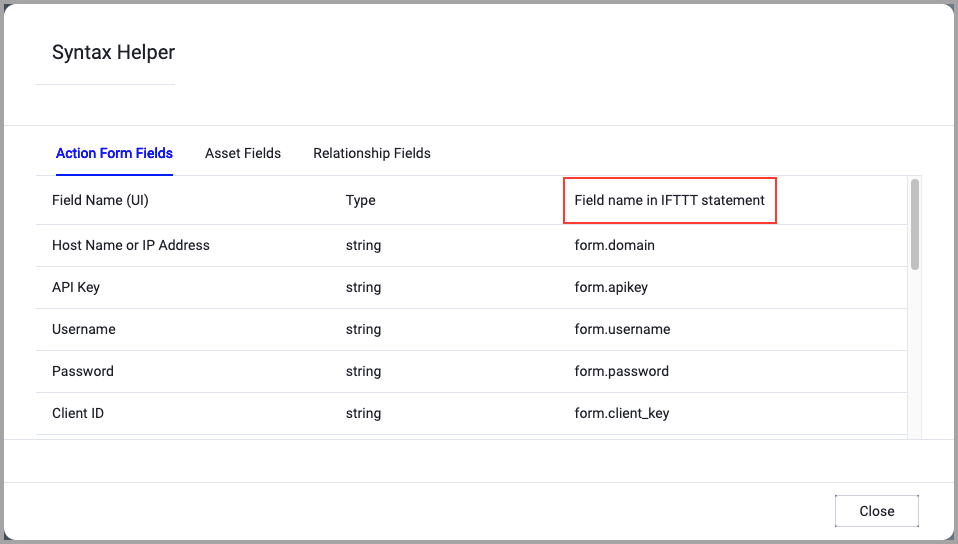
When accessing an enforcement action using the API, you must use the backend form of field names.
Use the Syntax Helper to find the correct name. In the enforcement action, enable Configure Dynamic Values and select Syntax Helper.
Note
- Not all asset types are supported for all Enforcement Actions.
- See Actions supported for Activity Logs, Adapters Fetch History, and Asset Investigation modules.
- See Actions supported for Aggregated Security Findings.
- See Actions supported for Software.
General Settings
- Action name - The name of this Enforcement Action. The system sets a default name. You can change the name.
- Configure Dynamic Values (optional) - Toggle on to enter a Dynamic Value statement. See Creating Enforcement Action Dynamic Value Statements to learn more about Dynamic Value statement syntax.
Action Settings
- Action type (required, default: Install Agent) - Select the action to be executed on the device:
- Install desktop central agent.
- Uninstall desktop central agent.
- Remove details of a computer managed by ManageEngine Desktop Central.
For more details about other enforcement actions available, see Action Library.
Updated 11 months ago