
FortiSASE
FortiSASE is a secure access service edge platform that provides network security, secure web gateway, zero trust access, and traffic inspection for distributed users and devices.
Use Cases the Adapter Solves
- Monitor VPN User Activity: Track active VPN sessions and user connectivity patterns to ensure secure remote access and identify unauthorized usage.
- Identify Remote User Locations: Gain visibility into the geographic regions where users are connecting from to support compliance requirements and security policies.
Asset Types Fetched
- Users, Devices, Software, SaaS Applications, Aggregated Security Findings
Data Retrieved through the Adapter
Devices - Fields such as hostname, serial number, device ID
Users - Fields such as Username, Session ID, Region, Remote Host.
Before You Begin
Required Ports
- TCP port 443 (HTTPS)
Authentication Methods
Username and Password Authentication
APIs
Axonius uses the FortiSASE API. The following endpoints are called:
POST https://customerapiauth.fortinet.com/api/v1/oauth/token/GET {domain}/monitor-api/v1/user/vpn/sessionsGET /monitor-api/v1/endpoints/detailsGET /monitor-api/v1/endpoints/software-on-endpoint/{device_id}
For complete API documentation, see the FortiSASE REST API reference on the Fortinet Developer Network.
Required Permissions
The following permissions are required:
- The API User must be assigned a profile where FortiSASE is explicitly set to
Read/WriteorRead Only - The API User must be authorized for the specific Account ID or OU where the SASE instance resides.
Supported From Version
Supported from Axonius version 8.0.23
Connecting the Adapter in Axonius
Navigate to the Adapters page, search for FortiSASE, and click on the adapter tile.
Click Add Connection.
To connect the adapter in Axonius, provide the following parameters:
Required Parameters
- Host Name or IP Address - Base domain for the API. Must include the
http://orhttps://prefix. Do not add any specific endpoints after the domain. Example:https://your-instance.fortisase.com/ - User Name - The username for authenticating to FortiSASE. Example:
[email protected] - Password - The password associated with the user account.
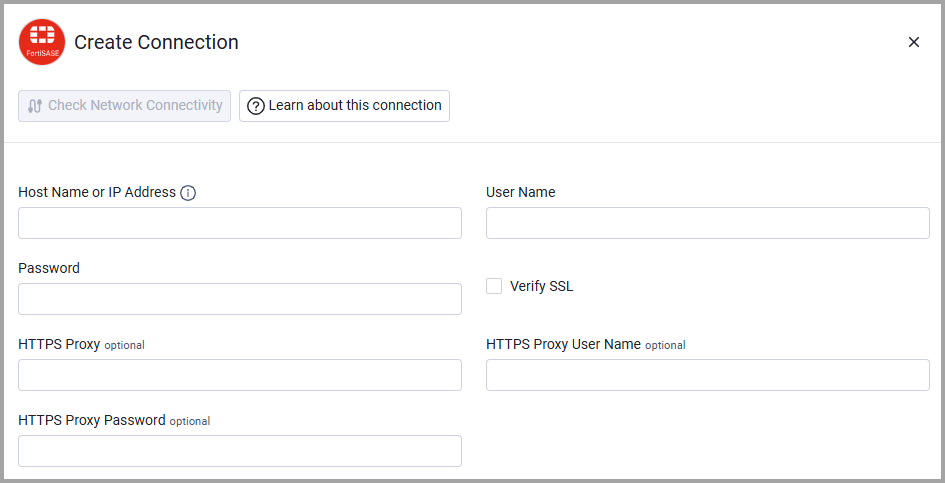
Optional Parameters
- Verify SSL - Select whether to verify the SSL certificate of the server against the CA database inside of Axonius. For more details, see SSL Trust & CA Settings.
- HTTPS Proxy - Connect the adapter to a proxy instead of directly connecting it to the domain.
- HTTPS Proxy User Name - The user name to use when connecting to the value supplied in Host Name or IP Address via the value supplied in HTTPS Proxy.
- HTTPS Proxy Password - The password to use when connecting to the server using the HTTPS Proxy.
To learn more about common adapter connection parameters and buttons, see Adding a New Adapter Connection.
Advanced Settings
Note
- Advanced settings can apply to either all connections of this adapter, or to a specific connection. For more detailed information, see Advanced Configuration for Adapters.
- For more general information about advanced settings, see Adapter Advanced Settings.
- Enrich Devices with Software - Enable this option (default behavior) to fetch Installed Software for each device by default. The adapter queries the FortiSASE API to retrieve the full software inventory for each discovered device.
- Enrich Devices with Vulnerable Endpoints - Enable this option to enrich devices with vulnerability findings (Aggregated Security Findings in Axonius). When enabled, the adapter fetches vulnerability data from FortiSASE and adds CVE findings to each affected device, including: CVSS scores, severity ratings, and detected file paths.
- Example: When this setting is enabled, devices will show CVE IDs such as CVE-2026-1111 with severity CRITICAL and CVSS 9.8.
Updated about 1 month ago