
ManageEngine Mobile Device Management
ManageEngine MDM is a mobile device management solution.
Asset Types Fetched
- Devices, Users
Before You Begin
APIs
Axonius uses the ManageEngine Mobile Device Manager Plus API.
Required Ports
You can set your own customer port. If you do not, then Axonius must be able to communicate with the value supplied in Host Name or IP Address via the following ports:
- TCP port 80
- TCP port 443
Required Permissions
The value supplied in API Key must be associated with credentials that have Read-only permissions to fetch assets.
The following permissions are required:
- MDMOnDemand.MDMInventory.READ
- MDMOnDemand.MDMUser.READ
Supported From Version
Supported from Axonius version 4.7
Connecting the Adapter in Axonius
Required Parameters
-
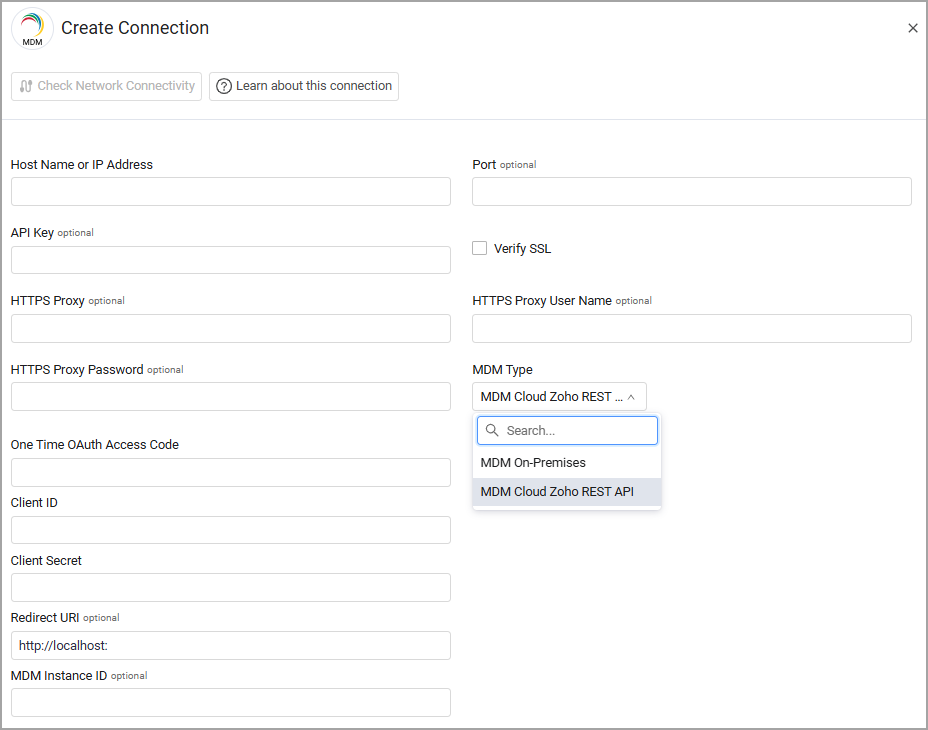
Host Name or IP Address - The hostname or IP address of the ManageEngine MDM server.
-
MDM Type - Select the MDM type you are using, either MDM On-Premises (the default) or MDM Cloud Zoho REST API.
When selecting MDM On-Premises, the following parameter is required:
- API Key - An API Key associated with a user account that has the Required Permissions to fetch assets.
To generate an API Key, see Authentication.
When selecting MDM Cloud Zoho REST API, the following parameters are required:
- One Time OAuth Access Code - The one-time authentication code to get the access token.
- Client ID and Client Secret - The Client ID and Client Secret for an account that has read access to the API. For more information, see OAuth.
- API Key - An API Key associated with a user account that has the Required Permissions to fetch assets.
Optional Parameters
- Port - Enter a port that Axonius can use to communicate with the server. If you don’t enter a port, Axonius will use the Required Ports.
- When selecting MDM Cloud Zoho REST API as the MDM Type, the following parameters are optional:
- Redirect URI - The same redirect URL used when registering the Client ID and Client Secret.
- MDM Instance ID - Provide your
mdm_instanceCookie.
- Verify SSL - Select whether to verify the SSL certificate of the server against the CA database inside of Axonius. For more details, see SSL Trust & CA Settings.
- HTTPS Proxy - Connect the adapter to a proxy instead of directly connecting it to the domain.
- HTTPS Proxy User Name - The user name to use when connecting to the value supplied in Host Name or IP Address via the value supplied in HTTPS Proxy.
- HTTPS Proxy Password - The password to use when connecting to the server using the HTTPS Proxy.
To learn more about common adapter connection parameters and buttons, see Adding a New Adapter Connection.
Version Matrix
This adapter was only tested with the versions marked as supported, but may work with other versions. Contact Axonius Support if you have a version that is not listed, which is not functioning as expected.
| Version | Supported | Notes |
|---|---|---|
| 1.0.0 | Yes | -- |
Updated 8 months ago