
AppViewX CERT+
AppViewX's CERT+ provides end–to–end lifecycle management for x.509 digital certificates across complex networks.
Use Cases the Adapter Solves
- Monitor Certificate Expiry: Track expiration dates across all certificate types (server, client, code signing, device, root CA, intermediate CA) to prevent outages and security gaps caused by expired certificates.
- Ensure Certificate Compliance: Verify that digital certificates meet organizational security policies, including signature algorithm, key algorithm, certificate authority, and compliance status.
- Manage Application Security Posture: Monitor platform-level security settings such as SAML SSO configuration, MFA enablement, IP restriction policies, login lockout settings, and SMTP configuration to maintain consistent security posture across the AppViewX platform.
Types of Assets Fetched
This adapter fetches the following types of assets:
- Certificates
- Application Settings
Data Retrieved through the Adapter
Certificates - fields such as: Common Name, Serial Number, Expiration Date, Certificate Status, Signature Algorithm
Application Settings - fields such as: SSO Enabled, Entity ID, IP Restriction Type, Key Rotation Recurrence
Before You Begin
Authentication Methods
AppViewX CERT+ supports two authentication methods:
- Service Account Login (Recommended) - Authenticates using a Client ID and Client Secret. Axonius calls
POST /avxapi/acctmgmt-get-service-tokento retrieve a session token, which is then used for all subsequent API calls. Available in AppViewX CERT+ version 2023.1.0_FP3 and above. - User Account Login - Authenticates by passing the user name and password directly in request headers. Use this method for versions earlier than 2023.1.0_FP3.
APIs
Axonius uses the AppViewX CERT+ API.
The following endpoints are called:
POST /avxapi/acctmgmt-get-service-token- Retrieves a session token for Service Account Login authenticationPOST /avxapi/certificate/search- Searches certificates by category (Server, Client, Code Signing, Device, Root CA, Intermediate CA)GET /avxapi/certificate/discovery/instance- Retrieves cipher, TLS version, and port scan discovery data for certificate enrichmentGET /avxapi/platform-appsettings-action?category=AUTHENTICATION&subCategory=SAML&action=get- Retrieves SSO (SAML) settingsGET /avxapi/platform-appsettings-action?category=AUTHENTICATION&subCategory=IP_RESTRICT&action=get- Retrieves IP restriction settingsGET /avxapi/platform-get-all-credentials- Retrieves PAM credentialsGET /avxapi/hsm-get-rotation-recurrence- Retrieves key rotation settingsGET /avxapi/platform-web-appsetting-logforwarding-logforwarding-get- Retrieves log forwarding settingsGET /avxapi/platform-web-get-alert-purging-info- Retrieves data retention settingsGET /avxapi/platform-web-appsetting-login_configuration-login_configuration-get- Retrieves login configuration settingsGET /avxapi/platform-smtp-tls-details- Retrieves SMTP settingsGET /avxapi/platform-web-appsetting-ssh-connection-get- Retrieves SFTP (SSH) connection settingsGET /avxapi/platform-appsetting-authentication-settings-get- Retrieves authentication settingsGET /avxapi/acctmgmt-fetch-service-accounts-byfilter- Retrieves service accounts
Required Ports
Axonius must be able to communicate with the value supplied in Host Name or IP Address via the API port, as configured in the AppViewX CERT+ application. The API port is usually 31443.
Required Permissions
The account provided must have API access with read permissions for certificate data and platform settings.
Supported From Version
Supported from Axonius version 6.1.29.0
Connecting the Adapter in Axonius
- Navigate to the Adapter Catalog, search for AppViewX's CERT+, and select the adapter.
- Click Add Connection.
- Provide the following parameters.
Parameters
Required Parameters
-
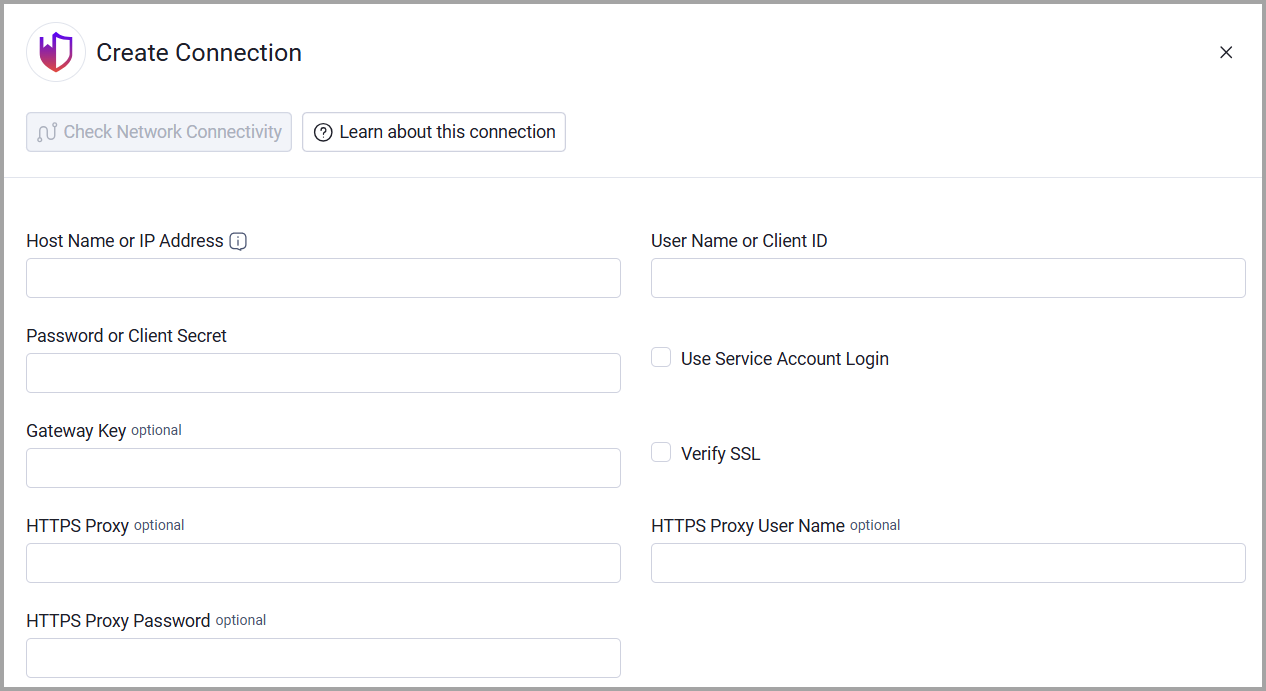
Host Name or IP Address - The hostname or IP address of the AppViewX CERT+ server that Axonius can communicate with via the Required Ports. Note: Use [http:// | https:// ]host_or_ip:port notation. The API port is usually 31443.
Example:
https://appviewx.local:31443 -
User Name or Client ID - If Use Service Account Login is selected, then this is used as the Client ID for authentication via the Service Account Login flow. Otherwise this is used as the user name for the User Account Login flow.
-
Password or Client Secret - If Use Service Account Login is selected, then this is used as the Client Secret for authentication via the Service Account Login flow. Otherwise this is used as the password for the User Account Login flow.
Notes
For information about Service Account Login, see Authentication using a Service Account.
For information about User Account Login, see Authentication using a User Account.
- Use Service Account Login - Select this option to use the Service Account Login flow when authenticating against the API.
Notes
The vendor recommends using this login flow for enhanced security.
This is only available in AppViewX CERT+ version 2023.1.0_FP3 and above. Earlier versions must use the default, which is User Account Login flow, using the user name and password supplied.
Optional Parameters
-
Gateway Key - Add your tenant's GWKey for multi-tenant environments (deprecated in version 2023.1.0_FP3).
-
Verify SSL - Select whether to verify the SSL certificate of the server against the CA database inside of Axonius. For more details, see SSL Trust & CA Settings.
-
HTTPS Proxy - Connect the adapter to a proxy instead of directly connecting it to the domain.
-
HTTPS Proxy User Name - The user name to use when connecting to the value supplied in Host Name or IP Address via the value supplied in HTTPS Proxy.
-
HTTPS Proxy Password - The password to use when connecting to the server using the HTTPS Proxy.
To learn more about common adapter connection parameters and buttons, see Adding a New Adapter Connection.
Advanced Settings
Note
Advanced settings can either apply for all connections for this adapter, or you can set different advanced settings and/or different scheduling for a specific connection, refer to Advanced Configuration for Adapters.
- Enrich certificates with discovery data (Default: False) - Select this option to enrich certificates with cipher, TLS version, and port scan data from AppViewX discovery jobs. You must also provide the Discovery Name for this enrichment to work.
- Discovery Name - Enter the AppViewX discovery job name used to fetch TLS version, cipher, and port scan results for certificates in this category. This is required for the enrichment endpoint to return data. Example: production-tls-scan
- Fetch Certificate of sub type server from Server Certificates - By default Axonius fetches the certificate of the subtype server from Server Certificates. Toggle off to not fetch the certificate of the subtype server from Server Certificates.
- Fetch Certificate of sub type client from Client Certificates - Toggle on to fetch the certificate of the subtype client from Client Certificates.
- Fetch Certificate of sub type code_sign from Code Signing Certificates - Toggle on to fetch the certificate of the subtype code_sign from Code Signing Certificates.
- Fetch Certificate of sub type device from Device Certificates - Toggle on to fetch the certificate of the subtype device from Device Certificates.
- Fetch Certificate of sub type root_ca from Root CA Certificates - Toggle on to fetch the certificate of the subtype root_ca from Root CA Certificates.
- Fetch Certificate of sub type intermediate_ca from Intermediate CA Certificates - Toggle on to fetch the certificate of the subtype intermediate_ca from Intermediate CA Certificates.
Note
To learn more about Adapter Configuration tab advanced settings, see Adapter Advanced Settings.
Updated 4 days ago