
FireMon Security Manager
FireMon Security Manager is a network security solution that provides real-time visibility, control, and management for network security devices across hybrid cloud environments.
Asset Types Fetched
- Devices, Network/Firewall Rules
Before You Begin
Ports
- TCP port 80/443
Authentication Method
- User Name/Password
Permissions
The value supplied in User Name must have the following permissions:
- Device Group (Read) - Read access to devices.
- Administration:Assessments and Controls (Write) - is used to grant permissions related to creating and assigning assessments and controls. It is also used for the ability to whitelist a rule.
This permission is required to enable the Enrich using "Axonius_Enrich_IOS_Version" control setting.
Connecting the Adapter in Axonius
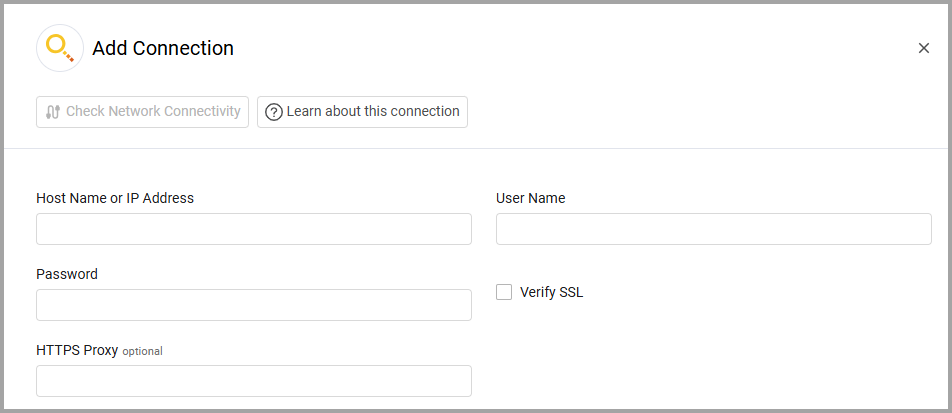
To connect the adapter in Axonius, provide the following parameters:
Required Parameters
- Host Name or IP Address - The hostname or IP address of the FireMon Security Manager server.
- User Name and Password - The credentials for a user account that has the Required Permissions to fetch assets.
Optional Parameters
-
Verify SSL - Select whether to verify the SSL certificate of the server against the CA database inside of Axonius. For more details, see SSL Trust & CA Settings.
-
HTTPS Proxy - Connect the adapter to a proxy instead of directly connecting it to the domain.
To learn more about common adapter connection parameters and buttons, see Adding a New Adapter Connection.
Advanced Settings
Note
Advanced settings can either apply to all connections for this adapter, or to a specific connection. Refer to Advanced Configuration for Adapters.
- Enrich using "Axonius_Enrich_IOS_Version" control (required, default: true) - FireMon's mechanism for retrieving information from devices involves executing “controls” over their configuration files. Select whether to enrich devices' information by executing the "Axonius_Enrich_IOS_Version" control.
- Fetch Firewall Rules - Select this option to fetch firewall rules.
- Try to parse SyslogMatch Names - Select this option to try to parse SyslogMatch Names as IP addresses or serial numbers.
Note
To learn more about Adapter Configuration tab advanced settings, see Adapter Advanced Settings.
Updated 11 months ago