
ControlUp
ControlUp is a digital workspace management platform that provides real-time monitoring and troubleshooting for virtual desktop infrastructure (VDI) environments.
Asset Types Fetched
Devices, Aggregated Security Findings, Users, Software, SaaS Applications
Parameters
-
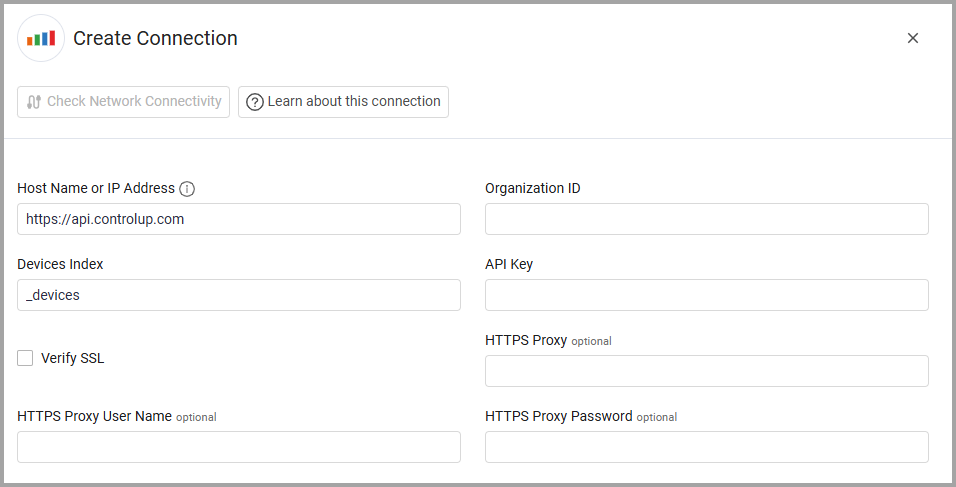
Host Name or IP Address (required, default:
https://api.controlup.com) - The hostname or IP address of the ControlUp server that Axonius can communicate with via the Required Ports. -
Organization ID (required) - Specify your ControlUp organization ID.
-
Devices Index _(required, default: devices) - Enter an index of devices to fetch.
-
API Key (required) - An API Key associated with a user account that has the Required Permissions to fetch assets.
-
Verify SSL - Select whether to verify the SSL certificate of the server against the CA database inside of Axonius. For more details, see SSL Trust & CA Settings.
-
HTTPS Proxy (optional) - Connect the adapter to a proxy instead of directly connecting it to the domain.
-
HTTPS Proxy User Name (optional) - The user name to use when connecting to the value supplied in Host Name or IP Address via the value supplied in HTTPS Proxy.
-
HTTPS Proxy Password (optional) - The password to use when connecting to the server using the HTTPS Proxy.
To learn more about common adapter connection parameters and buttons, see Adding a New Adapter Connection.
Advanced Settings
Note
Advanced settings can either apply to all connections for this adapter, or to a specific connection. Refer to Advanced Configuration for Adapters.
- Enrich Devices Endpoint with Software Endpoint - Toggle on to enrich the devices endpoint with the software endpoint. If this setting is enabled, the settings below may be configured.
- Software Index (optional) - Enter an index of software to fetch.
- Enrich Devices Endpoint with Vulnerabilities Endpoint - Toggle on to enrich the devices endpoint with the vulnerabilities endpoint. If this setting is enabled, the settings below may be configured.
- Vulnerabilities Index (optional) - Enter an index of vulnerabilities to fetch.
- Enrich Devices Endpoint with App Usage Single Endpoint - Toggle on to enrich devices with per-user application usage data. If this setting is enabled, the settings below may be configured.
- Query time from - Enter the number of days ago from which to start querying application usage data. Default: 30.
- Query time to - Enter the number of days ago up until which to query application usage data. Default: 0 (today).
- App Usage All - applies context on the following endpoints: App Usage Single - This fetches all application usage data from ControlUp and supplies it to the App. Usage Single endpoint. The following settings control the query time range.
- Query time from - Enter the number of days ago from which to start querying application usage data. Default: 30.
- Query time to - Enter the number of days ago up until which to query application usage data. Default: 0 (today).
- Fetch Devices of sub type compliance devices from Compliance Devices - Select this option to fetch devices of sub type compliance devices.
- Enrich Compliance Devices with Compliance Vulnerabilities Endpoint - Enable this option to use ControlUp's Compliance API for vulnerability data instead of the Edge API. The Compliance API provides significantly richer vulnerability data including CVSS v2.0/v3.0 scores, EPSS probability scores, remediation status, and detailed timestamps.
Note
To learn more about Adapter Configuration tab advanced settings, see Adapter Advanced Settings.
APIs
Axonius uses the ControlUp APIs.
Endpoints Used:
- Edge API (Default) -
GET /edge/api/data/$vulnerabilities_index- Provides basic vulnerability data. - Compliance API (Optional) -
GET /compliance/devicesandGET /compliance/devices/{device_id}/vulnerabilities- Provides richer vulnerability data
Required Ports
Axonius must be able to communicate with the value supplied in Host Name or IP Address via the following ports:
- TCP port 443
Version Matrix
This adapter was only tested with the versions marked as supported, but may work with other versions. Contact Axonius Support if you have a version that is not listed, which is not functioning as expected.
| Version | Supported | Notes |
|---|---|---|
| API v1 | Yes | -- |
Supported From Version
Supported from Axonius version 6.1.55.0
Updated 5 months ago