
Cloudflare Zero Trust
Deliver Zero Trust Network Access on Cloudflare's Edge.
Use Cases the Adapter Solves
- Zero Trust Security Posture Management: Monitor and track all devices accessing your network through Cloudflare Zero Trust, ensuring only authorized and compliant devices maintain access to corporate resources.
- User Access Governance: Identify users with active Zero Trust access, track their authentication patterns, and enforce access policies based on real-time security posture and policy compliance.
Types of Assets Fetched
This adapter fetches the following types of assets:
- Devices
- Users
- Network Services
Data Retrieved through the Adapter
Devices - Fields such as Name, Device Model, Device Manufacturer, Device Serial, CloudZeroTrust Device Type,
Users - Fields such as Display Name, Email, Username, Last Logon Timestamp, CloudZeroTrust Organization ID
Before You Begin
Required Ports
- TCP port 443 (HTTPS)
Authentication Methods
API Token Authentication
APIs
Axonius uses the Cloudflare API v4. The following endpoints are called:
Account & User Data:
GET /client/v4/accountsGET /client/v4/accounts/{account_id}/access/usersGET /client/v4/accounts/{account_id}/members
Device Data:
GET /client/v4/accounts/{account_id}/devicesGET /client/v4/accounts/{account_id}/devices/postureGET /client/v4/accounts/{account_id}/devices/revoke
Tunnels
GET /client/v4/accounts/{account_id}/tunnelsGET /client/v4/accounts/{account_id}/cfd_tunnel/{tunnel_id}/connections
Enrichment Data:
GET /client/v4/accounts/{account_id}/gateway/locationsGET /client/v4/accounts/{account_id}/access/policies
Enforcement Actions:
POST /client/v4/accounts/{account_id}/access/organizations/revoke_user- Revoke user sessionDELETE /client/v4/accounts/{account_id}/members/{member_id}- Remove member
Required Permissions
The following permissions are required:
Minimum Required Permissions:
Account: Zero Trust: Read- Access to Zero Trust user and device dataAccount: Access: Audit Logs: Read- Access to audit logs and session informationAccount: Account Settings: Read- Access to account configuration and settingsAccount: Cloudflare Tunnel: Read- Access to tunnel and tunnel connection data
Additional Permissions for Enforcement Actions:
Account: Zero Trust: Edit- Required for "Revoke User Session" enforcement actionAccount: Account Settings: Edit- Required for "Remove Member" enforcement action
Important
To create an API token with the required permissions, see Create an account owned token in the official Cloudflare documentation.
Supported From Version
Supported from Axonius version 4.5
Connecting the Adapter in Axonius
Navigate to the Adapters page, search for Cloudflare Zero Trust, and click on the adapter tile.
Click Add Connection.
To connect the adapter in Axonius, provide the following parameters:
Required Parameters
- Host Name or IP Address (Default:
https://api.cloudflare.com) - The hostname or IP address of the Cloudflare Zero Trust server. - API Token (required) - An API Token associated with a user account that has the Required Permissions to fetch assets. To create an API token, see Create an account owned token.
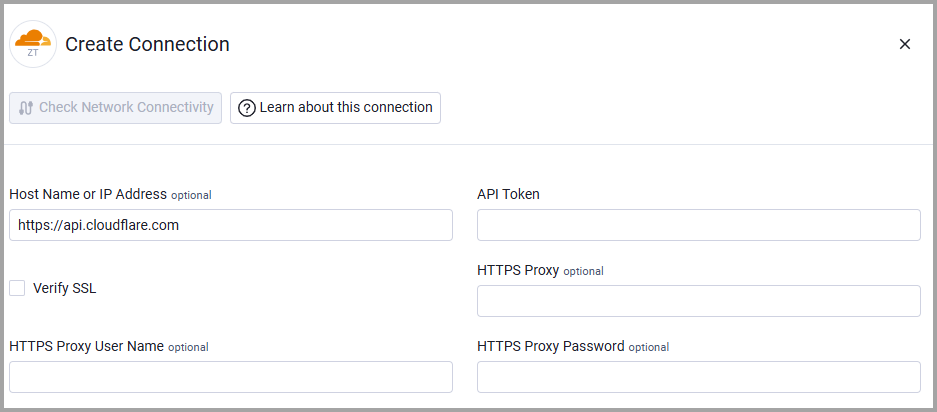
Optional Parameters
- Verify SSL - Select whether to verify the SSL certificate of the server against the CA database inside of Axonius. For more details, see SSL Trust & CA Settings.
- HTTPS Proxy (optional) - Connect the adapter to a proxy instead of directly connecting it to the domain.
- HTTPS Proxy User Name (optional) - The user name to use when connecting to the value supplied in Host Name or IP Address via the value supplied in HTTPS Proxy.
- HTTPS Proxy Password (optional) - The password to use when connecting to the server using the HTTPS Proxy.
To learn more about common adapter connection parameters and buttons, see Adding a New Adapter Connection.
Advanced Settings
Note
- Advanced settings can apply to either all connections of this adapter, or to a specific connection. For more detailed information, see Advanced Configuration for Adapters.
- For more general information about advanced settings, see Adapter Advanced Settings.
- Endpoints Config - Click the arrow.
- Enrich Devices with Gateway Location - Toggle on this option to add subdomain data for each device.
- Fetch Devices of sub type deleted_device from Deleted Devices - Toggle on to include data on deleted devices.
- Fetch Devices of sub type revoked_device from Deleted Devices - Toggle on to include data on revoked devices.
- Enrich Users with Policies - Toggle on this option to add policy data for each user.
- Enrich Tunnels with Tunnel Connections - Select this option to fetch tunnel connection details for each tunnel. When enabled, the adapter will retrieve detailed connection information including client version, origin IP, and connection timestamps for each tunnel.
Related Enforcement Actions
Updated 3 months ago