
Zoho Desk - Create Ticket
The Zoho Desk - Create Ticket action creates a ticket in Zoho Desk for:
- Assets returned by the selected query or assets selected on the relevant asset page.
See Creating Enforcement Sets to learn more about adding Enforcement Actions to Enforcement Sets.
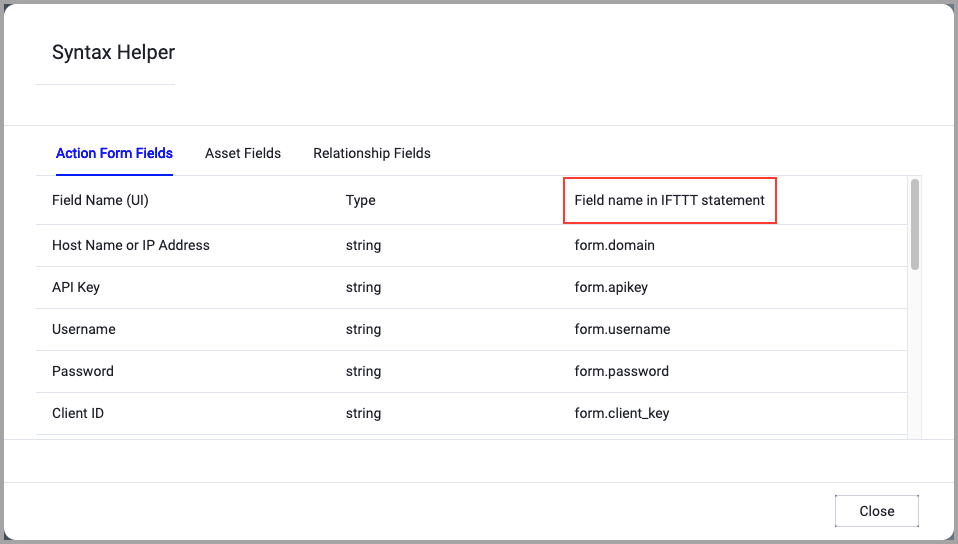
When accessing an enforcement action using the API, you must use the backend form of field names.
Use the Syntax Helper to find the correct name. In the enforcement action, enable Configure Dynamic Values and select Syntax Helper.
Note
- Not all asset types are supported for all Enforcement Actions.
- See Actions supported for Activity Logs, Adapters Fetch History, and Asset Investigation modules.
- See Actions supported for Aggregated Security Findings.
- See Actions supported for Software.
Required Fields
These fields must be configured to run the Enforcement Set.
- Action name - The name of this Enforcement Action. The system sets a default name. You can change the name.
- Configure Dynamic Values (optional) - Toggle on to enter a Dynamic Value statement. See Creating Enforcement Action Dynamic Value Statements to learn more about Dynamic Value statement syntax.
-
Split Tickets By - When enabled, group assets into different tickets based on a shared attribute. Click the adapter icon to select an adapter (or Aggregated), and then click the Select Adapter Field box to select the asset field used to generate a separate ticket for each unique value.
Note- The Split Tickets By option appears only in ticket creation actions, and does not appear in ticket-per-asset creation or ticket update actions.
- For assets containing multiple values, the system uses only the first value to perform the split.
- Domain - The domain address of the Zoho Desk server.
- Client id - The unique client identifier.
- Client secret - The unique client secret.
- Refresh token - The refresh token used to obtain new access tokens.
- Redirect uri - The redirect URI. It can be found in Zoho at Setup->Channels->Help Center->User Authentication.
- Organization id - The organization ID. It can be found in Zoho at Setup->Developer Space->API->OrgId.
- Department id - The Departement ID to which to attach the ticket. It can be found in Zoho at Setup->General->Departments. Click on the specific department and copy the number at the end of the URL.
Additional Fields
These fields are optional.
- Ticket subject (default: Axonius created ticket) - Enter a short description of the ticket issue.
- Ticket body (default: Axonius created ticket) - Enter a full description of the issue.
- Status (default: Open) - Select a status.
- Priority (default: None) - Select a priority.
- Category - Select a ticket category.
- Assignee id - Enter the ID of the user assigned to this ticket.
APIs
Axonius uses the Zoho Desk API.
For more details about other enforcement actions available, see Action Library.
Updated 8 months ago