
HPE Nimble SAN
HPE Nimble storage area networking (SAN) provides storage solutions for performance, scalability, and manageability.
Use Cases the Adapter Solves
- Storage Asset Visibility: Gain unified visibility into HPE Nimble SAN volumes across your environment, including status, capacity, and configuration details, within the Axonius asset inventory.
- Storage Compliance and Governance: Identify volumes that are offline, read-only, or approaching capacity limits to ensure your SAN infrastructure meets organizational policies and compliance requirements.
- Incident Response: Quickly locate HPE Nimble SAN volumes by serial number, pool, or connection count during incidents to accelerate root cause analysis and troubleshooting.
Asset Types Fetched
- Devices
Data Retrieved through the Adapter
Devices - fields such as: Name, Full Name, Size, Description, Reserve, Limit
Before You Begin
Required Ports
- TCP port 5392 (HTTPS)
Authentication Methods
HPE Nimble SAN uses username and password authentication.
APIs
Axonius uses the Nimble REST API. The following endpoints are called:
POST /v1/tokens- Authenticate and retrieve a session tokenGET /v1/volumes/detail- Retrieve volume (device) information
Required Permissions
The credentials provided must have permission to authenticate via the Nimble REST API and read volume data. Consult your HPE Nimble SAN administrator for the appropriate role assignment.
Supported From Version
Supported from Axonius version 4.8
Setting Up HPE Nimble SAN to Work with Axonius
For SSL verification, HPE highly recommends using the CA certificate, as described in cURL as the REST API Client. Use any web browser to export the array CA certificate and then add it to the Axonius system.
Please consult your HPE Nimble SAN administrator for instructions on generating API credentials.
Connecting the Adapter in Axonius
- Navigate to the Adapter Catalog, search for HPE Nimble SAN, and select the adapter.
- Click Add Connection.
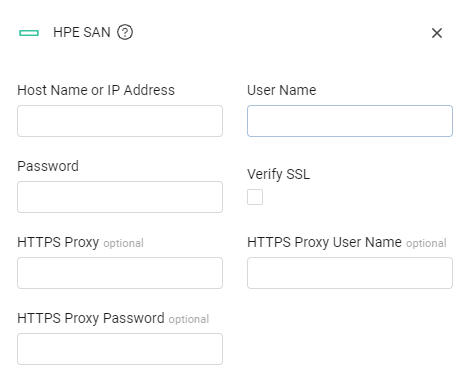
- Provide the following parameters.
Required Parameters
- Host Name or IP Address - The hostname or IP address of the HPE Nimble SAN server.
- User Name and Password - The credentials for a user account that has the permissions to fetch assets.
- Verify SSL (default: enabled) - Select whether to verify the SSL certificate of the server against the CA database inside of Axonius. For more details, see SSL Trust & CA Settings.
Optional Parameters
- HTTPS Proxy - Connect the adapter to a proxy instead of directly connecting it to the domain.
- HTTPS Proxy User Name - The user name to use when connecting to the value supplied in Host Name or IP Address via the value supplied in HTTPS Proxy.
- HTTPS Proxy Password - The password to use when connecting to the server using the HTTPS Proxy.
To learn more about common adapter connection parameters and buttons, see Adding a New Adapter Connection.
Updated 5 days ago