
Portnox CLEAR - Enrich Asset Data
Portnox CLEAR- Enrich Asset Data enriches each of the devices that are the result of the query run (based on MAC address) with additional data from Portnox, such as:
- Access point IP address - If a wireless device is connected to a wireless access point.
- Failed Portnox compliances rules - If the device failed the Portnox authentication process.
- Last seen - the date and time of the last Portnox probe/trap/ping for this device.
- Status - The device status. The possible values are:
- Rogue – Device failed to be authenticated by Portnox.
- UnderAuthentication – Device currently undergoing Portnox authentication.
- Authenticated – Device successfully passed authentication.
- NonComplied – One or more compliance rules were not satisfied.
- List of users logged in to this device.
- IP address, MAC address and MAC vendor.
- Operating system.
- SSID - For a wireless device connected to a wireless access point, this field is the name of the SSID assigned to the device by the wireless controller.
- Switch IP address, moduel and port - For wired devices.
- Virtual host and switch - For virtual machines.
See Creating Enforcement Sets to learn more about adding Enforcement Actions to Enforcement Sets.
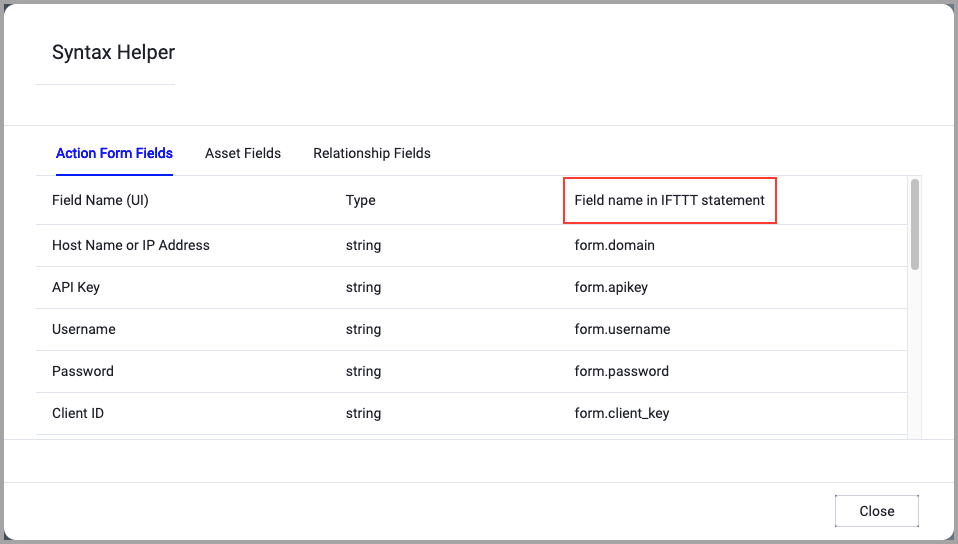
When accessing an enforcement action using the API, you must use the backend form of field names.
Use the Syntax Helper to find the correct name. In the enforcement action, enable Configure Dynamic Values and select Syntax Helper.
Note
- Not all asset types are supported for all Enforcement Actions.
- See Actions supported for Activity Logs, Adapters Fetch History, and Asset Investigation modules.
- See Actions supported for Aggregated Security Findings.
- See Actions supported for Software.
General Settings
- Action name - The name of this Enforcement Action. The system sets a default name. You can change the name.
- Configure Dynamic Values (optional) - Toggle on to enter a Dynamic Value statement. See Creating Enforcement Action Dynamic Value Statements to learn more about Dynamic Value statement syntax.
Requried Fields
These fields must be configured to run the Enforcement Set.
- Portnox domain - Specify the Portnox domain.
- User name - Enter the Portnox user name.
NOTE
The user must be a member of the ARMRead user groups.
- Password - Enter the Portnox password.
-
Compute Node - The Axonius node to use when connecting to the specified host. For more details, see Working with Axonius Compute Nodes.
Additional Fields
These fields are optional.
-
Verify SSL (Optional) (default: enabled) - Selects whether to verify the SSL certificate of the server against the CA database inside of Axonius. For more details, see SSL Trust & CA Settings. This setting is enabled by default on all new adapter settings. If you need to disable SSL verification, make sure you disable this setting.)
-
HTTPS Proxy (optional) - Connect the adapter to a proxy instead of directly connecting it to the domain.
For more details about other enforcement actions available, see Action Library.
Updated 11 months ago