
F5 BIG-IP iControl
F5 BIG-IP iControl is a Web services-enabled open API providing granular control over the configuration and management of F5's application delivery platform, BIG-IP.
F5 BIG-IP iControl provides information on virtual servers and their assigned pools, including availability state, enabled state, and status reason for each virtual server.
A pool is a logical set of devices, such as web servers, that you group together to receive and process traffic. Instead of sending client traffic to the destination IP address specified in the client request, F5 BIG-IP sends the request to any of the nodes that are members of that pool.
A pool consists of pool members. A pool member is a logical object that represents a physical node on the network. Once you have assigned a pool to a virtual server, F5 BIG-IP directs traffic coming into the virtual server to a member of that pool. An individual pool member can belong to one or multiple pools, depending on how you want to manage your network traffic.
For more details on pools, see Ask F5 - About Pools.
Use Cases the Adapter Solves
- Application Delivery Inventory: Discover and track all LTM virtual servers, pools, and pool members managed by F5 BIG-IP, providing a complete picture of application delivery infrastructure alongside other IT assets in Axonius.
- Network Security Visibility: Correlate F5 WAF policies, NAT rules, and firewall security rules with device and application data in Axonius to identify gaps in network protection and enforce security baselines.
- SSL Certificate Lifecycle Management: Inventory all SSL certificates and client profiles managed by F5 BIG-IP to proactively identify expiring certificates before they cause outages.
Asset Types Fetched
- Devices, Domains & URLs, Compute Services, Load Balancers, Certificates, Network/Firewall Rules, Application Resources, Network Devices
Data Retrieved through the Adapter
Devices - Fields such as: Name, IP Address, Pool Name, Availability State
Load Balancers - Fields such as: Name, Destination Address, Pool Members IPs
Compute Services - Fields such as: Name, Pool Name, Pool Members IPs, Load Balancing Mode
Network/Firewall Rules - Fields such as: Name, Full Path, Action, IP Protocol
Domains & URLs - Fields such as: Name, DNS Type, Pool Load Balancing Mode
Certificates - Fields such as: Name, Full Path, Expiration, Fingerprint
Application Resources - Fields such as: Name, Ciphers, Cache Timeout, Authentication Depth
Before You Begin
Required Ports
- TCP port 443 (HTTPS)
Authentication Methods
The F5 BIG-IP iControl adapter uses token-based authentication. The adapter uses the username, password, and login provider.
APIs
Axonius uses the Authentication with the F5 REST API.
- Read more about the virtual server at APIRef_tm_ltm_virtual.
- Read more about the load balancing pool configuration at APIRef_tm_ltm_pool.
The following endpoints are called:
POST /mgmt/shared/authn/login— Authenticate and obtain a session tokenGET /mgmt/tm/ltm/virtual— Fetch LTM virtual serversGET /mgmt/tm/ltm/virtual/stats— Fetch virtual server status (availability state, enabled state, status reason)GET /mgmt/tm/ltm/pool— Fetch LTM pools and pool membersGET /mgmt/tm/ltm/virtual-address— Fetch virtual addressesGET /mgmt/tm/cm/device— Fetch BIG-IP device configuration (optional)GET /mgmt/tm/asm/policies— Fetch ASM/WAF policies (optional)GET /mgmt/tm/ltm/nat— Fetch NAT rules (optional)GET /mgmt/tm/security/firewall/rule-list— Fetch firewall security rules (optional)GET /mgmt/tm/gtm/wideip— Fetch GTM Wide IPs (optional)GET /mgmt/tm/gtm/server— Fetch GTM servers (optional)GET /mgmt/tm/asm/signatures— Fetch global ASM signatures for WAF Threat Profiles (optional)GET /mgmt/tm/sys/file/ssl-cert— Fetch SSL certificates (optional)GET /mgmt/tm/ltm/profile/client-ssl— Fetch SSL client profiles (optional)DELETE /mgmt/shared/authz/tokens/{token_id}— Revoke the session token on disconnect
Required Permissions
The value supplied in User Name must match the reader role called Auditor.
Connecting the Adapter in Axonius
- Navigate to the Adapter Catalog, search for F5 BIG-IP iControl, and select the adapter.
- Click Add Connection.
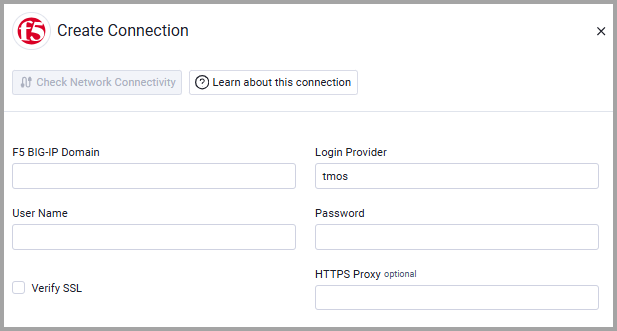
- Provide the following parameters.
Required Parameters
- F5 BIG-IP Domain - Your F5 BIG-IP domain.
- User Name and Password - Provide the user name and password for a read-only user.
- Login Provider - Use "tmos".
Optional Parameters
- Verify SSL - Select whether to verify the SSL certificate of the server against the CA database inside of Axonius. For more details, see SSL Trust & CA Settings.
- HTTPS Proxy (optional) - Connect the adapter to a proxy instead of directly connecting it to the domain.
To learn more about common adapter connection parameters and buttons, see Adding a New Adapter Connection.
Advanced Settings
Note:
Advanced settings can either apply to all connections for this adapter, or to a specific connection. Refer to Advanced Configuration for Adapters.
- Fetch devices configuration - Select whether to fetch Device configuration information as devices.
- Fetch virtual servers policies - Select to fetch policy information for each virtual server. When this is enabled, F5 Firewall Security Rules are fetched and parsed as Network/Firewall Rules.
- Enrich policies with ASM context elements - Select this option to enrich the policies objects with the following ASM context elements: Cookies, Methods, File Types, Violations, Evasions, HTTP Protocols, Web Services Securities, Signatures.
- Fetch NAT rules - Select this option to fetch the NAT rules from F5 iControl REST and associate them with the Virtual Servers.
- Fetch GTM (Global Traffic Management) assets - Select this option to fetch GTM WideIPs, GTM Pools, and GTM Servers.
- Fetch SSL certificates and profiles -Select this option to fetch SSL Client Profiles as Application Resources and SSL Certificates as Certificates.
- Fetch WAF Threat Profiles (CVE mappings from ASM signatures) - Select this option to fetch global ASM signature data, cross-reference it with firewall policy signatures, and extract CVE identifiers. This provides visibility into which specific CVEs are addressed by each threat profile.
- Fetch virtual server status (availability state) - Select this option to fetch virtual server status fields from the
/mgmt/tm/ltm/virtual/statsendpoint, including Availability State, Enabled State, and Status Reason for each virtual server. - API version to use (e.g. 13.1.1) (optional) - Enter the F5 API version to use. If not specified, the latest API version is used. For backwards compatibility it may be useful to set an older API version.
- Perform DNS lookup for virtual servers with proxy rules - Select this option to resolve hostnames of virtual servers that have iRule proxy rules via DNS to enrich them with host IPs. Disable this option to improve fetch performance if DNS resolution is slow or not needed.
Note:
To learn more about Adapter Configuration tab advanced settings, see Adapter Advanced Settings.
###
Updated about 2 months ago