
RUCKUS Cloud
CommScope RUCKUS Cloud is a network management-as-a-service platform that enables IT to provision, manage, optimize, and troubleshoot wired and wireless networks.
Asset Types Fetched
- Devices, Users
Before You Begin
APIs
Axonius uses the RUCKUS Cloud API .
Required Permissions
To Fetch assets, you must have RUCKUS admin support for an OAuth2 token for read-only consumption.
Supported From Version
Supported from Axonius version 4.8
Connecting the Adapter in Axonius
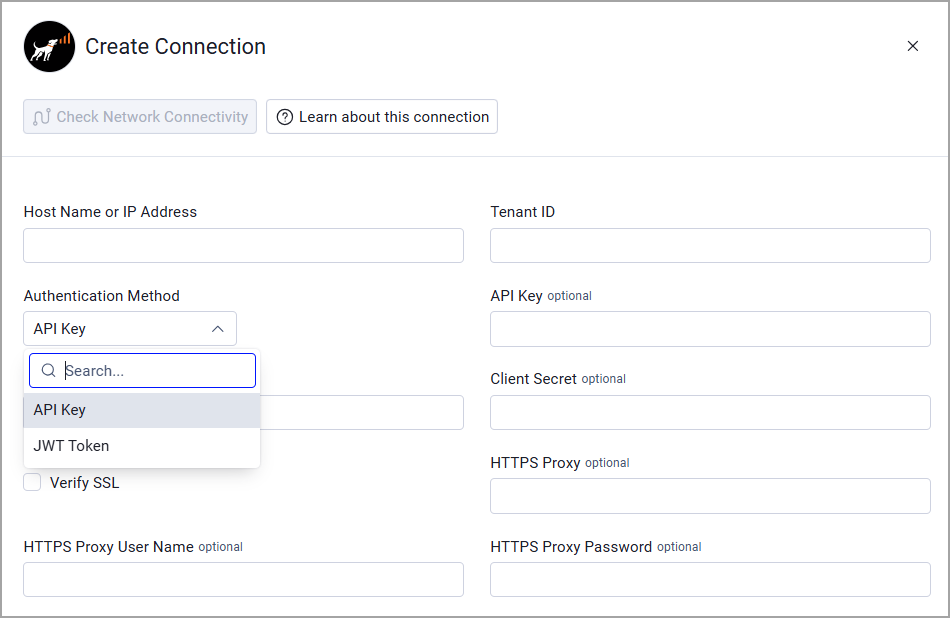
Required Parameters
-
Host Name or IP Address - The hostname or IP address of the RUCKUS Cloud server.
-
Tenant ID - For instructions on retrieving the Tenant ID, refer to API client Authentication endpoint on the RUCKUS Cloud Platform. Note that you need to provide username and password in the process.
-
Authentication Method - Select between API Key and JWT Token.
- API Key - For instructions on retrieving the API Key, refer to API client Authentication endpoint on the RUCKUS Cloud Platform. Note that you need to provide username and password in the process.
- Client ID and Client Secret - The OAuth2 Client ID and Client Secret for JWT Token authentication. For instructions, refer to API Authentication and JWT.
Optional Parameters
-
Verify SSL - Select whether to verify the SSL certificate of the server against the CA database inside of Axonius. For more details, see SSL Trust & CA Settings.
-
HTTPS Proxy - Connect the adapter to a proxy instead of directly connecting it to the domain.
-
HTTPS Proxy User Name - The user name to use when connecting to the value supplied in Host Name or IP Address via the value supplied in HTTPS Proxy.
-
HTTPS Proxy Password - The password to use when connecting to the server using the HTTPS Proxy.
To learn more about common adapter connection parameters and buttons, see Adding a New Adapter Connection.
Version Matrix
This adapter was only tested with the versions marked as supported, but may work with other versions. Contact Axonius Support if you have a version that is not listed, which is not functioning as expected.
| Version | Supported | Notes |
|---|---|---|
| RUCKUS Networks V22.07.11 | Yes |
Updated 26 days ago